
On September 30, 2026, the AWS Architecture Blog published a technical how-to for a multi-day Availability Zone evacuation using Amazon Application Recovery Controller (ARC) Zonal Shift. This ARC Zonal Shift AZ evacuation architecture diagram follows that walkthrough. It is an illustrative three-AZ platform, not a named customer case study and not a measured recovery result. The drill moves traffic off one zone for 48 to 72 hours across load balancers, Amazon ECS, Amazon EKS, Amazon RDS for PostgreSQL, and Amazon Aurora PostgreSQL, then restores traffic in a stated order. Facts below follow only that post.
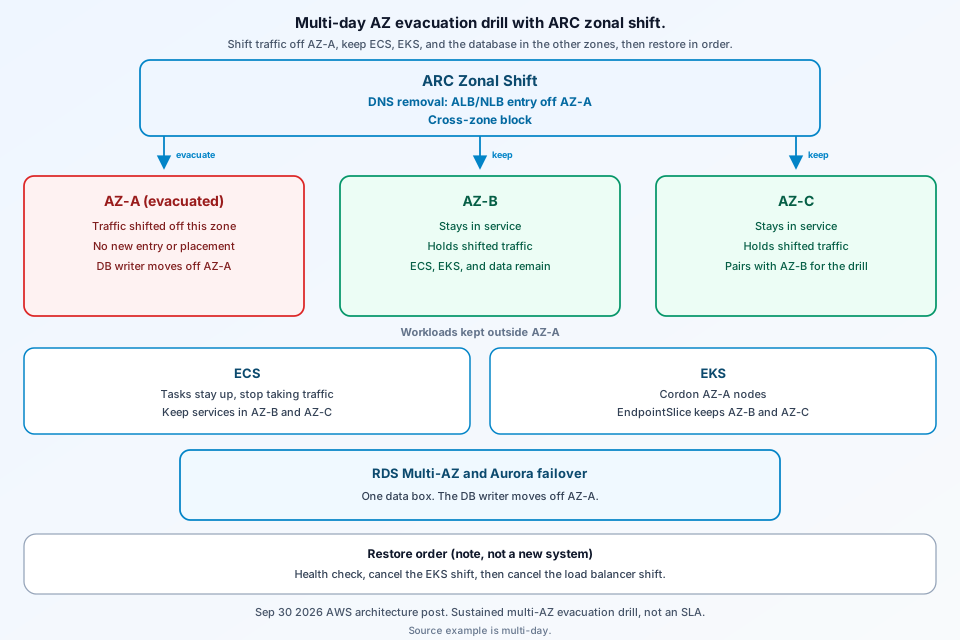
What this ARC Zonal Shift AZ evacuation architecture diagram shows
The diagram is three Availability Zones, before and after AZ-A is evacuated. The post’s illustrative stack is an Application Load Balancer in front of ECS on Fargate, a Network Load Balancer in front of EKS, RDS for PostgreSQL Multi-AZ with the primary in AZ-A and the standby in AZ-B, and Aurora PostgreSQL with the writer in AZ-A and a reader in AZ-B. Aurora storage is called out separately: it replicates to six storage nodes across zones, so only the writer or reader instance fails over. The post presents this as a planned drill in the how-to, not an SLA.
The problem this architecture is solving
A short failover, shift then roll back within minutes, misses what shows up over hours: Auto Scaling not tuned for sustained N-1, pipelines that ignore AZ health, stale DNS or cached endpoints, scheduled jobs, and rare long-lived connections. A 48 to 72 hour shift is how the post forces full load onto the remaining zones. It notes that some insurers and banks run periodic evacuations. That is a general remark, not a named case study or a published recovery time.
Main components and trust boundaries
ARC Zonal Shift on a load balancer does two things: it removes that zone’s load balancer IP from DNS, and nodes in the healthy zones stop sending requests to targets in the shifted zone even when cross-zone load balancing is on. The post calls this a data-plane operation, so it does not depend on the AWS control plane. ECS service updates, RDS and Aurora failovers, and subnet-group edits are control-plane calls. For a planned drill the control plane is healthy. In a real impairment the post says to start the zonal shift first and run control-plane steps only after traffic has moved.
On EKS, with zonal shift enabled, ARC cordons nodes in the impacted zone, removes that zone’s pod endpoints from EndpointSlices, suspends managed-node-group rebalancing, and updates Auto Scaling groups to launch only in healthy zones. Nodes and pods in the shifted zone are not terminated. ECS tasks stay up and stop taking traffic. They are not drained. Prerequisites in the post include zonal shift enabled on the load balancer (off by default), a 60-second deregistration delay, ECS stopTimeout of 55 seconds, and a one-time EKS zonal-shift setting. A single-AZ target group cannot be shifted.
Request or data path, step by step
Start the shift on the load balancer and, for east-west traffic, on the EKS cluster. The post’s example expiry is 72 hours. Shifts expire. If you do not extend them, traffic returns to the shifted zone. For ECS, update the service network configuration so new tasks launch only in the healthy subnets. The post says to pre-scale for N-1 rather than scale during the drill. In a three-AZ design it describes that as about 50 percent more compute than baseline peak. That is sizing guidance, not a measurement from a named workload.
If the RDS primary is in AZ A, reboot with force failover onto the standby. RDS may recreate that standby in the evacuated zone; the post says it takes no client traffic. Moving it with a subnet-group change can take several minutes. For Aurora, fail over to a reader already in a healthy zone. The post says a new reader typically takes less than 10 minutes to create, and a pre-provisioned reader often promotes in less than 30 seconds. Those are the authors’ notes, not a drill result. The cluster endpoint follows the writer. ARC does not steer pod-to-RDS connections; AZ-specific readers are a separate Istio locality topic in the post.
Restore in the post’s order: health check, cancel the EKS zonal shift, then cancel the load balancer shift. Confirm the evacuated zone is healthy, cancel the EKS zonal shift first so east-west traffic returns while you watch errors, then cancel the load balancer shift so north-south traffic comes back as DNS propagates. If Auto Scaling added capacity in the healthy zones, scale back gradually over 15 to 30 minutes. Watch per-AZ metrics for 30 minutes. The post says zonal shift itself has no additional charge.
The diagram: labeled boxes and failure or isolation edges
Boxes: three AZs, ARC zonal shift, ECS, EKS, and one data box (RDS Multi-AZ and Aurora failover). ALB and NLB appear only as DNS removal of the ALB/NLB entry off AZ-A, not as two box pairs. Solid arrows are client traffic. After the shift, DNS removal and a blocked cross-zone hop take the ALB/NLB entry off AZ-A. EKS nodes there are cordoned, and their EndpointSlice entries are gone. The nodes stay; they are not terminated. ECS tasks stay up and stop taking traffic. AZ-A shows only that the DB writer moves off AZ-A. Control-plane steps (service update, failover API) sit under the data-plane shift. The failure edge is AZ-A impaired or deliberately emptied for the drill. The restore note is a health check, then cancel the EKS shift, then cancel the load balancer shift.
What the source does not claim
This is a September 30, 2026 how-to. The architecture is illustrative, not a preview, a beta, or a case study with results. It is a drill, not an SLA. Aurora timing lines above are the authors’ notes, not a measured drill. Zonal autoshift and Resilience Hub are later suggestions. The CloudWatch tables are what to watch, not numbers from a run.
FAQ
What does a zonal shift change on a load balancer?
The September 30, 2026 post says ARC removes the load balancer IP in the affected Availability Zone from DNS, and load balancer nodes in the remaining zones stop routing to targets in the shifted zone even when cross-zone load balancing is enabled. The post calls that a data-plane operation. It does not by itself change ECS task placement, EKS scheduling, or the database primary.
Does an EKS zonal shift delete the nodes in the evacuated zone?
No. With zonal shift enabled, the post says ARC cordons those nodes, removes their pod endpoints from EndpointSlices, and stops managed node groups from launching replacements in that zone. Nodes and pods stay in place so capacity is still there when the shift ends. The shift does not evict pods or trigger autoscaling by itself.
What restore order does the post recommend after a multi-day drill?
Confirm the evacuated zone is healthy, cancel the EKS cluster zonal shift first, then cancel the load balancer zonal shift. If Auto Scaling added capacity in the healthy zones, scale it back gradually over 15 to 30 minutes, and watch per-AZ metrics for 30 minutes after traffic returns. The post says the zonal shift feature has no additional charge.
Conclusion
The September 30, 2026 how-to is an illustrative drill: three zones, DNS removal and a cross-zone block, ECS tasks that stay up and stop taking traffic, EKS cordon and EndpointSlice removal without deleting nodes, then an RDS and Aurora failover that moves the writer off the evacuated zone. Restore is a health check, cancel the EKS shift, then cancel the load balancer shift. The AWS Architecture Blog post is the source. More diagrams are on the ByteDiagram blog.
Diagram a multi-day AZ evacuation
Map the three zones, the load balancer shift, EKS EndpointSlices, and the database failover and restore order in ByteDiagram.
Open Diagram Editor