
System design interviews, engineering docs, and stakeholder presentations all benefit from one thing: a diagram that shows how the pieces fit together. For eCommerce platforms, that means more than a single line from "User" to "Database" — you need tiers, services, queues, and data stores.
Start with user flows, not servers
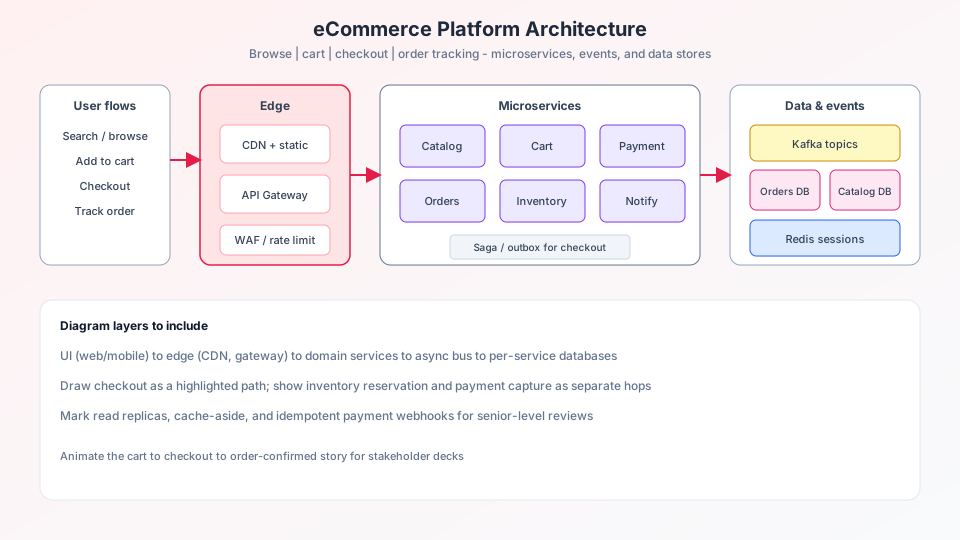
Begin on the left with entry points: search, browse, cart, checkout, and order tracking. Each flow should be a distinct path into your system. This mirrors how real users experience the product and makes the diagram readable for non-engineers.
Layer your architecture
A strong eCommerce diagram typically includes these layers:
- UI / Client — web app, mobile app, admin portal
- Edge — CDN, load balancer, API gateway
- Services — cart, order, payment, inventory, search, notification
- Messaging — Kafka or RabbitMQ for async events
- Data — MySQL, MongoDB, Redis, Elasticsearch clusters
- Analytics — Spark, Flink, or batch pipelines
Tip: Use tech icons (Kafka, Redis, Nginx) instead of generic boxes — your audience recognizes them instantly.
Connect with purpose
Every line should mean something. Services talk to their own database, publish events to a message bus, and call other services when needed. Avoid spaghetti: group related services and show shared infrastructure (cache, queue) as hubs.
Generate faster with AI
In ByteDiagram, paste a detailed prompt listing every service and database, then refine with the AI chat assistant. Ask it what is missing — cache layers, monitoring, fraud detection — and apply suggestions one at a time.
Example prompt:
eCommerce architecture with User Search Flow, Cart Service,
Order Service, Kafka, Redis cache, MySQL + MongoDB + Elasticsearch,
Nginx load balancer, Cloudflare CDN, Prometheus monitoring.
Keep iterating
Your first diagram will not be perfect. Treat it as a living document: add services as the product grows, rename labels for clarity, and use animated edges to show request direction in presentations.
Try it in ByteDiagram
Create your eCommerce architecture diagram with AI — free to start.
Open Diagram Editor