
Apple's biometric security guide (December 19, 2024) puts the sensor and the Secure Enclave on opposite sides of a secure link. The enclave enrolls an encrypted template and, later, compares a fresh capture. A match can unlock the device or count as valid for Apple Pay, in-app use, and other Face ID or Touch ID prompts. A passkey is not that template. The FIDO Alliance defines it as a key pair the user approves locally — a biometric, a PIN, or a pattern — while the site sees only success. This diagram is that handoff: the template stays on the device, and the signature the relying party checks comes from the passkey after that local approval.
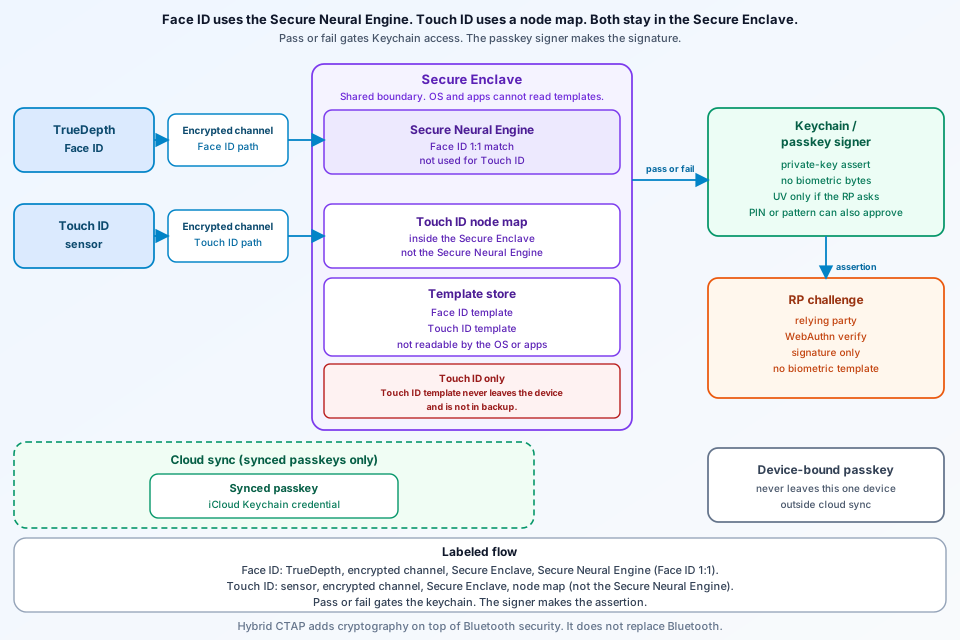
What this Secure Enclave Face ID FIDO passkey architecture diagram shows
Two sensors, one enclave. TrueDepth confirms an attentive face, reads thousands of infrared dots, and sends a signed sequence of 2D infrared images and depth maps inward. A portion of the Secure Neural Engine, protected inside the Secure Enclave, turns that capture into a mathematical representation and compares it with enrolled facial data. That Secure Neural Engine step is Face ID only. Touch ID is the node map, not a Secure Neural Engine comparison. Touch ID sends a scan the application processor can forward but cannot read. The enclave vectorizes it, drops the raster, and compares a lossy node map. Apple's LocalAuthentication article says the outward result is pass or fail, which gates a keychain password or private key. The enclave does not emit the FIDO signature. FIDO lets the user exercise a passkey through WebAuthn or a platform FIDO API. User verification happens only if the relying party requests it, and then a biometric, a PIN, or a pattern can approve. The cloud box is synced passkeys. Device-bound passkeys never leave the one device.
The problem this architecture is solving
FIDO treats passwords as phishable shared secrets and replaces them with challenge-response, so the server stores no password. Phishing resistance, the page says, holds whether or not the key is hardware-bound. People unlock a device often more than a hundred times a day, yet Face ID and Touch ID do not replace a passcode. Touch ID still needs the passcode after boot, restart, or Mac logout, and when the passcode or enrollments change. The Secure Enclave answers pass or fail, and that answer is what opens the keychain. The passkey signer produces the signature after the user approves. The relying party has to request user verification before that check is required, and a PIN or a pattern can approve as well as a biometric. A sync path, when the passkey is synced, carries the credential and never the template.
Main components and trust boundaries
TrueDepth runs on wake, on notification authentication, and when an app asks. Attention means open eyes on the device. VoiceOver disables that check, and a user can disable it, but a mask always requires it. The camera randomizes captures, projects a device-specific pattern, and signs the sequence. Face ID’s “low false-match rate” is a design goal on this page, not a number.
A built-in Touch ID sensor uses a serial bus sealed with a per-sensor factory key: AES key wrapping, randomness from both sides, and AES-CCM. The processor cannot read the payload. A peripheral sensor is securely paired to the Secure Enclave on a Mac with Apple silicon. Apple specifies that serial-bus format for the built-in sensor, not for the peripheral. The raster is discarded after vectorizing. Ridge-flow mapping drops minutiae that could rebuild the print. The node map is encrypted, enclave-only, and has no identity data. Apple says that Touch ID map never leaves the device, is not sent to Apple, and is not included in device backups. Face ID instead stores a mathematical representation compared in the enclave. Apple does not repeat the backup exclusion for the face.
Apple's keychain sample uses kSecAttrAccessibleWhenPasscodeSetThisDeviceOnly and userPresence. No passcode means no item; removing the passcode makes that item unavailable; ThisDeviceOnly excludes iCloud Keychain and a restore onto a new device. userPresence allows a biometric or the device passcode. Face ID needs NSFaceIDUsageDescription; Touch ID does not. User space never sees stored fingerprints. On the FIDO side, WebAuthn is the browser API, apps use platform APIs, and CTAP stays between client and authenticator. User verification happens only if the relying party requests it. When it does, the check is a local biometric, a PIN, or a pattern. The figure’s boundaries are the sensor-to-enclave channel, pass or fail into the keychain, a signature from the passkey to the relying party, and cloud only for synced passkeys.
Request or data path, step by step
Enrollment processes, encrypts, and stores the template inside the enclave. Apple’s guide does not describe uploading that template. Face ID then waits for attention unless the check is off, and compares the signed depth sequence. Touch ID crosses the sealed channel, discards the raster, and compares the node map. It can replace a passcode in some apps, but not where Apple still requires one.
A keychain read calls LocalAuthentication unless UI is skipped. Only a pass releases the item, and passcode fallback stops at the gate. ThisDeviceOnly limits that keychain item. It is not the Touch ID backup rule, and it does not place a device-bound passkey inside cloud sync. Sign-in uses WebAuthn or a platform FIDO API. The user approves locally, and the authenticator signs. The Secure Enclave’s pass or fail gates the key; it is not the signature. FIDO says the biometric never reaches the server. If the passkey is missing, a QR cross-device flow or a security key can be used. Hybrid CTAP — FIDO’s description of the CTAP 2.2 hybrid transport — uses Bluetooth Low Energy for proximity and adds cryptography on top of Bluetooth security, not instead of it. Only synced passkeys then copy, end-to-end encrypted, via the same provider and account, such as iCloud Keychain, Google Password Manager, 1Password, or Dashlane. Device-bound passkeys, including security keys or UAF apps, never leave that one device.
The diagram: labeled boxes and failure or isolation edges
The figure runs from TrueDepth and Touch ID, through the protected channel, the Secure Enclave, the template store, and the pass-or-fail gate, to the passkey signer and the relying-party challenge. Synced passkeys sit in a cloud box outside the enclave. Device-bound passkeys have no arrow into that cloud. FIDO’s “highest assurance” line is about device-bound passkeys on modern hardware security keys, not a score against the enclave.
- No attention when the check is required: Face ID stops.
- No match: the item stays gated.
- Passcode gone:
WhenPasscodeSetThisDeviceOnlyitems are refused or dropped. - Template isolation: the Touch ID map never leaves, is not sent to Apple, and is not backed up. Fingerprints stay out of user space. Passkey biometrics stay off the server. Apple’s backup exclusion is the Touch ID map, not the Face ID representation.
- Sync: synced passkey material only. No arrow from the template store. A device-bound passkey stays on one device.
What the source does not claim (preview, case study, or limits)
These pages are evergreen references, not a preview, a beta, or a case study. The biometric chapter is dated December 19, 2024, the LocalAuthentication article carries a 2026 copyright, and the FIDO page is an overview with an FAQ. FIDO quotes vendor figures such as Amazon “6x,” Google “4x,” and Yubico “99.99%,” plus other percentages, as marketing attributions. They are not measurements of the Secure Enclave. Apple calls a low false-match rate a Face ID design goal and does not publish a rate on this page. Touch ID’s backup exclusion is not a Face ID claim, and it is not a ban on synced passkeys. FIDO notes that some regulatory regimes still do not list passkeys as an official form of multi-factor authentication.
FAQ
Does Touch ID template data leave the device or appear in a backup?
No. Apple says the Touch ID node map is encrypted, readable only by the Secure Enclave, and stored without identity information. It never leaves the device, is not sent to Apple, and is not included in device backups. The raster is discarded after a lossy map that drops the minutiae needed to reconstruct the print. That never-leaves-the-device and not-in-backups statement is Apple's Touch ID claim. Face ID, on the same page, is a mathematical representation compared inside the Secure Enclave, and Apple does not repeat the backup exclusion for the face.
Does a passkey sign-in send Face ID or Touch ID data to the website?
No. FIDO says biometric information stays on the device and is never sent to a remote server; the site sees only that the check succeeded. Apple's Secure Enclave returns pass or fail, and that result gates keychain access. User space never receives stored fingerprints. The enclave does not emit the FIDO signature. WebAuthn and CTAP carry the credential ceremony, not a template. User verification runs only if the relying party requests it, and a PIN or a pattern can approve as well as a biometric.
How do synced passkeys differ from device-bound passkeys and from a biometric template?
FIDO's synced passkeys are copied across devices by a provider and end-to-end encrypted. Device-bound passkeys never leave one device, including those on security keys or in UAF apps. Examples of sync providers include iCloud Keychain and Google Password Manager. That cloud copy is the passkey credential, not the Touch ID template, and a device-bound passkey is not inside that sync. ThisDeviceOnly also keeps one keychain item out of iCloud Keychain, but only that item in Apple's sample.
Conclusion
The match stays in the Secure Enclave. Pass or fail gates keychain access, and the passkey — not the biometric gate — produces the FIDO signature. Touch ID’s node map does not leave the device, is not sent to Apple, and is not included in a backup. Face ID remains a separate mathematical representation, compared with the Secure Neural Engine portion inside the enclave. Synced passkeys are the cloud-sync case. Device-bound passkeys stay on one device. The sources for that split are Apple's biometric security guide, the LocalAuthentication article, and the FIDO passkeys page. More diagrams are on the ByteDiagram blog.
Diagram on-device Face ID and Touch ID template isolation
Map the sensor, the Secure Enclave match, the pass/fail keychain gate, and the FIDO challenge — cloud boundary for synced passkeys only — then take it into your next authentication review.
Open Diagram Editor