
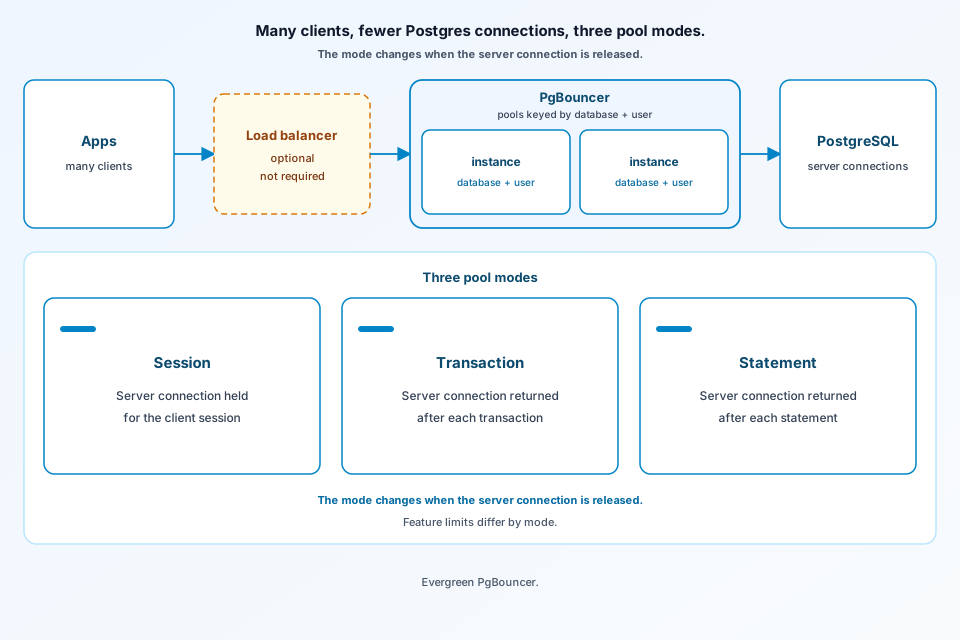
PgBouncer’s features page describes a lightweight PostgreSQL pooler: many client connections share fewer server connections, and the pool gives the server connection back at session, transaction, or statement boundaries. The configuration reference is where the defaults live, including listen port 6432, pool_mode = session, and pools per user and database. Microsoft’s Azure Database for PostgreSQL flexible server guide repeats those three modes and adds where to place the process. The figure is that path: client fan-in, three release modes, and an optional load balancer.
What this PgBouncer architecture diagram connection pooling shows
Clients terminate on PgBouncer, not on a Postgres backend process per connection. The features page says memory stays low — 2 kB per connection by default — because PgBouncer does not need to see full packets at once. Treat that as the project’s stated reason, not a benchmark. One PgBouncer is not tied to one host: destination databases can live on different servers. Most settings can be reloaded online, and the features page says an online restart or upgrade can keep client connections. The interesting box is the pool itself. By default a pool is one user plus one database. default_pool_size is 20 server connections for that pair unless a database or user overrides pool_size. max_client_conn defaults to 100. If the database entry sets user=, every client for that database shares one pool.
The problem this architecture is solving
The Azure guide states the cost of skipping a pool: each new connection makes the PostgreSQL postmaster start a process. A cache of server connections, handed out and returned, is how that guide says you cut that overhead. PgBouncer is the tool it discusses. The architectural question on the diagram is not “is pooling on?” but when the server connection goes back. Session mode holds it until the client disconnects and, the features page says, supports PostgreSQL features. Transaction mode holds it only for a transaction. Statement mode is transaction mode that also rejects multi-statement transactions, aimed at autocommit and PL/Proxy. Open-source PgBouncer defaults to session. Azure’s built-in PgBouncer defaults to transaction, and that guide says transaction mode there does not support prepared transactions.
Main components and trust boundaries
PgBouncer authenticates clients itself (auth_file, auth_user plus auth_query, HBA, and other auth_type values in the config reference). It then logs into PostgreSQL as the client user, or as the forced user if one is set. Those are two trust edges: client to pooler, pooler to server. TLS is separate. Client TLS is disabled unless you set it; server TLS defaults to prefer. The admin console is the reserved database name pgbouncer, limited to admin_users and read-only stats_users. It is an admin surface, not a hop on the query path.
Transaction mode drops session features on purpose. The features table marks SET/RESET, LISTEN, WITH HOLD cursors, SQL PREPARE/DEALLOCATE, preserved temp tables, LOAD, and session advisory locks as unsupported. Protocol-level prepared statements work only if max_prepared_statements is non-zero. The config default is 200; 0 disables them. SQL PREPARE is not tracked. server_reset_query defaults to DISCARD ALL in session mode and is skipped in transaction mode unless server_reset_query_always forces it.
Request or data path, step by step
A client connects to listen_port (default 6432) or the Unix socket. PgBouncer picks the pool for that database and user, then a server connection. In session mode the server connection stays with the client until disconnect, then returns to the pool. In transaction mode it returns when the transaction ends. In statement mode it returns when the query ends, and a transaction that spans statements is rejected. Server connections are reused LIFO by default so a few connections take most of the load, which the config says fits a single backend. If a round-robin target sits behind the database address — several hosts, or DNS — server_round_robin spreads assignment instead. A host list in the database connection string is also round-robin, and the config warns every host in that list must be up; unlike libpq, PgBouncer does not skip a dead host in the list.
The diagram: labeled boxes and failure or isolation edges
The figure shows apps feeding PgBouncer pools keyed by database and user, then fewer PostgreSQL server connections. Session mode holds the server connection for the client session. Transaction mode returns it after each transaction. Statement mode returns it after each statement. The only dashed stroke is the load balancer box, labeled optional and not required. Several single-threaded PgBouncer processes can sit behind it. so_reuseport shares one TCP port (Linux, and recent DragonFlyBSD and FreeBSD per the config). Each process needs its own socket directory, pid file, and peer_id. Cancels use another TCP connection, so peers must forward them; peering across the 1.21.0 boundary does not work. Azure’s guide uses multiple VMs behind Azure Load Balancer for that, warns that a sidecar per pod can exhaust connections at large scale, and says built-in PgBouncer lives on the flexible server VM, is absent on Burstable, restarts with the VM (including failover, same connection string), and forces clients to reconnect.
What the source does not claim (preview, case study, or limits)
No latency SLO or safe fan-in ratio is published. Port 6432, session mode, pool size 20, 100 clients, and 2 kB per connection are defaults, not sizing rules. Azure’s transaction default, the prepared-transaction gap, and the md5 migration note are that guide’s statements, not a full matrix. Open-source online restart is not the same as Azure’s built-in service, which drops connections when the VM restarts.
FAQ
When does PgBouncer release a server connection?
In session mode (the open-source default) the server connection stays until the client disconnects. In transaction mode it returns when the transaction finishes. In statement mode it returns when the statement finishes, and multi-statement transactions are disallowed. Azure’s built-in PgBouncer defaults to transaction mode.
Which Postgres session features break in transaction pooling?
The features table says SET/RESET, LISTEN, WITH HOLD cursors, SQL PREPARE and DEALLOCATE, temp tables that preserve rows, LOAD, and session-level advisory locks do not work. Protocol-level prepared plans can work when max_prepared_statements is non-zero. The config default for that setting is 200; setting it to 0 disables the support.
Why peer PgBouncer processes behind a load balancer?
PgBouncer is single-threaded. so_reuseport lets several processes share a listen port. A cancel request uses a different TCP connection than the query, so a load balancer may deliver it to the wrong process. The peers section and a unique peer_id forward that cancel back. Peering across the 1.21.0 boundary is not compatible.
Conclusion
Many clients share PgBouncer pools keyed by database and user, and those pools keep fewer server connections into PostgreSQL. The server connection stays until disconnect in session mode, returns at transaction end in transaction mode, and returns at statement end in statement mode. Session mode is the open-source default and keeps Postgres session features; transaction and statement modes do not. An optional load balancer in front of several poolers is a deployment choice, including the Azure pattern, and needs peering if query cancel must survive SO_REUSEPORT. Those rules are documented on the features page, the configuration reference, and the Azure pooling guide. Browse more on the ByteDiagram blog.
Diagram PgBouncer pool modes
Map client fan-in, per-database and per-user pools, and the three release modes in ByteDiagram — then mark what transaction mode cannot keep.
Open Diagram Editor