
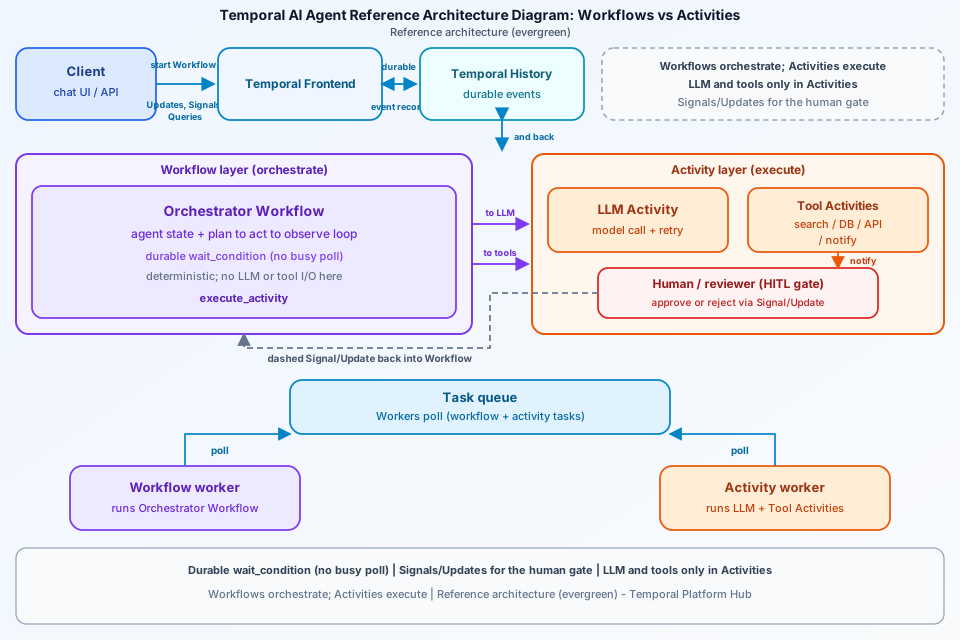
Temporal’s Platform Hub publishes a canonical AI agent reference architecture: durable Workflows own the agent loop and conversation state; every LLM call, tool invocation, external API, and database read runs inside an Activity; Signals and Updates implement human-in-the-loop gates. This Temporal AI agent architecture diagram maps that control plane — Client → Temporal Frontend/History → Orchestrator Workflow → Activities on task queues, with workers and HITL edges — without inventing product features beyond the hub. Treat it as evergreen reference guidance derived from the temporal-ai-agent patterns Temporal documents, not a product launch announcement.
What a Temporal AI agent architecture diagram shows
Draw the path left to right. A client (chat UI, API, or another service) starts a long-lived agent Workflow and drives turns with Updates (or Signals). Traffic hits the Temporal service — Frontend for admission, History for durable event records. The Orchestrator Workflow holds agent state (messages, step count, pending tool proposals) and runs the plan → act → observe loop by scheduling Activities. Beneath that, label distinct Activities: LLM Activity, tool Activities (search, DB, external APIs, file I/O), and a HITL gate path that notifies reviewers then waits. Show workers polling task queues so reviewers see that code execution is not “inside the Temporal cloud box” — it is on your worker fleet. Key callout text on the art: Workflows orchestrate; Activities execute.
Workflows orchestrate; Activities do side effects
The hub’s core principle is blunt: all non-deterministic I/O belongs in Activities, not Workflows. Workflow code is the durable brain — conversation history, pending flags, branching, timers, and wait_condition sleeps that consume no worker thread while waiting. It never calls the model or an external service directly; it schedules Activities and waits for recorded results. That separation is what makes durable agent orchestration safe under crash recovery: the event history can replay Workflow decisions without re-rolling the dice on every side effect.
In the reference shape, the Workflow exposes a per-turn Update (for example send_message) that appends the user message and suspends until the run loop finishes the turn, plus Signals such as end_session and Queries to read history for the UI. The run loop owns plan → act → observe up to a per-turn step cap — Temporal’s sample uses a max steps-per-turn guard so a runaway tool loop fails closed instead of burning history forever.
LLM and tool calls only inside Activities
If you call an LLM inside Workflow code, replay will attempt the call again, get different tokens, break determinism, and corrupt state. Wrapping the call in an Activity records the result once. The same rule covers every tool: web search, database query, third-party API, file I/O, and notification sends. Register each tool as its own Activity on the Worker so you get per-tool retry policies, isolated timeouts, and named events in Workflow history.
The hub also documents Activity-side practice that belongs on the diagram as labels, not as invented metrics: Temporal-owned retries (disable client-level LLM retries), structured handling for rate limits versus non-retryable content-policy errors, and heartbeats while streaming so long completions do not look dead to the service. Payload size and continue-as-new are operational footnotes — trim the active context window passed into Activities; add continue-as-new for long sessions so history stays bounded. Do not invent CRD fields or proprietary routers beyond what the reference architecture describes.
Signals and Updates for human approval gates
Human-in-the-loop is first-class. For a one-shot approval gate (send email, execute a trade, delete records), the Workflow proposes an action via an Activity, notifies reviewers via another Activity, then waits durably — for example up to a timeout — for a Signal carrying the approval decision, with a timeout fallback that cancels. For interactive chat, the temporal-ai-agent pattern uses Signals such as user_prompt, confirm, and end_chat, plus an Update like respond_to_action when the client needs a synchronous acknowledgment. Prefer Updates when the human is actively waiting for a reply; Signals fit fire-and-forget or async review.
On the diagram, draw a dashed edge from a human / reviewer box into the Orchestrator Workflow labeled Signal/Update. Emphasize zero-cost blocking: wait_condition persists state without busy-polling a worker thread. Queue user prompts so back-to-back Signals stay ordered. Stay inside Temporal’s documented Signal rate guidance for programmatic fan-in; do not invent custom “approval microservices” as if they were part of the reference architecture.
Task queues and workers in the agent path
Clients do not invoke LLM workers directly. They talk to Temporal; workers poll task queues. A typical registration puts the Orchestrator Workflow and the LLM/tool/notification Activities on the same application task queue (the hub sample uses a name like ai-agents-prd). Visually separate Workflow worker slots (deterministic orchestration) from Activity worker slots (side effects), even when they share a process — reviewers need to see that retries and heartbeats attach to Activities. Label Frontend/History as the durable control plane; label workers as your compute. That is the recovery story: a worker crash mid-Activity is a retry or timeout policy, not a lost chat session.
Staying inside the reference architecture
Stamp the diagram as reference architecture / evergreen. Cite Temporal’s Platform Hub AI reference architecture only for product claims. Do not invent: model routers, proprietary Temporal “AI node” types, CRD fields, SLA numbers, or features not described on the hub page. Safe labels from the source: Workflows orchestrate / Activities execute; LLM + tools in Activities; Signals/Updates for HITL; task queues + workers; Updates for turn replies; continue-as-new and context trimming as ops notes. Link engineers to the hub for code-level patterns; use this diagram for the control-plane story in design reviews.
FAQ: durable agents on Temporal
Why must LLM and tool calls run inside Temporal Activities?
Workflow code is replayed from event history during recovery. Calling an LLM or tool directly inside a Workflow produces non-deterministic results on replay and corrupts state. Activities record side effects once so replay stays deterministic.
How do Signals and Updates implement human approval gates?
The Orchestrator Workflow waits durably (for example via wait_condition) until a human Signal or Update arrives. One-shot approval gates use a Signal with a timeout fallback; interactive turns often use Updates that return a value synchronously to the client.
Where do task queues and workers sit in a Temporal AI agent architecture diagram?
Clients talk to the Temporal service (Frontend/History). Workers poll task queues: Workflow workers run deterministic orchestration; Activity workers run LLM, tool, and notification side effects registered on the same queue path the reference architecture describes.
Conclusion
Keep the picture honest to Temporal’s published guidance: durable Workflows orchestrate the agent loop; LLM calls and tools run only inside Activities; Signals and Updates gate humans; task queues and workers execute the work while History keeps resume safe. Source: Temporal Platform Hub — AI Agent Reference Architecture. Browse more architecture diagrams on the ByteDiagram blog.
Diagram Temporal Workflows vs Activities
Map Client → Temporal Frontend/History → Orchestrator Workflow → LLM/tool Activities on task queues, plus Signal/Update human gates, in ByteDiagram for your next durable-agent review.
Open Diagram Editor