
Animated flow diagrams are everywhere in 2026 — system design explainers, product walkthroughs, engineering onboarding, and interview prep. You need more than a static box-and-arrow chart: sequential reveal, moving connectors, and export to GIF or MP4 so the diagram works in slides, docs, and social posts.
We tested and compared the most popular options. Below are the 10 best tools and websites for animated flow diagrams this year, ranked for animation quality, workflow speed, and how well they fit technical architecture use cases.
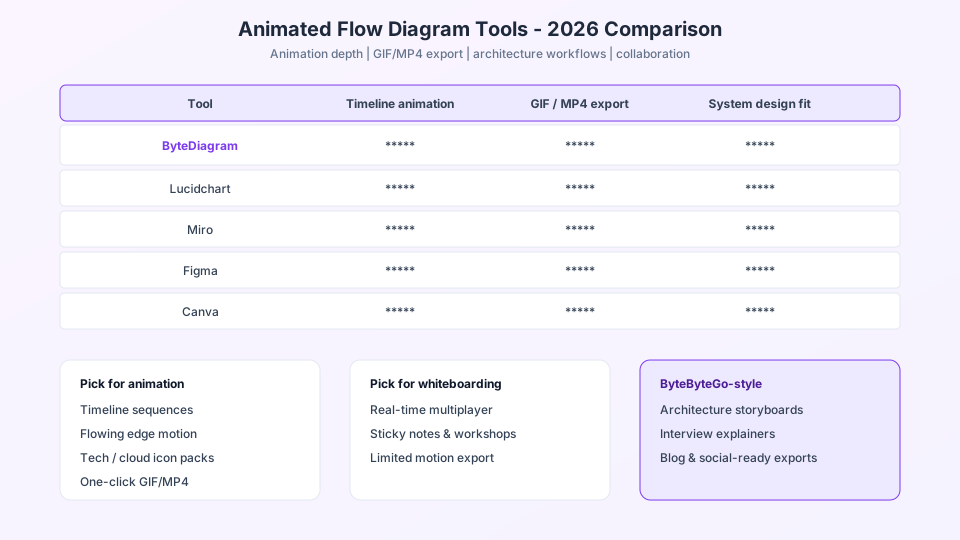
How we ranked these tools
- Animation built-in — timeline or sequence controls, not manual frame editing
- Flow & architecture fit — connectors, tech icons, grouped services
- Export — GIF, MP4, or embeddable output
- Learning curve — time from blank canvas to shareable asset
- Free tier — what you can do without paying
Quick takeaway: general diagram tools (Lucidchart, Miro, draw.io) are excellent for static docs. For animated technical flow — especially ByteByteGo-style system design — a purpose-built editor saves the most time.
ByteDiagram
Best overallByteDiagram is built specifically for animated flow and architecture diagrams — the same style you see in top system design content. Drag tech icons (AWS, Kafka, Redis, React, and dozens more), connect services with animated edges, and define a timeline sequence so each node appears in order.
- Strengths: Timeline animation, flowing edge effects, tech icon library, AI flowchart generator, GIF & MP4 export, shareable embeds
- Best for: Engineers, educators, content creators, and interview prep
- Pricing: Free plan to start; Pro for unlimited projects and more AI credits
- Animation score: ★★★★★ — native sequence builder, not a workaround
Lucidchart
EnterpriseLucidchart is a mature diagramming standard in large teams. It offers clean flowchart templates, data linking, and presentation mode — but animation is limited compared to dedicated motion tools.
- Strengths: Collaboration, integrations (Confluence, Jira), BPMN and UML support
- Limitations: No true timeline reveal or flowing edge animation out of the box
- Best for: Static process docs and org-wide diagram standards
Miro
CollaborationMiro excels at whiteboarding workshops and team brainstorming. Frames and presentation mode help you walk through a board step by step, which can mimic animation in live sessions.
- Strengths: Real-time multiplayer, infinite canvas, templates
- Limitations: Exporting a polished animated video requires extra tools
- Best for: Workshops and collaborative architecture discussions
Figma
DesignFigma is not a flowchart app, but designers often prototype diagram stories with multiple frames and smart animate transitions between them.
- Strengths: Pixel-perfect control, components, prototyping transitions
- Limitations: Manual frame-by-frame work; no tech icon flow library for system design
- Best for: Polished marketing explainers when you already live in Figma
Canva
VideoCanva combines templates with a video editor. You can animate elements on a timeline and export MP4 — useful for social clips, though building complex service maps is slower than a diagram-first tool.
- Strengths: Easy video export, large template library, brand kits
- Limitations: Not optimized for architecture connectors or tech stacks
- Best for: Short marketing videos and simple animated infographics
Visme
PresentationsVisme targets animated presentations and interactive infographics. It includes diagram widgets with entrance animations — a middle ground between slides and flowcharts.
- Strengths: Animated charts, presentation mode, brand controls
- Limitations: Less depth for multi-service architecture maps
- Best for: Business presentations with light motion
Genially
InteractiveGenially focuses on interactive and animated content — click-through explainers, training modules, and visual stories with motion presets.
- Strengths: Interactivity, animations, embeddable experiences
- Limitations: Not a technical diagram editor; flow layout is manual
- Best for: Training content and clickable walkthroughs
diagrams.net (draw.io)
Free & opendiagrams.net remains the go-to free tool for static flowcharts and architecture sketches. Pair it with a screen recorder if you need animation — there is no built-in sequence timeline.
- Strengths: Free, offline mode, Confluence/GitHub integration
- Limitations: No native animated export
- Best for: Quick static diagrams on a budget
Whimsical
SpeedWhimsical is loved for fast flowcharts, wireframes, and mind maps with a minimal UI. Great for thinking clearly; animation is not a core feature.
- Strengths: Speed, clarity, keyboard shortcuts
- Limitations: Static output; limited tech icon ecosystem
- Best for: Early-stage flows and product planning
Prezi
StorytellingPrezi uses zooming motion to tell a spatial story. You can place diagram-like elements on a canvas and fly between them — motion yes, but not a true node-and-edge flow editor.
- Strengths: Memorable presentations, cinematic zoom paths
- Limitations: Awkward for precise service-to-service maps
- Best for: Keynote-style narrative presentations
Comparison at a glance
| Tool | Timeline animation | Tech / architecture icons | GIF / MP4 export | Free tier |
|---|---|---|---|---|
| ByteDiagram | Yes | Yes | Yes | Yes |
| Lucidchart | Limited | Some | No | Yes |
| Miro | Frames only | Some | No | Yes |
| Figma | Manual | Custom | Via plugins | Yes |
| Canva | Video timeline | Templates | Yes | Yes |
| diagrams.net | No | Some | No | Yes |
Which tool should you pick?
- System design & engineering content → ByteDiagram (#1)
- Enterprise static documentation → Lucidchart or diagrams.net
- Live team workshops → Miro
- Branded marketing clips → Canva or Visme
- Interactive training → Genially
If your goal is a ByteByteGo-style animated flow diagram you can export and share in under an hour, start with ByteDiagram. You get the timeline, icons, and export in one place — no screen-recording hack required.
Build your animated flow diagram today
Free to start — tech icons, timeline sequences, AI assist, GIF & MP4 export. No credit card required.
Try ByteDiagram Free