
On September 22, 2026, Cloudflare launched Worker Previews: each Git branch gets a production-like place to run — its own code, configuration, URL, observability, and state. That is a different contract from older “preview URLs” (now called Version URLs), which pointed at uploaded Worker versions and could still touch production resources.
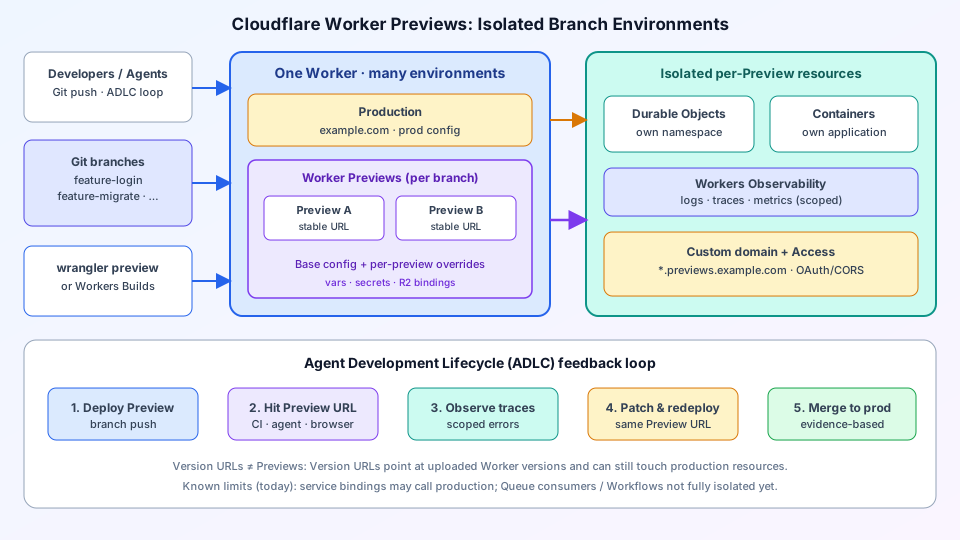
This guide shows what to draw on a Cloudflare Worker Previews architecture diagram: Git → wrangler preview / Workers Builds → one Worker with Production plus many Previews → isolated Durable Object namespaces and Containers → scoped Observability → custom-domain URLs behind Access. Pair edge caching stories with a separate CDN architecture diagram; Previews are about branch-isolated runtime, not cache PoPs.
Why Worker Previews exist
Agents and humans are shipping larger diffs. Staging that shares production Durable Objects or secrets is how “it worked in staging” becomes a production incident. Previews extend the Git branch model past source:
- Isolated deploy —
npx wrangler preview(or automatic Workers Builds on push) creates a Preview with its own vars, secrets, and bindings. - Stable Preview URL — every push updates the same running Preview for that branch so reviewers and agents can re-test without chasing ephemeral links.
- Isolated state — Cloudflare automatically creates a new Durable Object namespace and Container application per Preview so migrations cannot mutate production singletons.
- Scoped Observability — logs, errors, metrics, and traces for that Preview only; breadcrumb switch in the dashboard mirrors “checkout branch.”
Cloudflare frames this as an Agent Development Lifecycle (ADLC): each change is atomic, independently deployable, observable, and revisable before merge.
Architecture layers to draw
| Layer | What it is | Diagram tip |
|---|---|---|
| Inputs | Developers, coding agents, Git branches | Left column: ADLC actors + branch names |
| Deploy trigger | wrangler preview or Workers Builds | Blue box feeding the Worker |
| Worker shell | One Worker; Production + Previews | Amber Production card above purple Previews cluster |
| Config | Previews base + per-Preview overrides | Label vars/secrets/R2 inside Previews |
| Isolated state | DO namespace + Containers per Preview | Teal right column; never share prod DO IDs |
| Edge access | Custom domain + Cloudflare Access | Amber strip: *.previews.example.com |
| Observe | Workers Observability (scoped) | Indigo box; arrow from Preview traffic |
Deploy path: branch to isolated Preview
- Define a
previewsblock in Wrangler once (base configuration for variables, secrets, R2, and other bindings). In the dashboard this appears as Previews Base beside Production. - From a feature branch, run
npx wrangler preview, or push if the Worker is Git-connected through Workers Builds. - Cloudflare creates the Preview under the same Worker: stable URL, copy of base config, and fresh DO namespace + Container application.
- Override config for that Preview only when you need a test database or migration key — without changing Production, the base, or sibling Previews.
- Send traffic (curl, CI probes, headless browser / Browser Run, or a human click-through). Inspect Observability scoped to the Preview. Patch, redeploy to the same Preview URL, verify, then merge.
Diagram rule: Production and Previews sit inside one Worker boundary. Do not draw a separate Worker per Preview — that is the older Wrangler environments model Cloudflare contrasts with Previews.
Durable Objects and Containers: why isolation is mandatory
Durable Objects are singletons per object ID. If a Preview shared the production DO namespace, a bad migration would mutate the same instance serving live traffic. Previews allocate a new namespace so ctx.exports.Counter resolves to production in Production and to the Preview namespace inside a Preview — same code path, different storage plane.
Containers follow the same isolation story: each Preview gets its own Container application so sandbox cold-start experiments or schema changes stay on the branch. On the diagram, draw two teal cards (DO namespace, Containers) with a dashed “auto-created on preview” label from the Previews cluster.
Custom domains, Access, and production-like auth
Preview URLs can live on your custom domain (for example feature-login.previews.example.com) so cookies, CORS, and OAuth redirects behave like production. Protect those hostnames with Cloudflare Access when Previews must stay private. Annotate the edge box with “Access gate” so security reviews do not assume every Preview is world-readable.
For global edge and cache topology (Anycast PoPs, origin shield, purge), keep using a dedicated CDN architecture diagram — Previews sit beside that story as the pre-production runtime plane, not as a cache layer.
Version URLs vs Worker Previews
| Version URLs (legacy “preview URLs”) | Worker Previews (2026) |
|---|---|
| Point at a specific uploaded Worker version | Isolated environment per Git branch |
| Could still bind to production resources | Own config, DO namespace, Containers |
| Useful for version pinning / debug | Full ADLC loop before merge |
| Not a branch staging substitute | Hundreds of Previews can run in parallel |
Known limits to label on the diagram
Honest architecture docs call out today’s edges so teams do not over-claim isolation:
- Service bindings — a Preview’s service binding may still call the bound Worker’s production deployment; multi-Worker Preview paths are on the roadmap.
- Queues / Workflows — Previews can send to Queues but cannot fully consume them in-isolation yet; Workflow isolation needs extra config.
- Long-lived staging — private-beta feedback asks for persistent QA/dev Previews across sprints; short-lived feature Previews are the GA sweet spot today.
Put a small footnote band under the hero: “Version URLs ≠ Previews” plus those three limits. Interview and design-review audiences trust diagrams that show constraints.
Example prompt for AI diagram generation
Drop this into ByteDiagram for a first draft that matches the hero figure:
Left: Developers/Agents + Git branches + wrangler preview
Center: One Worker — amber Production card, purple Previews cluster (A/B) with base config
Right: Isolated Durable Objects namespace + Containers + Observability + Access custom domain
Bottom: ADLC loop Deploy → Hit URL → Observe → Patch → Merge
Left-to-right flow, blue Worker shell, teal isolation column.
FAQ
Are Worker Previews the same as Wrangler environments?
No. Wrangler environments typically mean separate Workers to manage. Previews keep isolation under one Worker with a dashboard breadcrumb across Production and every Preview.
Do I need a custom domain?
Not required to start, but custom preview hostnames make OAuth, cookies, and CORS match production — recommend them for auth-heavy apps.
Can agents drive the loop?
Yes. Cloudflare describes agents opening the Preview URL (for example via Browser Run / Playwright), correlating failures with Workers Observability, patching, and redeploying — all scoped to the branch.
Conclusion
Worker Previews are Cloudflare’s September 2026 answer for production-like, branch-isolated edge runtimes — especially when agents accelerate change volume. A clear architecture diagram shows Git → Preview deploy → one Worker (Production + Previews) → isolated DO/Containers → Observability and Access on custom domains, with honest footnotes for Version URLs and current binding/Queue limits. Draw that once for platform docs, then reuse it in ADLC runbooks and design reviews. For classic layer-4/7 front doors in front of origins, also keep a load balancer architecture handy.
Diagram your Worker Previews stack
Generate a per-branch Preview layout with isolated Durable Objects and Observability in ByteDiagram, then animate the ADLC loop for platform onboarding.
Open Diagram Editor