
On September 24, 2026, Google announced that Google Cloud API Gateway can act as a remote MCP server in Public Preview: annotate the OpenAPI spec you already deploy, and existing REST operations become agent-ready Model Context Protocol (MCP) tools — without standing up a separate MCP process that re-implements routing, auth, and quotas. This Google Cloud API Gateway MCP architecture diagram walks that managed path: agents and MCP clients hitting /mcp, OpenAPI annotations that opt operations into tools, a single policy plane for JWT/API-key auth and quotas, optional publish into API hub / Agent Registry, and the Apigee / Agent Gateway / model-routing contrasts Google draws in the same launch. Facts below follow the Google Developers Blog post; Public Preview limits are first-class design constraints, not footnotes.
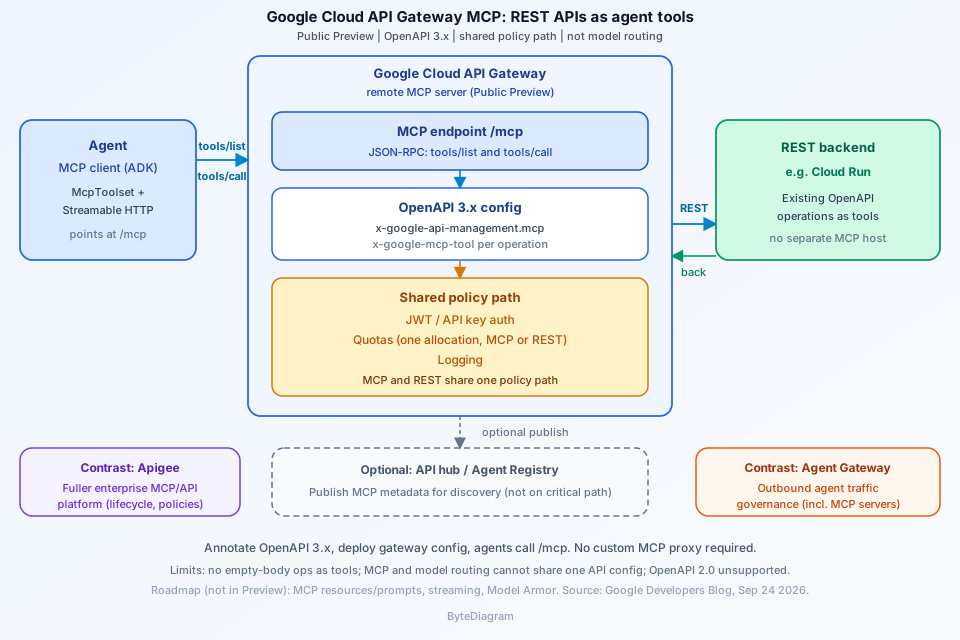
/mcp (remote MCP server) → OpenAPI-annotated REST backends (e.g. Cloud Run), with shared auth/quotas/logging on one policy path and optional API hub / Agent Registry discovery. Public Preview.
What a Google Cloud API Gateway MCP architecture diagram shows
Draw left-to-right: an agent runtime (ADK, Gemini Enterprise, or any MCP client) → an MCP client connection to the gateway’s /mcp base path → Google Cloud API Gateway labeled as the remote MCP server → REST backends such as Cloud Run that already sit behind the gateway. Parallel to the data path, draw a policy plane: JWT or API-key auth, quotas, and logging that apply to both MCP-transcoded calls and ordinary REST. Optional upper lane: connect the gateway to API hub so the MCP server is published with MCP-specific metadata and appears in Agent Registry. Side callouts (not the same product): Apigee as the fuller enterprise API/MCP platform, and Agent Gateway for governing outbound agent traffic to MCP servers like this one. Label the whole picture Public Preview.
From OpenAPI annotation to remote MCP server
The launch pitch is operational: most enterprise capability already lives behind REST, but agents cannot “see” it until someone builds and operates a separate MCP server. API Gateway closes that gap by accepting standard MCP JSON-RPC on one endpoint, transcoding each tools/call into the corresponding REST request, applying existing policies, and translating the response back as an MCP result.
MCP support requires OpenAPI 3.0.x or 3.1.x — OpenAPI 2.0 is not supported, so migrate first if the gateway still runs a 2.0 spec. Opt in at the document level with x-google-api-management.mcp, and customize or skip individual operations with x-google-mcp-tool (name and description). Each exposed operation needs a backend and a non-empty description; Google stresses that the tool description is the primary signal an LLM uses to decide when to call it, so write when and why, not only what it returns. Deploy the API config as usual — the gateway generates an MCP-aware configuration and serves MCP on /mcp with no extra infrastructure to provision.
Auth, quotas, and policy reuse on the tool path
Because the transcoded request is indistinguishable from a normal REST call, the JWT or API-key authentication, quota, and logging you already configured for that operation keep working unchanged. MCP and REST traffic share exactly one policy path, and a given operation draws on one quota allocation however it is invoked. That is the architectural win to label on the diagram: one auth story, one quota pool, one log stream — not a shadow MCP stack with duplicated policy.
Discovery has a sharper rule. By default tools/list is unauthenticated (convenient for development, but it publishes tool names and input schemas to anyone who asks). For production, require a JWT — Google notes that API keys cannot secure tools/list. tools/call always enforces whatever authentication the underlying REST operation requires, whether or not you secure discovery. In ADK, point McpToolset at the gateway /mcp URL and pass the credential the gateway already expects (for example an API key header on call traffic).
Agent Registry / API hub placement (high level)
Connect the gateway to API hub and its MCP server is published there with MCP-specific metadata and appears in Agent Registry automatically, so agents and developers can find the tools it exposes. On the diagram, that is a discovery publish arrow off the gateway — not a second execution path. Keep Apigee and Agent Gateway as labeled contrasts: API Gateway is Google’s lightweight on-ramp (for example, a Cloud Run service secured and exposed to agents quickly); Apigee is the fuller enterprise API and MCP platform (lifecycle, advanced traffic policies, monetization); Agent Gateway governs what agents call on the way out, including MCP servers like this one. Model routing — one stable endpoint for outbound LLM calls — is the companion capability for the other direction of AI traffic, and must not share the same API config as MCP (see limits below).
How this differs from a generic MCP gateway
ByteDiagram’s earlier MCP gateway architecture diagram guide covers the generic / custom MCP gateway pattern: a dedicated proxy or server you operate in front of tool backends. This post is different product geometry. Here the managed Google Cloud API Gateway you already use for REST becomes the remote MCP server via OpenAPI annotations — REST-to-tools, shared policy path, optional API hub / Agent Registry publish. Do not draw them as the same box: one is a pattern for standing up or buying an MCP-aware front door; the other is GCP’s Public Preview path that reuses API Gateway config and quotas. AlloyDB and other agentic database paths are also orthogonal — this diagram is gateway-as-MCP for annotated REST, not database-as-tooling.
Public Preview limits to design around
Design the architecture review around Google’s stated Public Preview scope, not the roadmap:
- Empty-body operations (for example HTTP 204) are not exposed as tools.
- Deeply nested object schemas may not render fully in
tools/list. - A gateway serves up to about 1,000 tools.
- MCP and model routing cannot be enabled in the same API config — split configs if you need both directions.
- OpenAPI 2.0 unsupported — migrate to 3.x before opting into MCP.
- Roadmap, not Preview: MCP resources and prompts, response streaming, and Model Armor payload inspection.
Mark every slide and hero caption Public Preview. Do not invent latency or tool-count metrics beyond the ~1,000 tools per gateway ceiling Google published.
FAQ: REST-to-MCP on API Gateway
How does Google Cloud API Gateway expose REST APIs as MCP tools?
Annotate an OpenAPI 3.x spec with x-google-api-management.mcp (and optional per-operation x-google-mcp-tool), deploy the API config, and API Gateway serves MCP JSON-RPC on /mcp. tools/call is transcoded to REST; the backend response returns as an MCP result. No separate MCP server to build or host. Announced September 24, 2026 as Public Preview.
Do MCP tools reuse the same auth and quotas as REST?
Yes. Transcoded calls share the JWT/API-key auth, quotas, and logging already configured for the REST operation — one policy path and one quota allocation. Secure tools/list with a JWT in production (API keys cannot secure discovery); tools/call always enforces the underlying REST operation’s auth.
What Public Preview limits matter for API Gateway MCP?
No OpenAPI 2.0; no empty-body ops (e.g. HTTP 204) as tools; nested schemas may truncate in tools/list; ~1,000 tools per gateway; MCP and model routing cannot share the same API config. Resources, prompts, streaming, and Model Armor are roadmap items — not Preview features to draw as available.
Conclusion
Draw the managed REST-to-tools story: agents → MCP client → Google Cloud API Gateway /mcp → OpenAPI-annotated REST backends, with a shared auth/quotas/logging plane, optional API hub / Agent Registry discovery, and clear Apigee / Agent Gateway / model-routing contrasts. Cite the Google Developers Blog for Public Preview scope and limits, and keep empty-body ops and the MCP-vs-model-routing config split on the diagram so reviewers do not assume GA parity. Browse more architecture diagrams on the ByteDiagram blog.
Diagram REST APIs as MCP tools on API Gateway
Map agents → /mcp → Google Cloud API Gateway as a remote MCP server, OpenAPI-annotated Cloud Run (or REST) backends, shared auth/quotas, and optional API hub / Agent Registry publish in ByteDiagram — then label Public Preview limits for your next architecture review.
Open Diagram Editor