
In September 2026, AWS announced Elastic Beanstalk Cluster Mode — a fully managed deployment mode that runs multiple applications on shared infrastructure powered by Amazon EKS inside your account. Instead of one dedicated environment per app on EC2 (Standard Mode), Cluster Mode bin-packs many services onto a single operational baseline: you bring source code, a Dockerfile, or an ECR image; Elastic Beanstalk owns deploy, scale, patch, monitor, and upgrade for the life of the workload.
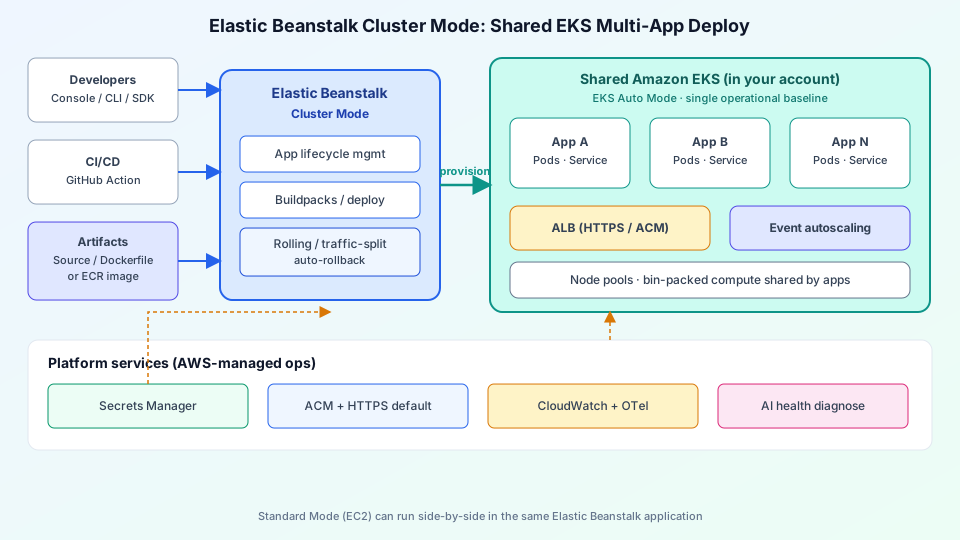
This guide shows what to draw on an Elastic Beanstalk Cluster Mode architecture diagram: the control plane, shared EKS node pools, ALB/HTTPS, Secrets Manager, OpenTelemetry observability, and when Standard Mode still wins. Pair it with a generic Kubernetes cluster architecture diagram when you need to explain the pods and Services underneath.
Why Cluster Mode exists
Classic Elastic Beanstalk (now Standard Mode) shines for a single app per environment on EC2 platforms. Portfolios of microservices pay for idle capacity and repeat the same ops story N times. Cluster Mode flips that model:
- Shared compute — many apps share an EKS cluster Elastic Beanstalk provisions and operates (including EKS Auto Mode charges for the nodes it creates).
- One experience — console, CLI, SDKs, and a new GitHub Action you already know; no separate Kubernetes day-2 team required for the baseline.
- Lower per-app cost as count grows — bin-packing amortizes control-plane and node overhead across the portfolio.
AWS states there is no extra Elastic Beanstalk fee for Cluster Mode; you pay for the underlying EKS control plane, Auto Mode compute, ECR, CloudWatch, and related resources. Cluster Mode is generally available in commercial Regions where Elastic Beanstalk runs, and is not Free Tier eligible.
Architecture layers to draw
| Layer | What it is | Diagram tip |
|---|---|---|
| Inputs | Developers, CI/CD, GitHub Action | Left column: Console / CLI / pipeline |
| Artifacts | Source, Dockerfile, or ECR URI | Label Cloud Native Buildpacks when source is uploaded |
| EB Cluster Mode | App lifecycle, deploy strategies, rollback | Blue control-plane box between CI and EKS |
| Shared EKS | App A…N as Pods/Services on pooled nodes | Teal cluster boundary; multiple app cards inside |
| Edge ingress | ALB, HTTPS via ACM, health checks | Amber ALB box facing public apps only |
| Platform strip | Secrets Manager, OTel → CloudWatch, AI diagnose | Bottom band under the data path |
Deploy path: source to shared EKS
- Create (or reuse) an Elastic Beanstalk application that can hold both Standard and Cluster environments.
- Create an environment with deployment type Cluster (
Tier Name=Cluster,Type=EKSin the API). - Supply an application version: local source (Buildpacks containerize supported runtimes), a Dockerfile, or an image URI in Amazon ECR.
- The first deploy in a subnet set provisions the EKS cluster (~10 minutes). Later environments reuse that cluster — draw “first deploy creates cluster; next deploys reuse.”
- Elastic Beanstalk applies option settings for CPU/memory, replica min/max, service port, ALB scheme, and health-check path per environment.
Diagram rule: one arrow from EB into the EKS boundary labeled “provision / update”; separate app cards inside so reviewers see multi-tenancy of applications, not multi-tenant AWS accounts.
Networking, HTTPS, and scaling
Cluster Mode expects you to pass subnet and IAM role options under aws:elasticbeanstalk:eks namespaces. Public-facing services typically attach an internet-facing Application Load Balancer with HTTPS by default via AWS Certificate Manager. Internal services can stay private — mark which apps have ALB exposure so security reviews do not assume every Service is public.
Event-driven autoscaling adjusts replicas from min to max based on load. On the diagram, put autoscaling next to the app Services, not on the EB control plane alone — the scale action lands on Kubernetes replicas.
Deployment strategies and rollback
Production portfolios need more than “replace all pods.” Cluster Mode supports all-at-once, rolling, immutable, and traffic-splitting deployments with automatic rollback on failure. Annotate the EB box with “traffic-split + auto-rollback” so interviewers and on-call engineers see the safety rails. That pairs cleanly with a front-door load balancer architecture story when you also terminate TLS or fan out beyond a single ALB.
Secrets, observability, and AI troubleshooting
- AWS Secrets Manager — inject secrets without baking them into images; show a dashed line from the platform strip into app pods.
- OpenTelemetry — native OTel export to Amazon CloudWatch and third-party backends; label the observability role option on the EKS environment.
- AI-powered environment analysis — Elastic Beanstalk can collect service-side logs and suggest fixes; useful as a small “diagnose” node in ops diagrams, not as a substitute for runbooks.
Compliance posture for Elastic Beanstalk (HIPAA eligible; PCI DSS, SOC, FedRAMP, IRAP in scope per AWS announcements) belongs in a footnote on architecture docs for regulated teams — not as a giant badge that crowds the data path.
Standard Mode vs Cluster Mode
| Choose Standard (EC2) | Choose Cluster (EKS) |
|---|---|
| Single app / single environment | Portfolio of services sharing capacity |
| Windows / .NET Framework on IIS | Containerizable Linux runtimes or images |
| Cannot containerize | Source, Dockerfile, or ECR-ready apps |
| Spend under ~$500/mo where EKS fees dominate | Enough apps that bin-packing offsets control-plane cost |
Both modes can live in the same Elastic Beanstalk application. Migrate one environment at a time; validation checks run before changes. On a migration diagram, draw Standard and Cluster side-by-side under one application umbrella.
What not to confuse with “raw” Kubernetes
Cluster Mode is not “you own the control plane.” Elastic Beanstalk manages the EKS lifecycle for this use case. You still choose subnets, roles, and per-app sizing, but you should not draw a full DIY GitOps + cluster-upgrade story unless your team operates outside Beanstalk. If you need the full DIY map, start from the Kubernetes architecture guide and layer Beanstalk only as the deployer.
Example prompt for AI diagram generation
Drop this into ByteDiagram for a first draft that matches the hero figure:
Left: Developers + GitHub Action + Source/Dockerfile/ECR
Center: Elastic Beanstalk Cluster Mode (deploy, traffic-split, rollback)
Right: Shared Amazon EKS with App A, App B, App N pods/services
Bottom: ALB+ACM HTTPS, Secrets Manager, CloudWatch OTel, AI diagnose
Left-to-right flow, teal EKS boundary, blue EB control plane.
FAQ
Is Cluster Mode a new Elastic Beanstalk product fee?
No additional Beanstalk service charge. You pay for EKS, Auto Mode compute, ECR, CloudWatch, and related AWS resources your apps consume.
Can Standard and Cluster environments coexist?
Yes. They run side by side in the same application so teams can migrate gradually after compatibility checks.
Do I still need to know Kubernetes?
Day-to-day you stay in Beanstalk APIs and console. Understanding Pods, Services, and ALB health checks still helps for capacity and incident reviews — Cluster Mode does not erase Kubernetes concepts; it abstracts cluster ops.
Conclusion
Elastic Beanstalk Cluster Mode is the 2026 answer for teams that want Beanstalk’s “you bring the app, AWS runs it” contract across a portfolio on shared EKS. A clear architecture diagram shows Inputs → Cluster Mode control plane → shared EKS apps → ALB/HTTPS, with Secrets Manager and OTel/CloudWatch on the platform strip — and a callout that Standard Mode remains for single-app, Windows, or non-containerizable workloads. Draw that once for onboarding docs, then reuse it in migration reviews.
Diagram your Beanstalk Cluster Mode stack
Generate a shared-EKS multi-app layout with tech icons in ByteDiagram, then animate the deploy path for runbooks or Cloud architecture reviews.
Open Diagram Editor