
You already have a flowchart — maybe in draw.io, on a whiteboard photo, or in a slide deck. It shows the right steps, but it is static. Viewers see every box at once and have to trace arrows themselves.
An animated diagram fixes that: each step appears in order, connectors show direction with motion, and the story unfolds the way you would explain it live. The good news — you can convert a flowchart to an animated diagram online for free without After Effects, screen recording, or frame-by-frame editing.
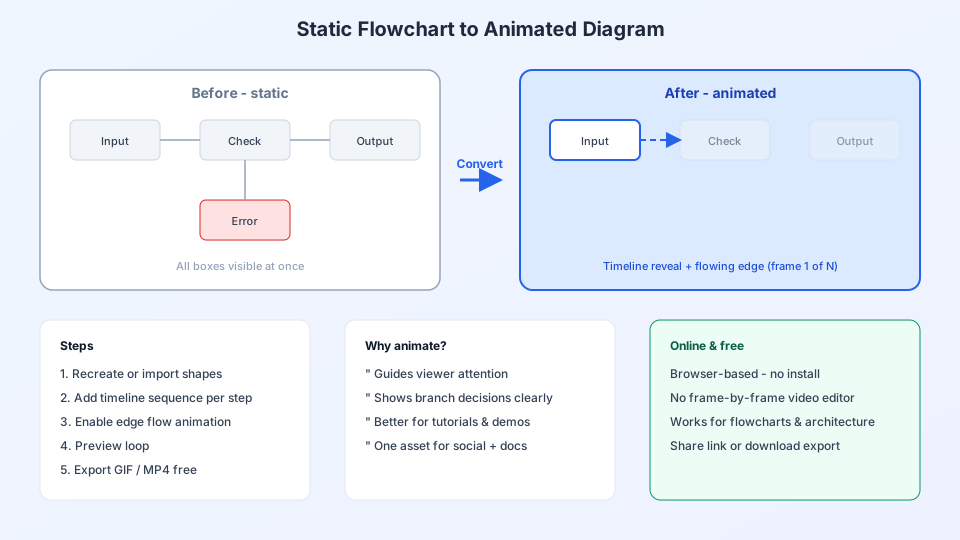
Static flowchart vs animated diagram
| Static flowchart | Animated diagram | |
|---|---|---|
| Reveal | Everything visible at once | Steps appear on a timeline |
| Flow direction | Arrows only | Moving dots or pulses on edges |
| Best use | Documentation, print | Video, presentations, tutorials |
| Export | PNG, PDF | GIF, MP4, embeddable link |
Converting a flowchart to animation is not about redrawning from scratch — it is about adding timing and motion to the structure you already have.
3 ways to convert your flowchart (free online)
Option A — Recreate in an animated editor (fastest for most people)
Open ByteDiagram (free account), create a project, and rebuild your flowchart on the canvas. Use the same shapes: process boxes, decision diamonds, start/end nodes. Because the tool is built for animation, you add motion as you go instead of bolting it on later.
Typical time: 15–30 minutes for a 8–12 step flowchart.
Option B — Import diagram JSON
If you already exported a diagram from ByteDiagram or have compatible JSON (nodes + edges), use Import in the editor to load it instantly. Then open the timeline panel and assign animation delays to each node.
Option C — AI-generated starting point
Paste a text description of your flowchart — or your existing bullet list of steps — into the AI Flow Generator. It places nodes and connections automatically. You refine layout, swap in tech icons if it is an architecture diagram, then animate.
Example prompt:
Convert this flowchart to an animated user signup flow:
User opens app → enters email → OTP sent →
user verifies OTP → profile created → welcome screen.
Reveal each step 2 seconds apart with animated connectors.
Step-by-step: animate your flowchart in ByteDiagram
Step 1 — Sign up free (no credit card)
Go to ByteDiagram and create a free account. Open a new project on the canvas. Everything runs in the browser.
Step 2 — Place your flowchart nodes
Match your original flowchart structure:
- Start / End — circular nodes
- Process steps — rectangles
- Decisions — diamonds (yes/no branches)
- Data stores — cylinders or tech icons (Redis, PostgreSQL, etc.)
Drag from the sidebar gallery. For system design flowcharts, replace generic boxes with tech icons so the animated version looks professional in videos and docs.
Step 3 — Connect with animated edges
Draw edges between steps in the same order as your original flowchart. Enable edge animation so particles travel along each connector — viewers instantly see which direction the flow moves.
Step 4 — Add a timeline sequence
Open the Timeline or Sequence Builder. Assign each node a start time so the diagram reveals step by step:
- 0s — Start node
- 1.5s — First process step
- 3s — Decision branch
- 4.5s — Parallel services (if any)
- 6s — Database / external API
- 7.5s — End node
Click Preview and adjust timing until it matches how you would walk someone through the flowchart aloud.
Step 5 — Preview and export free
When the sequence feels right, export:
- GIF — great for Slack, README, and blog embeds
- MP4 — best for YouTube, LinkedIn, and presentations
- Share link — embed the animated diagram on a page
No watermark on core exports with the free plan. You have converted a static flowchart into a shareable animated asset without leaving the browser.
Converting from popular flowchart tools
- draw.io / diagrams.net — export PNG for reference, rebuild in ByteDiagram (15–20 min) or describe the flow to AI
- Lucidchart / Visio — same approach; focus on matching node order and labels
- PowerPoint / Google Slides — one shape per slide becomes one timed node in the sequence
- Whiteboard photo — list steps in the AI prompt; clean up layout in the editor
Direct import from every format is not always possible, but the structure of your flowchart transfers quickly — and animation is what the static tools cannot add natively.
Tips for a smooth conversion
- One reveal at a time — do not animate more than 2–3 new nodes per beat
- Keep labels short — animation carries the pacing; long text slows comprehension
- Align left-to-right or top-to-bottom — matches how people read flowcharts
- Use consistent spacing — makes the animated version look polished
- Run preview twice — catch nodes that appear too early or too late
Why use ByteDiagram for this?
Most flowchart apps stop at PNG export. ByteDiagram is purpose-built to go from flowchart → animated diagram → GIF/MP4 in one free online workflow:
- Timeline / sequence animation built in
- Animated connectors on edges
- Tech icon library for architecture flows
- AI assist to speed up conversion from text
- Free tier to start — no credit card required
FAQ
Can I convert a flowchart to animation completely free?
Yes. ByteDiagram’s free plan lets you create diagrams, animate them, and export. Paid plans add higher limits and more AI credits — but converting a typical flowchart does not require payment.
Do I need a video editor?
No. The editor captures frames with timing and motion applied, then exports GIF or MP4 directly.
What file formats can I export?
GIF and MP4 for video use, plus shareable links for embedding. You can also save the diagram as JSON to edit later.
How long does conversion take?
A simple 10-step flowchart: about 20 minutes to rebuild and animate. With AI generation from a written outline: often under 10 minutes plus refinement.
Convert your flowchart to animation now
Free online editor — timeline sequences, animated edges, GIF & MP4 export. No credit card required.
Start Free on ByteDiagram