
Large language models answer fluently, but they do not know your private wiki, ticket history, or yesterday’s pricing sheet. Retrieval-augmented generation (RAG) closes that gap by fetching relevant documents at query time and grounding the model’s response in retrieved text. Architects, ML engineers, and product teams all need the same thing: a RAG architecture diagram that separates offline ingestion from online query serving.
This article explains each stage — chunking, embeddings, vector search, re-ranking, prompt assembly, and evaluation — and shows what to draw when you document an AI feature for stakeholders or a system design review.
Why RAG exists: limits of fine-tuning alone
Fine-tuning teaches style and task format, but it is expensive to refresh with every policy change. RAG keeps the model weights stable while updating the knowledge store. That makes RAG the default pattern for internal copilots, support bots, and search-augmented chat — as long as you accept retrieval latency and the need for citation quality controls.
Offline ingestion path
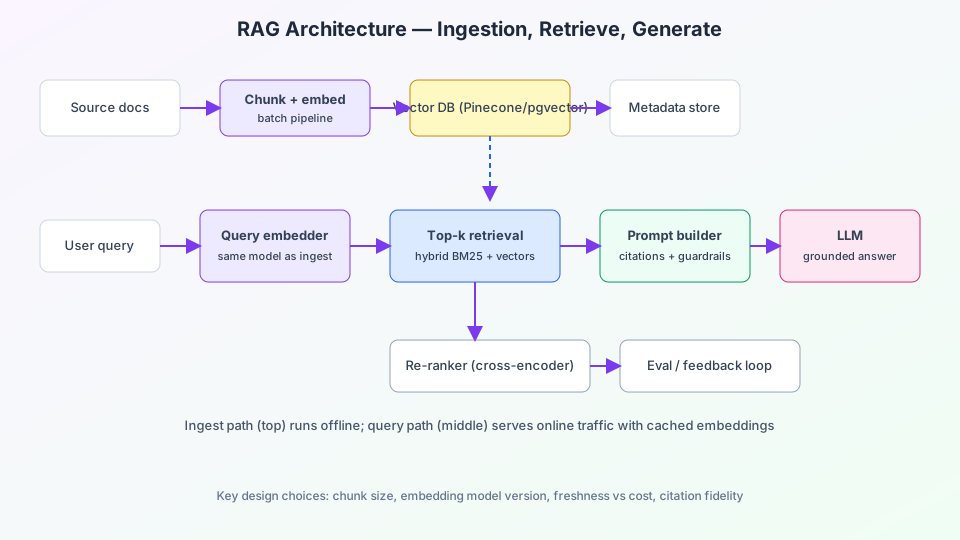
Draw the ingestion pipeline as a left-to-right batch flow on the top of your diagram:
- Sources — PDFs, Confluence, Git repos, CRM exports, product catalogs.
- Extract & normalize — strip boilerplate, preserve headings, store source URL and version.
- Chunking — split text into overlapping windows (e.g. 512 tokens, 64 overlap); chunk boundaries strongly affect recall.
- Embedding model — convert each chunk to a dense vector; version the model ID in metadata.
- Vector index — Pinecone, Weaviate, pgvector, OpenSearch k-NN; store vectors + metadata filters (team, product, ACL).
- Metadata DB — titles, ACLs, freshness timestamps for filtering before vector search.
Label embedding model version on the diagram. When you re-embed corpora, mixed versions in one index silently hurt retrieval quality.
Online query path
The serving path runs per user question — show it below ingestion with a distinct color in presentations:
- User query enters an API gateway with auth and rate limits.
- Query embedding uses the same model family as ingestion.
- Retrieval — top-k approximate nearest neighbors; optional hybrid with BM25 keyword search.
- Re-ranking — cross-encoder scores query–chunk pairs; keeps latency in check by re-ranking only top 20–50.
- Prompt builder — injects chunks with citation markers, system policies, and tool definitions.
- LLM — generates an answer constrained to provided context; stream tokens to the client.
For visual storytelling in demos, animate ingestion first, then query flow — similar to sequencing layers in animated architecture tutorials.
Components worth a dedicated box
| Component | Role | Diagram tip |
|---|---|---|
| Object storage | Raw files before parsing | Place left of chunker |
| Queue / workflow | Airflow, Temporal for ingest jobs | Show async off main query path |
| Cache | Hot query embeddings or frequent answers | Between gateway and retriever |
| Guardrails | PII redaction, topic filters | Before and after LLM |
| Observability | Traces with retrieval IDs | Dashed line to logging stack |
Design decisions that change the diagram
Chunk size and structure
Technical docs benefit from heading-aware chunks; chat logs may use time-bounded segments. Note chunk strategy in a callout — reviewers will ask.
Access control
Filter vector search by user ACL before the LLM sees text. The diagram should show auth on the query path intersecting metadata filters, not “retrieve everything then filter in prompt.”
Freshness
Event-driven re-index when documents change; batch nightly for low-churn corpora. Draw webhooks from CMS to the ingest queue.
Evaluation and feedback loop
Production RAG is not finished at launch. Close the loop on your diagram with:
- Human thumbs-up/down tied to query ID and retrieved chunk IDs.
- Offline eval sets with expected citations (precision/recall@k).
- LLM-as-judge only as a supplement — not your sole metric.
Compare tooling options for diagram-heavy docs in our roundup of animated flow diagram tools when you need motion for executive reviews.
Failure modes to document
- Empty retrieval — model hallucinates without a “I don’t know” policy.
- Stale chunks — outdated policy retrieved with high similarity score.
- Context overflow — too many chunks truncate mid-sentence in the prompt window.
- Latency spikes — re-ranker or vector DB cold starts under load.
Example ByteDiagram prompt
RAG architecture: S3 document bucket → parsing workers → chunk + OpenAI embeddings
→ Pinecone vector index + Postgres metadata with ACL fields
User chat API → embed query → hybrid retrieval (BM25 + vectors)
→ cross-encoder re-ranker → GPT-4o with citations → streaming response
Include eval feedback loop and Langfuse tracing.
FAQ
Is RAG the same as semantic search?
Semantic search stops at ranked chunks. RAG adds an LLM step that synthesizes an answer and (ideally) cites sources. Your diagram should show generation after retrieval, not conflate the two.
When should I skip RAG and fine-tune instead?
Narrow tasks with stable wording (classification, extraction) often fine-tune well. Open-domain Q&A over changing knowledge bases favors RAG.
Do I need a separate vector database?
Many teams start with pgvector inside existing Postgres for simplicity. Dedicated vector stores help at larger scale or hybrid search features — show whichever you operate on the diagram.
Conclusion
A clear RAG architecture diagram separates batch ingestion from low-latency query serving, names embedding versions, and shows where auth and evaluation attach. That clarity prevents the most common production surprises: stale indexes, mixed embeddings, and ungrounded answers. Draw both paths, annotate design choices, and keep the feedback loop visible so the system improves after launch.
Map your RAG pipeline visually
Generate ingestion and serving diagrams with AI in ByteDiagram — add icons for vector DBs, queues, and LLMs, then export for docs or talks.
Start Free on ByteDiagram