
Diagrams drawn in a separate app tend to drift away from the code they describe. Diagram-as-code tools keep the diagram as plain text next to the code, so it can be reviewed in a pull request, diffed and rebuilt. Choosing the best diagram tool for developers depends mostly on one question: where does the diagram need to render?
There is no single winner. This guide sets out our criteria, picks a tool per use case, compares them in a sourced table, and shows the same small architecture, 5 nodes and 4 edges, that we rendered on 13 October 2026 (IST) in Mermaid, PlantUML, D2 and Graphviz.
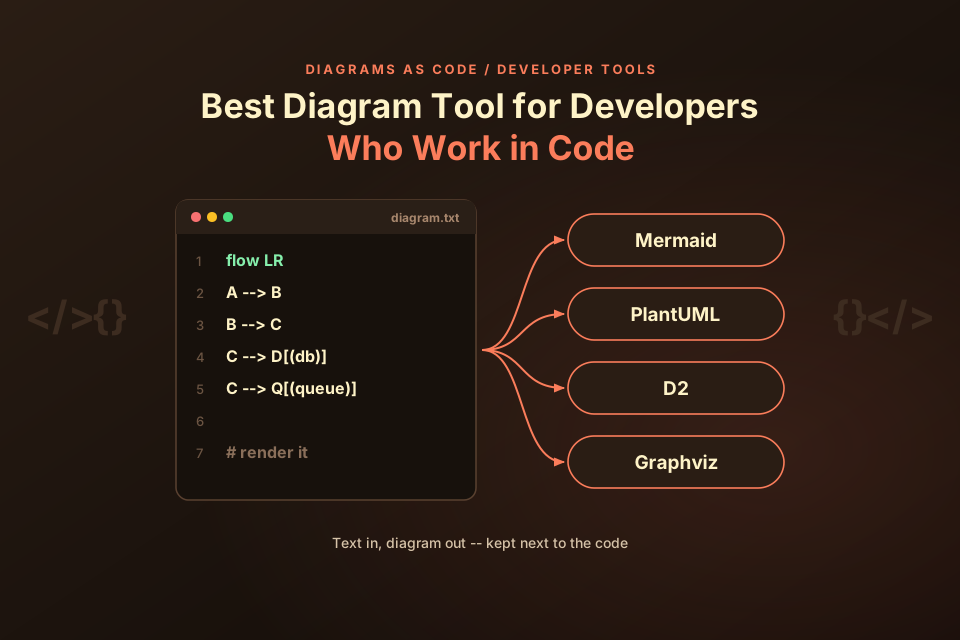
Quick picks:
- Mermaid: for Markdown and docs-first teams.
- PlantUML: for broad UML coverage.
- D2: for readable architecture-as-code with flexible layouts.
- Graphviz: for raw graphs and script-generated output.
- Structurizr DSL: for C4 model workspaces (we did not run this).
- diagrams (mingrammer): for Python-defined cloud architecture (we did not run this).
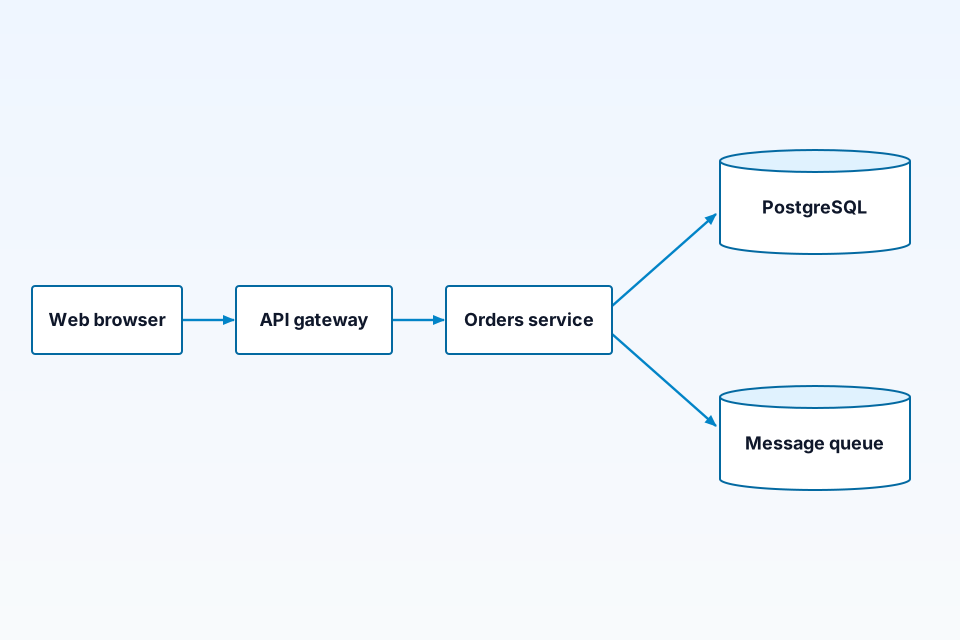
The diagram above is the test architecture: a web browser calls an API gateway, which calls an orders service that writes to PostgreSQL and a message queue. It has 5 nodes and 4 unlabeled edges, the same in all four tools we rendered.
How we chose: the criteria
We compared the tools on six points that matter when a diagram lives in a repository:
- Plain-text format. The source should diff cleanly in git and be readable in a code review.
- License. Open-source licenses differ; check that yours fits how you plan to use the tool.
- Rendering. Whether you can render with a local command-line tool, a library, or a hosted renderer.
- Output formats. At least SVG and PNG, ideally from the tool's own documentation.
- Editor and docs integration. Whether your editor or docs platform can preview it.
- Architecture fit. Shapes such as databases and queues, and layouts that suit services and data flows.
We did not score or rank tools numerically. Integrations and features change between releases, so check each tool's documentation before you commit.
A practical way to start: put the diagram source in the same folder as the code or docs it describes, render it in CI or with your docs build, and review diagram changes in the same pull request as the code change. Whichever tool you pick, that habit does most of the work of keeping diagrams current.
Best diagram tool for developers, by use case
Mermaid: for docs that render Markdown
Mermaid's documentation describes it as "a JavaScript based diagramming and charting tool that renders Markdown-inspired text definitions". Its GitHub repository lists TypeScript as the main language and an MIT license. The Mermaid CLI README says it takes a definition file and "generates an SVG/PNG/PDF file as output". On the Visual Studio Marketplace, a Mermaid extension is described as "the official Mermaid Editor plugin by the Mermaid open source team", and the JetBrains Marketplace lists a Mermaid plugin for IntelliJ-based IDEs.
Best for: diagrams inside Markdown docs, READMEs and wikis whose platform renders Mermaid. Trade-off: in our view you get less direct control over layout than with D2 or Graphviz, so large diagrams can take some rearranging. From our test: Orders --> DB[(PostgreSQL)].
PlantUML: for full UML coverage
PlantUML's site calls it an open-source tool that draws UML diagrams from simple textual descriptions, and its repository describes it as a way to "generate diagrams from textual description". The main repository lists Java as its language and LGPL-3.0 as its license. The site lists output formats including PNG, SVG, LaTeX and EPS, plus ASCII art for sequence diagrams only. The Visual Studio Marketplace lists a PlantUML extension, and the JetBrains Marketplace lists a PlantUML integration plugin; we could not confirm from those pages that either is published by the PlantUML project itself.
Best for: teams that need many UML diagram types from one tool. Trade-off: local rendering needs Java, and PlantUML's own site notes that good layout "is sometimes non-trivial". From our test: database "PostgreSQL" as DB.
D2: for readable architecture-as-code
D2's documentation describes it as "a diagram scripting language that turns text to diagrams", and says the name "stands for Declarative Diagramming". The docs do not say what D2 is written in; its GitHub repository lists Go as the main language and MPL-2.0 as the license. The exports page says the CLI can export to SVG, PNG, PDF, PPTX, GIF and ASCII. A D2 extension published under Terrastruct's name, the company behind D2, is listed on the Visual Studio Marketplace.
Best for: architecture diagrams where readable syntax and styling matter. Trade-off: if your docs platform does not render D2, you will need a build step that exports the image. From our test: Queue: Message queue {shape: queue}.
Graphviz (DOT): for generated graphs and scripts
Graphviz renders graphs written in the DOT language; its GitLab repository reports C as the main language. Its license page shows the Eclipse Public License 2.0, and its output formats page lists many formats, including SVG, PNG, PDF and JSON. Because DOT is simple, it is easy to generate from scripts, for example a dependency graph built from your code.
Best for: graphs produced by code and graph-heavy layouts. Trade-off: the default look is plain, and architecture-specific shapes need manual styling. From our test: DB [label="PostgreSQL", shape=cylinder];.
Structurizr DSL: for C4 model workspaces
Structurizr's documentation says its DSL "provides a way to define a software architecture model (based upon the C4 model) using a text-based domain specific language". Its main GitHub repository lists Java and an Apache-2.0 license. The idea is to define the model once and generate several views from it. We did not run this; it is compared from docs, not rendered.
diagrams (mingrammer): for Python cloud diagrams
The diagrams library lets you describe cloud architecture in Python; its repository calls it "Diagram as Code for prototyping cloud system architectures" and lists an MIT license. Its installation docs say it "uses Graphviz to render the diagram, so you need to install Graphviz to use it". We did not run this; it is compared from docs, not rendered.
For contrast: Excalidraw and draw.io
Excalidraw (a "virtual whiteboard for sketching hand-drawn like diagrams") and draw.io (a "client-side editor for general diagramming") are drawing tools rather than code-first tools, so they sit outside this comparison. We did not run these; they are compared from docs, not rendered. For a hands-on view of one of them, see our ByteDiagram vs Excalidraw take.
Comparison table
Every cell comes from the project's own pages or repository; "Rendered by us" refers to our test below.
| Tool | Syntax / repo language | License | Rendering and outputs (per docs) | Rendered by us | Source |
|---|---|---|---|---|---|
| Mermaid | Markdown-inspired text / TypeScript | MIT | JavaScript in the browser; CLI to SVG, PNG, PDF | Yes (mermaid.ink) | docs |
| PlantUML | PlantUML text / Java | LGPL-3.0 (main repo) | Java; PNG, SVG, LaTeX, EPS and more | Yes (Kroki) | site |
| D2 | D2 declarative language / Go | MPL-2.0 | CLI to SVG, PNG, PDF, PPTX, GIF, ASCII | Yes (Kroki) | docs |
| Graphviz | DOT / C | EPL-2.0 | CLI; SVG, PNG, PDF, JSON and many more | Yes (Kroki) | docs |
| Structurizr DSL | C4 model DSL / Java | Apache-2.0 | Model-based views; see docs | No (from docs) | docs |
| diagrams (mingrammer) | Python code / Python | MIT | Renders through Graphviz | No (from docs) | docs |
The test: one architecture, four tools
We wrote the same architecture in each tool: 5 nodes (Web browser, API gateway, Orders service, PostgreSQL, Message queue) and 4 edges (browser to gateway, gateway to orders, orders to PostgreSQL, orders to queue), with no edge labels. A script counted 5 nodes and 4 edges in each of the four sources.
Mermaid (PostgreSQL and the queue use Mermaid's cylinder shape):
flowchart LR
    Browser[Web browser] --> Gateway[API gateway]
    Gateway --> Orders[Orders service]
    Orders --> DB[(PostgreSQL)]
    Orders --> Queue[(Message queue)]
PlantUML (3 node elements, 1 database, 1 queue):
@startuml
node "Web browser" as Browser
node "API gateway" as Gateway
node "Orders service" as Orders
database "PostgreSQL" as DB
queue "Message queue" as Queue
Browser --> Gateway
Gateway --> Orders
Orders --> DB
Orders --> Queue
@enduml
D2 (a cylinder for PostgreSQL and the queue shape for the queue):
direction: right
Browser: Web browser
Gateway: API gateway
Orders: Orders service
DB: PostgreSQL {shape: cylinder}
Queue: Message queue {shape: queue}
Browser -> Gateway
Gateway -> Orders
Orders -> DB
Orders -> Queue
Graphviz DOT (a cylinder for PostgreSQL; the other 4 nodes use the default shape):
digraph G {
  rankdir=LR;
  Browser [label="Web browser"];
  Gateway [label="API gateway"];
  Orders [label="Orders service"];
  DB [label="PostgreSQL", shape=cylinder];
  Queue [label="Message queue"];
  Browser -> Gateway;
  Gateway -> Orders;
  Orders -> DB;
  Orders -> Queue;
}
How we rendered them: Mermaid through mermaid.ink (/svg/ for SVG and /img/ with ?type=png for PNG), and PlantUML, D2 and Graphviz by posting the source to the public Kroki API. All requests returned HTTP 200, and every SVG contained all 5 labels. We installed no local tools.
The four outputs are not identical, and the differences are useful. The labels and arrows are the same everywhere, but each tool draws the shapes its own way: Mermaid and D2 both have a cylinder for the database, D2 and PlantUML have a dedicated queue shape, and Graphviz draws plain ellipses unless you set a shape, as we did only for PostgreSQL. Layout also differs, because each tool uses its own layout engine. If the exact look matters, render a sample in each candidate tool before choosing, as we did here.
Mermaid vs PlantUML vs D2: which to pick
Pick Mermaid if your docs platform already renders it, because the diagram then appears where people read. Pick PlantUML if you need many UML diagram types from one tool. Pick D2 if you mainly draw architecture and want more control over layout and styling. Pick Graphviz when another program generates the diagram, and Structurizr DSL if your team already works with the C4 model and wants several views from one model (we did not run this). For sequence diagrams specifically, see our sequence diagram tools comparison.
Where AI fits
AI chat tools can draft diagram code for any of these languages, which you then render and review like hand-written code. For a workflow, see how to create diagrams with AI, and for tools, the AI diagram generators we tested.
ByteDiagram
Disclosure: ByteDiagram is our product, made by us, so we list it separately rather than rank it. Its site says "Let AI help you create diagrams from text descriptions or existing code" and lists eight diagram types: flowcharts, architecture, sequence, pipelines, mind maps, network, state machines and timelines. We did not run the test architecture in ByteDiagram (not tested by us).
FAQ
What is diagram as code?
Diagram as code means you define a diagram in a text language, keep that text in git next to your code, and let a tool render it to an image such as SVG or PNG. Because the source is plain text, changes show up in diffs and pull requests like any other code. Mermaid, PlantUML, D2 and Graphviz DOT are common examples.
Can I render PlantUML, D2 or Graphviz without installing anything?
Yes. In our test, the public Kroki API rendered all three to SVG from a single HTTP POST each, with nothing installed locally. Public renderers receive your diagram source, so avoid sending sensitive diagrams to them; for private work, self-host Kroki or install the tools' own command-line programs.
Is Graphviz still useful for architecture diagrams?
It can be, especially for diagrams generated by scripts or for graph-heavy output, since DOT is simple to produce from code and Graphviz lists many output formats. Out of the box it offers less architecture-specific styling than some newer tools. The Python diagrams library builds on Graphviz for cloud architecture diagrams; we did not run this.
Sources
All pages were checked on 13 October 2026 (IST).
- Mermaid documentation: About Mermaid: what Mermaid is.
- Mermaid on GitHub: repository language and MIT license.
- Mermaid CLI on GitHub: SVG, PNG and PDF output.
- PlantUML: what PlantUML is and its listed output formats.
- PlantUML on GitHub: repository language and LGPL-3.0 license.
- D2 Tour: Introduction: D2 as a declarative diagram scripting language.
- D2 Tour: Exports: export formats.
- D2 on GitHub: repository language and MPL-2.0 license.
- Graphviz: project home.
- Graphviz: Output Formats: the output format list.
- Graphviz: License: Eclipse Public License 2.0.
- Graphviz on GitLab: source repository.
- Structurizr DSL documentation: C4 model DSL description.
- Structurizr on GitHub: repository language and Apache-2.0 license.
- diagrams: Installation: Python requirement and Graphviz dependency.
- diagrams on GitHub: repository language and MIT license.
- Excalidraw on GitHub: description and license.
- draw.io on GitHub: description and license.
- Kroki: the public rendering API we used for PlantUML, D2 and Graphviz.
- mermaid.ink: the public renderer we used for Mermaid.
- Visual Studio Marketplace: Mermaid: VS Code extension listing.
- Visual Studio Marketplace: D2: VS Code extension listing.
- Visual Studio Marketplace: PlantUML: VS Code extension listing.
- JetBrains Marketplace: Mermaid: IntelliJ-based IDE plugin listing.
- JetBrains Marketplace: PlantUML Integration: IntelliJ-based IDE plugin listing.
- Our homepage (bytediagram.com): the AI text-to-diagram statement and the list of eight diagram types.
Keep your diagrams close to the code
Pick the tool that renders where your team reads. To see what ByteDiagram offers, visit our homepage.
Visit ByteDiagram