
We took one short login flow and judged every tool on this list against it, using the same six criteria in the same order. Six of the ten tools could be run from text without an account, so we rendered the shared spec in those six and saved the output. The other four need a drag-and-drop canvas, an account or an interactive editor, so we compared them from their docs and pricing pages and say so in their headings. Every fact below comes from vendor pages we fetched on 8 October 2026 (IST). There are no scores or star ratings, because a single run can’t back them up.
Quick picks
| Need | Pick | Status | Why (facts only) |
|---|---|---|---|
| Best text-based | PlantUML | Rendered | Drew every element of the spec; its docs list many fragments, arrow styles and output formats |
| Best drag-and-drop | draw.io | Compared from docs, not rendered | Free forever, no sign-up; UML shape library with lifelines, activation boxes and frames for alt, opt, par, loop and critical |
| Best for docs and GitHub | Mermaid | Rendered | Drew every element of the spec; Markdown-style text that lives next to your code |
| Best free | SequenceDiagram.org | Rendered | Free web tool; drew every element of the spec; text and mouse editing in one model; SVG and PNG export |
| Best with AI help | Lucidchart | Compared from docs, not rendered | Three ways in: drag shapes, type sequence markup, or prompt Lucid AI; Lucid AI is listed on the Free plan |
How we compared sequence diagram tools
Test date: 8 October 2026, IST. Plans used: free tiers and public renderers only, with no paid keys and no accounts. We used the same six criteria, in the same order, in every tool section and in the side-by-side table:
- Input style: text DSL, drag-and-drop, or AI prompt.
- UML coverage: lifelines, sync/async/return messages, activation bars, alt/opt/loop/par fragments, notes.
- Layout and editing: whether layout is automatic, and how you change the diagram afterwards.
- AI help: only what the vendor page states or what we saw in a run.
- Export and embeds: SVG, PNG, PDF or source, and where the diagram can be embedded (Markdown, GitHub, Confluence, docs).
- Free plan and first paid tier: taken from the vendor’s pricing page in October 2026.
AI help is one criterion here, not the focus. For generation quality, see our same-prompt test of AI diagram generators.
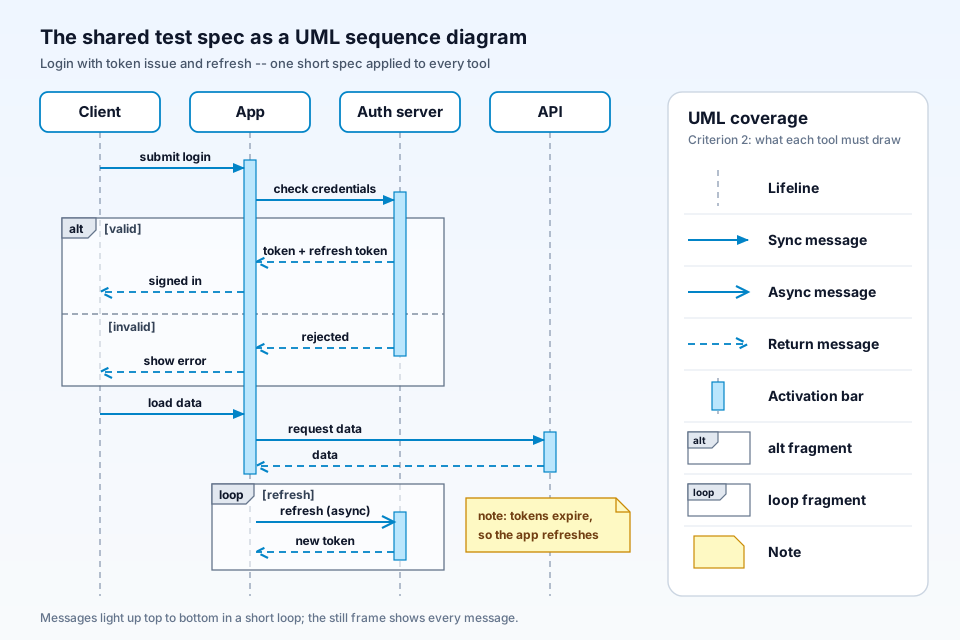
Shared spec (verbatim). It is a login that issues a token and then refreshes it. It has four lifelines, one alt fragment, one loop, activation bars, one async message, dashed returns and a note:
Shared spec: login with token issue + refresh
Lifelines: Client, App, Auth server, API

1. Client -> App: submit login                (App activates)
2. App -> Auth server: check credentials      (Auth server activates)
3. alt [valid]
     Auth server --> App: token + refresh token    (return)
     App --> Client: signed in                     (return)
   else [invalid]
     Auth server --> App: rejected                 (return)
     App --> Client: show error                    (return)
   end                                        (Auth server deactivates)
4. Client -> App: load data
5. App -> API: request data                   (API activates)
6. API --> App: data                          (return; API and App deactivate)
7. loop [refresh]
     App ->> Auth server: refresh (async)     (Auth server activates)
     Auth server --> App: new token           (return; Auth server deactivates)
   end
8. note right of Auth server: tokens expire, so the app refreshes
How we rendered it: we translated the spec into each tool’s own syntax and ran it through a public renderer or the vendor’s documented API; each tool’s “Our run” line says which.
1. Mermaid: text DSL, rendered
Our run: the sequenceDiagram source rendered to SVG on both mermaid.ink and kroki.io (HTTP 200). Every element of the spec appeared.
- Input style: Markdown-inspired text. The commercial Mermaid editor at mermaid.ai advertises a visual drag-and-drop editor on top of the same syntax.
- UML coverage: participants and actors, solid and dotted lines, async open arrows, stackable activations, notes, loop, alt/else, opt, par, critical, break, background highlighting and autonumber.
- Layout and editing: layout is computed from the text, so you change the diagram by editing the source.
- AI help: none in the open-source library. Mermaid’s paid product lists AI credits, and its free Basic plan shows 15 in the plan comparison.
- Export and embeds: SVG in the browser; mermaid-cli outputs SVG, PNG or PDF. GitHub renders mermaid code blocks natively.
- Free plan and first paid tier: the library and the mermaid.live editor are free. On mermaid.ai, Basic is free (the plan card says 3 diagrams, the table up to 6). Plus was shown to us at ₹390 per user per month, billed annually (INR for our India location).
- Who it suits: developers who keep diagrams next to code in READMEs, wikis and pull requests.
2. PlantUML: text DSL, rendered
Our run: the same spec in @startuml syntax rendered to SVG on kroki.io and on the public plantuml.com server (both HTTP 200). Every element appeared, and the async message was drawn with PlantUML’s thin ->> arrow.
- Input style: text DSL. The homepage editor renders in the browser with a JavaScript engine.
- UML coverage: participants of several types, activate/deactivate, alt/else, opt, loop, par, break, critical and group. Also notes, thin, dotted and lost-message arrows, autonumber, dividers, references and delays.
- Layout and editing: automatic layout from the text; you edit the source.
- AI help: none stated on the plantuml.com pages we read.
- Export and embeds: the command line outputs many formats, including PNG (the default), SVG, PDF, EPS, LaTeX/TikZ and ASCII art. The integrations page lists Confluence, GitLab and GitHub Markdown, and an official browser extension renders PlantUML inside GitHub.
- Free plan and first paid tier: open source, offered under GPL and other licenses. We found no paid plan on plantuml.com.
- Who it suits: teams that need broad UML coverage and many output formats from one text file.
3. SequenceDiagram.org: text plus mouse, rendered
Our run: we called the site’s documented JavaScript API (SEQ.api.generateSvgDataUrl and generatePngDataUrl) from headless Chrome. Both an SVG and a PNG came back, and every element of the spec was drawn, including an open-arrow async message and a folded-corner note.
- Input style: text notation and click-and-drag drawing “in the same model”.
- UML coverage: many participant types; dashed and open-arrow messages; activations; notes, boxes and ref; dividers; create and destroy. The fragment list is alt, opt, loop, par, break, critical, ref, seq, strict, neg, ignore, consider, assert and region.
- Layout and editing: automatic layout from the text. You can also drag participants and messages, edit text by double-clicking, and stretch fragments with the mouse.
- AI help: no built-in AI. The FAQ suggests asking ChatGPT to write SequenceDiagram.org syntax.
- Export and embeds: SVG with the source text embedded, PNG, share URLs, and PDF through the browser’s print dialog. Diagrams can be stored in Google Drive, OneDrive or local files. There is a Confluence Cloud app, an IntelliJ plugin and an on-prem Docker build.
- Free plan and first paid tier: the web tool is free to use, with Patreon support from $1 a month. The on-prem Docker licence is sold on request. All processing runs client-side, and the codebase is not open source.
- Who it suits: anyone who wants a free tool that does full fragment coverage and accepts both typing and mouse edits.
4. WebSequenceDiagrams: text DSL, rendered (free PNG)
Our run: a POST to the documented REST API without a key returned a PNG (HTTP 200). It contained every element of the spec, with “www.websequencediagrams.com” in the footer. The same request with format=svg returned HTTP 402.
- Input style: its own text syntax. The reference guide says it also accepts Mermaid and PlantUML syntax, mapping unsupported features to the closest equivalent. There is a VS Code extension and a HAR-file import.
- UML coverage: solid and dashed signals with filled or open arrowheads, delayed signals, alt/else, opt, loop, par, seq, notes, and activation and destroy. States, reference boxes, parallel sequences and autonumbering are marked Premium.
- Layout and editing: automatic layout from the vendor’s own engine; you edit the text.
- AI help: an MCP integration so Claude, GitHub Copilot or other MCP clients can write WSD syntax.
- Export and embeds: embed with a script tag or the REST API. The Basic pricing card strikes through “High quality PDF/SVG export”, while Pro lists SVG and multipage PDF export and removing WSD branding.
- Free plan and first paid tier: WSD Basic is free and lets you save your work. WSD Pro is $10 a month, billed $120 annually. WSD Team is $699 a year for 10 Pro accounts.
- Who it suits: teams with large diagrams who are willing to pay for vector export.
5. ZenUML: code-style DSL, rendered through Mermaid
Our run: we rendered ZenUML syntax through Mermaid’s ZenUML integration on mermaid.ink (HTTP 200), not through ZenUML’s own web app. (Kroki rejected it with HTTP 400.) All 11 messages, the alt and the loop rendered, but activation follows call nesting, so App got two bars and the async refresh got none. The note became a comment label, and messages were auto-numbered.
- Input style: a code-like text DSL. Messages are method calls, fragments are
if/else,whileorloopblocks, and nesting uses{}. - UML coverage: sync, async, creation and reply messages; activation through nesting; loop; alt through if/else; opt; par; try/catch/finally; comments. The vendor says diagrams comply with OMG UML 2.5.1.
- Layout and editing: automatic. The vendor says clicking a message selects its code in the editor.
- AI help: none verified on the zenuml.com pages we read.
- Export and embeds: the vendor says rendering and image export run in the browser with no data sent to its server. It also runs in Confluence (Cloud, Server, Data Center), a web app, Chrome, JetBrains, VS Code and a Mac app.
- Free plan and first paid tier: the Confluence Cloud app listing shows it free for up to 10 users, with a 30-day trial. Paid tiers are priced by user count; web-app pricing wasn’t stated on the pages we could read.
- Who it suits: Confluence teams and developers who think in method calls.
6. D2: text DSL (sequence_diagram shape), rendered
Our run: a D2 file with shape: sequence_diagram rendered to SVG on kroki.io (HTTP 200). D2 has no alt/else or loop keywords, so the alt became two nested labeled groups with no dashed “else” divider, and with no async arrow our async message looked like a normal one.
- Input style: the same D2 text language used for D2’s other diagrams, with no special sequence syntax to learn.
- UML coverage: actors, spans (activation bars), groups (fragments), notes and self-messages; styling such as dashed lines. Fragment types and async arrows are not built in.
- Layout and editing: order follows the source. A sequence diagram is an ordinary D2 object, so it can sit inside a larger D2 diagram.
- AI help: none on the d2lang.com pages we read.
- Export and embeds: the CLI outputs SVG (the default), PNG, PDF, PPTX, GIF and ASCII.
- Free plan and first paid tier: open source (MPL-2.0). terrastruct.com/pricing now redirects to d2lang.com, and we found no paid tier.
- Who it suits: teams already using D2 for architecture who want sequence diagrams in the same toolchain.
7. draw.io (diagrams.net): drag-and-drop, compared from docs, not rendered
- Input style: drag-and-drop from the UML shape libraries and templates. It can also insert Mermaid source and generate a diagram from it.
- UML coverage: the docs cover lifelines, activation boxes, solid call messages, dotted returns, destroyed lifelines, and frame shapes for alt, opt, par, loop and critical fragments with guards in square brackets.
- Layout and editing: manual placement. You attach activation shapes and connectors to lifelines yourself, and every shape stays editable.
- AI help: a Generate tool (the sparkle button) uses a free hosted backend or your own OpenAI, Claude or Gemini keys, and admins can disable it.
- Export and embeds: PNG, JPEG, SVG, PDF, XML, HTML, URL, JSON and animated GIF. It integrates with Google Drive, Docs and Slides, Microsoft SharePoint, OneDrive and Teams, Confluence and Jira, GitHub, VS Code and Notion.
- Free plan and first paid tier: free forever, no sign-up, Apache 2.0 source. The Atlassian apps are sold separately, and we did not check their prices.
- Who it suits: people who prefer arranging shapes by hand. Our free Visio alternatives for architecture diagrams post covers draw.io and Lucidchart beyond sequence diagrams.
8. Lucidchart: drag-and-drop plus markup, compared from docs, not rendered
- Input style: drag shapes from the UML Sequence library, type sequence markup (“Use Markup”, then Build), or prompt Lucid AI.
- UML coverage: lifelines, activation boxes, and synchronous, asynchronous, reply, create and delete messages. The markup supports alt, opt, par, loop and critical. The tutorial page doesn’t mention notes.
- Layout and editing: markup and AI produce an editable diagram on the canvas, which you then adjust by hand.
- AI help: Lucid AI generates an editable diagram from a description and is listed on the Free plan.
- Export and embeds: share, publish, embed in a wiki, and download. There are add-ons for Google Workspace and Microsoft Word, Excel and PowerPoint. Visio import and export are listed on Individual; Confluence and Jira integrations are listed on Team.
- Free plan and first paid tier: Free gives 3 editable documents, 75 shapes per document and 100 templates. Individual is $9 a month and Team $10 per user a month, both billed annually. The sequence templates on Lucid’s tutorial page are marked “Paid Account”.
- Who it suits: teams already on Lucid that want drag-and-drop, markup and AI in one canvas.
9. Eraser: diagram-as-code, compared from docs, not rendered
- Input style: diagram-as-code (
Web App > DB: Start transaction), with drag-and-drop editing and AI generation in the same canvas. - UML coverage: columns (lifelines); arrows
>,<,<>, lines and dotted arrows; loop, alt/else, opt, par/and and break blocks; activate/deactivate. The syntax page has no note element and no separate async arrowhead. - Layout and editing: layout comes from the code, and columns can carry icons, colours and links.
- AI help: AI diagrams, with 3 on the Free plan.
- Export and embeds: the plan comparison lists export to PDF, PNG, SVG and MD on every plan, plus GitHub, Notion, Confluence and VS Code integrations.
- Free plan and first paid tier: Free gives 3 files, 3 AI diagrams and 7-day version history. Starter is $15 per member a month billed annually, or $20 monthly.
- Who it suits: teams writing design docs who want code, canvas and AI together.
10. Swimlanes.io: text DSL, compared from docs, not rendered
- Input style: text on the left with a live diagram on the right.
- UML coverage: simple, open-arrow, lost, bidirectional, dashed, bold and self messages; notes; if/else and group sections, nested one level; dividers; delay; autonumber. The full syntax overview has no loop keyword and no activation bars, so the spec could not be expressed as written.
- Layout and editing: automatic, from the text.
- AI help: none on the site.
- Export and embeds: download as an image, a 2x image or a PDF; image links, embed code and short URLs.
- Free plan and first paid tier: the site calls itself “a free webapp”, with optional Google or GitHub sign-in to keep diagrams. We found no pricing page (swimlanes.io/pricing returned 404).
- Who it suits: quick, simple message flows shared as links.
Side-by-side comparison table
| Tool | Status | 1. Input style | 2. UML coverage | 3. Layout and editing | 4. AI help | 5. Export and embeds | 6. Free plan / first paid tier (Oct 2026) |
|---|---|---|---|---|---|---|---|
| Mermaid | Rendered | Text | Full spec rendered; also opt, par, critical, break | Auto; edit source | Not in OSS; mermaid.ai credits | SVG; CLI PNG/PDF; native in GitHub | OSS free; mermaid.ai Plus ₹390/user/mo annual (INR shown) |
| PlantUML | Rendered | Text | Full spec rendered; broad fragment and arrow set | Auto; edit source | None stated | Many CLI formats incl. SVG, PDF and EPS; Confluence; GitHub via extension | Open source; no paid plan found |
| SequenceDiagram.org | Rendered | Text + mouse | Full spec rendered; 14 fragment types | Auto, plus drag to edit | None built in | SVG (with source), PNG, print to PDF; Confluence, IntelliJ | Free web tool; on-prem licence on request |
| WebSequenceDiagrams | Rendered (free PNG) | Text (also reads Mermaid/PlantUML) | Full spec rendered; parallel sequences, states, autonumber are Premium | Auto; edit source | MCP integration | Free PNG with site footer; SVG/PDF on Pro (SVG API call: 402) | Basic free; Pro $10/mo billed $120/yr |
| ZenUML | Rendered (via Mermaid) | Code-style text | All 11 messages, alt, loop; note became a comment; activation by nesting | Auto; click message to jump to code | None verified | In-browser render; Confluence, IDEs, Chrome | Confluence Cloud free up to 10 users; paid tiers by user count |
| D2 | Rendered | Text | Spans, groups, notes; no alt/else divider or async arrow | Auto; order follows source | None stated | SVG, PNG, PDF, PPTX, GIF, ASCII | Open source (MPL-2.0); no paid tier found |
| draw.io | Compared from docs, not rendered | Drag-and-drop (+ Mermaid insert) | Lifelines, activation, frames for alt/opt/par/loop/critical | Manual; fully editable | Generate tool | PNG, JPEG, SVG, PDF, XML, HTML, GIF; Confluence, GitHub, Google, Microsoft | Free forever, no sign-up |
| Lucidchart | Compared from docs, not rendered | Drag-and-drop + markup + AI | Lifelines, activation, async; markup alt/opt/par/loop/critical | Generated, then edit on canvas | Lucid AI (on Free) | Download, wiki embed, Office/Google add-ons; Visio on Individual | Free 3 docs, 75 shapes/doc; Individual $9/mo annual |
| Eraser | Compared from docs, not rendered | Diagram-as-code + canvas + AI | Loop, alt, opt, par, break, activation; no notes in syntax page | Auto from code | AI diagrams (3 on Free) | PDF, PNG, SVG, MD; GitHub, Notion, Confluence, VS Code | Free 3 files; Starter $15/member/mo annual |
| Swimlanes.io | Compared from docs, not rendered | Text | Messages, notes, if/else sections; no loop or activation | Auto | None | Image, 2x image, PDF; embed, links | Free web app; no pricing page found |
Text-based vs drag-and-drop: which workflow fits your team
Text-based tools (Mermaid, PlantUML, SequenceDiagram.org, WebSequenceDiagrams, ZenUML, D2, Swimlanes.io, and Eraser’s code mode) fit teams that review changes in pull requests. Our spec took 23 to 31 lines in each syntax, it diffs like code, and the layout redraws itself whenever you add a message. The cost is control: you accept the engine’s spacing and its gaps.
Drag-and-drop tools (draw.io, Lucidchart) suit people who think visually, want exact placement, or are drawing with non-developers in a workshop. The trade-off is upkeep: adding a message mid-diagram means moving everything below it by hand. Lucidchart’s markup and draw.io’s Mermaid insert reduce that by generating a first draft you can then arrange.
If you are drawing system architecture rather than message order, our text-to-diagram workflow for architecture covers that job.
Which sequence diagram tool should you pick?
Start with the Quick picks above. For needs they don’t cover: WebSequenceDiagrams if your diagrams are very large and you will pay for SVG/PDF; ZenUML, or SequenceDiagram.org’s Confluence app, if your team works in Confluence; D2 if your architecture diagrams are already in D2 and you can live without real alt/else dividers; Eraser if you want code, canvas and AI in one workspace.
To see a longer flow built step by step, read our worked OAuth PKCE sequence diagram example.
Our product, not part of this comparison: ByteDiagram is made by us. Its homepage lists “sequence” among its eight diagram types. However, bytediagram.com does not describe UML sequence elements such as alt or loop fragments, activation bars or async messages, and we did not run the spec in it, so it is not ranked above. It fits after the diagram is drawn: ByteDiagram orders steps on a timeline so a finished flow can play one message at a time. Its Free plan lists GIF export, and video export is listed on Pro ($9/month). For other ways to animate a diagram once it is drawn, see our methods guide.
FAQ
What is the best free sequence diagram tool?
SequenceDiagram.org and Mermaid both rendered every element of our test spec at no cost. SequenceDiagram.org adds mouse editing and SVG or PNG export in the browser; Mermaid suits Markdown and GitHub. PlantUML and D2 are also free and open source. WebSequenceDiagrams has a free plan, but SVG/PDF export is on Pro.
Can I create a sequence diagram from text?
Yes. Eight tools here build sequence diagrams from text, and we rendered the same login spec from text in six: Mermaid, PlantUML, SequenceDiagram.org, WebSequenceDiagrams, ZenUML (through Mermaid) and D2. Lucidchart also accepts sequence markup, and draw.io can insert Mermaid source.
Mermaid vs PlantUML for sequence diagrams: which should I use?
Both rendered every element of our spec. Pick Mermaid if your diagrams live in GitHub or Markdown files. Pick PlantUML if you need more UML options and output formats: its docs list extra fragment types, lost messages, dividers and delays, and its command line exports many formats, including PNG, SVG, PDF, EPS, LaTeX and ASCII art.
Animate a finished sequence flow
Once your sequence is drawn, rebuild the flow in ByteDiagram, order the steps on its timeline, and export a GIF on the Free plan. Video export is on Pro.
Open Diagram Editor