
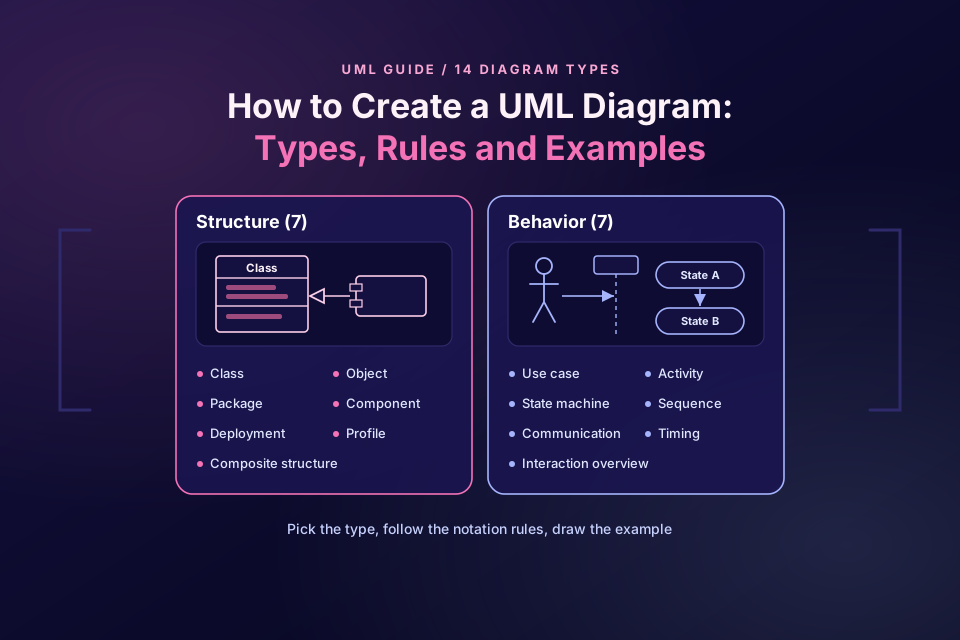
UML is not one diagram but a family of them, so the first step in how to create a UML diagram is picking the right type for the question you need to answer: is it about the structure of the system, or about its behaviour? Get that right and the notation rules follow.
This guide covers the UML diagram types at a glance, as listed in the UML 2.5.1 specification, the notation rules for the five types you are most likely to need, a six-step method, and a worked example: a small online shop class diagram you can paste into Mermaid. We rendered it on 10 October 2026 (IST), and every count we give for it was checked against the code.
How to create a UML diagram in six steps:
- Pick the question (structure or behaviour).
- Choose the diagram type.
- List the elements.
- Add relationships and multiplicity.
- Apply the notation rules.
- Render, review and keep it as text.
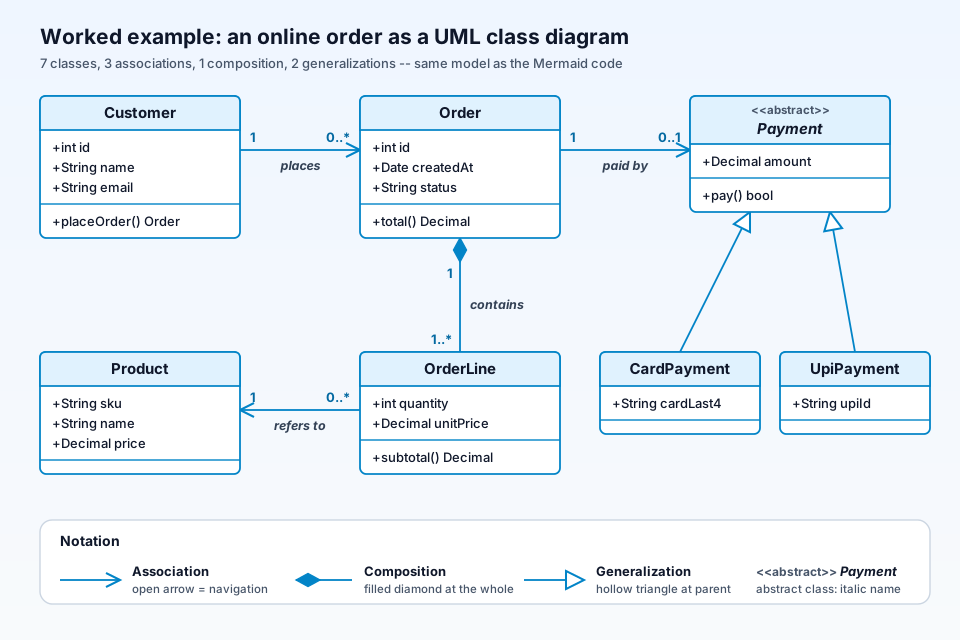
The diagram above is the finished worked example: seven classes, one of them abstract, joined by three associations, one composition and two generalizations. It is the same model as the Mermaid code later in this guide.
What UML is
UML, the Unified Modeling Language, is a visual language for specifying, designing and documenting software systems. It is standardized by the Object Management Group (OMG); the current version on the OMG site is UML 2.5.1, a formal specification published in December 2017.
UML is a notation, not a method and not a tool. It tells you what a hollow triangle or a filled diamond means, but not which diagrams to draw or in what order. That part is up to you, and it is what the step-by-step section below is for.
The 14 UML 2.5 diagram types: structural vs behavioral
Annex A of the UML 2.5.1 specification says there are "two major kinds of diagram types: structure diagrams and behavior diagrams", and its taxonomy figure (Figure A.5) places each type under one of them. Behavior diagrams include a group of interaction diagrams. The annex lists 14 diagram types in total. Note that the spec does not print the number 14 or a 7/7 split itself; those are our counts of its list and figure.
| Structure diagrams (7) | Behavior diagrams (7) |
|---|---|
| Class | Use case |
| Object | Activity |
| Package | State machine |
| Component | Sequence (interaction) |
| Composite structure | Communication (interaction) |
| Deployment | Interaction overview (interaction) |
| Profile | Timing (interaction) |
Structure diagrams
In the spec's words, structure diagrams "show the static structure of the objects in a system", the parts that do not depend on time. Class diagrams show classes and their relationships; object diagrams show instances at one moment; package diagrams group model elements; component and deployment diagrams show software parts and where they run; composite structure diagrams show the inside of a class; and profile diagrams define extensions to UML itself.
Behavior diagrams
Behavior diagrams "show the dynamic behavior of the objects in a system". Use case, activity and state machine diagrams sit directly under behavior. The four interaction diagrams (sequence, communication, interaction overview and timing) form a subgroup that focuses on messages between participants. The spec adds that this taxonomy "does not preclude mixing different kinds of diagram types", so the boundaries are a guide rather than a rule.
Which UML diagram should you use?
Start from the question, not from the diagram. Some common pairings:
| Question you need to answer | Diagram type |
|---|---|
| What classes exist and how are they related? | Class diagram |
| Who uses the system, and for what? | Use case diagram |
| What happens, in order, between objects for one scenario? | Sequence diagram |
| What is the workflow, including decisions and parallel steps? | Activity diagram |
| What states can one object be in, and what moves it between them? | State machine diagram |
| Where does the software run? | Deployment diagram |
If the question is about services, data stores and traffic at a high level rather than about classes or objects, a UML diagram is often more detail than you need; see how to draw a system design diagram for an interview for that kind of picture.
UML notation rules for the most-used diagrams
Class diagram
- Class box: typically three compartments for the name, the attributes and the operations. The spec shows an abstract class name in italics; tools such as Mermaid also use the
<<abstract>>annotation. - Visibility:
+public,-private,#protected,~package. - Multiplicity at each end of an association:
1,0..1,0..*or1..*. - Association: a solid line; an open arrowhead shows the direction you can navigate.
- Aggregation: a hollow diamond at the whole. Composition: a filled diamond at the whole.
- Generalization (inheritance): a line with a hollow triangle pointing at the parent. Realization: the same triangle on a dashed line. Dependency: a dashed line with an open arrow.
Sequence diagram
Participants sit along the top with dashed lifelines running down; thin activation bars show when each is busy. A solid line with a filled arrowhead is a synchronous message, an open arrowhead marks an asynchronous one, and a dashed line is a reply. Boxes called combined fragments, labelled alt, opt or loop, wrap conditional or repeated parts. For tools, see sequence diagram tools compared, and for a worked example, our OAuth PKCE sequence diagram of the authorization code flow.
Use case diagram
Actors (stick figures) stand outside a rectangle that marks the system boundary, and use cases are ovals inside it, joined to actors by lines. Shared steps use a dashed arrow labelled <<include>>; optional behaviour uses <<extend>>, and per the spec the extend arrow points from the extending use case towards the base use case.
Activity diagram
A filled circle is the start, rounded rectangles are actions, and a diamond is a decision or merge, with guards in square brackets such as [paid]. A bar (the spec calls it a line segment) forks into parallel flows or joins them back, and a bullseye marks the end.
State machine diagram
States are rounded rectangles; transitions are arrows labelled event [guard] / effect. A filled circle points to the initial state, and a bullseye is the final state. The difference from an activity diagram: a state machine follows the life of one object (an order goes from Placed to Paid to Shipped), while an activity diagram follows a flow of work that may involve many objects.
How to create a UML diagram step by step
Step 1: Pick the question (structure or behaviour)
Write the question down in one sentence. "How is an order modelled?" is structure; "what happens when a customer pays?" is behaviour. Keep it to one question per diagram.
Step 2: Choose the diagram type
Use the table above. For "how is an order modelled?", that is a class diagram, which is what our worked example uses.
Step 3: List the elements
For a class diagram, list the nouns that the system needs to know about, and the facts (attributes) and actions (operations) for each. Leave out classes that do not help answer your question.
Step 4: Add relationships and multiplicity
For each pair of related classes, decide the relationship kind (association, composition, aggregation or generalization) and write the multiplicity at both ends. Reading it aloud helps: "one customer places zero or more orders".
Step 5: Apply the notation rules
Check every symbol against the rules above: the diamond at the whole, the triangle at the parent, an arrow only where navigation matters, and abstract classes marked.
Step 6: Render, review and keep it as text
Write the diagram as code (Mermaid or PlantUML, for example), render it, and review it with someone who knows the domain. Text keeps the diagram reviewable in a pull request and easy to update.
Worked example: a UML class diagram for a small online shop
Here is the shop as a Mermaid class diagram, exactly as we rendered it:
classDiagram
    class Customer {
        +int id
        +String name
        +String email
        +placeOrder() Order
    }
    class Order {
        +int id
        +Date createdAt
        +String status
        +total() Decimal
    }
    class OrderLine {
        +int quantity
        +Decimal unitPrice
        +subtotal() Decimal
    }
    class Product {
        +String sku
        +String name
        +Decimal price
    }
    class Payment {
        <<abstract>>
        +Decimal amount
        +pay() bool
    }
    class CardPayment {
        +String cardLast4
    }
    class UpiPayment {
        +String upiId
    }
    Customer "1" --> "0..*" Order : places
    Order "1" *-- "1..*" OrderLine : contains
    OrderLine "0..*" --> "1" Product : refers to
    Order "1" --> "0..1" Payment : paid by
    Payment <|-- CardPayment
    Payment <|-- UpiPayment
What it contains, counted from the code:
- 7 classes: Customer, Order, OrderLine, Product, Payment, CardPayment and UpiPayment. One, Payment, is abstract.
- 18 members: 14 attributes and 4 operations (
placeOrder(),total(),subtotal()andpay()). - 6 relationships: 3 directed associations (a customer places 0..* orders; an order line refers to exactly 1 product; an order is paid by 0..1 payment), 1 composition (an order contains 1..* order lines, with the filled diamond at Order), and 2 generalizations (CardPayment and UpiPayment inherit from Payment). The 4 non-inheritance lines carry labels; the 2 inheritance lines do not.
Two modelling choices are worth saying out loud. OrderLine is a composition part because an order line makes no sense without its order; Product is only associated, because products exist whether or not anyone orders them. Payment is abstract because you never create a plain "payment", only a card or UPI one.
What we ran: on 10 October 2026 (IST) we URL-safe base64-encoded the code and requested https://mermaid.ink/svg/<encoded code> and https://mermaid.ink/img/<encoded code>?type=png. Both returned HTTP 200 (image/svg+xml and image/png); without ?type=png, /img/ returned a JPEG. The render showed all 7 classes with their members, the «abstract» label on Payment, the filled diamond at Order, both hollow triangles at Payment and all multiplicities and labels. No account was needed. Mermaid's layout differs from the illustration above, but the model is the same.
Common UML mistakes
- Mixing up class and ER diagrams. A class diagram models objects and behaviour, while an ER diagram models tables, keys and foreign keys; if you are designing a database, see how to create an ER diagram for your database.
- Putting the diamond at the wrong end. The diamond sits at the whole (Order), not at the part (OrderLine).
- Leaving out multiplicity. "Order to OrderLine" says little; "1 to 1..*" says an order needs at least one line.
- Too much detail. Showing every getter, setter and private field hides the design. Include the members that explain it.
- Mixing diagram types on one canvas. The spec allows some mixing, but a class diagram with sequence arrows drawn on it usually confuses readers. Draw two diagrams.
UML diagrams and ByteDiagram
Disclosure: ByteDiagram is our product, made by us. Its site lists eight diagram types, and sequence diagrams and state machines are among them; it does not list UML or class diagrams. We have not tested it for UML (not tested by us for UML), so use a UML-specific tool or Mermaid for the example above.
FAQ
How many types of UML diagrams are there?
Annex A of the UML 2.5.1 specification lists 14 diagram types. Its taxonomy figure splits them into structure diagrams (class, object, package, component, composite structure, deployment and profile) and behavior diagrams (use case, activity and state machine, plus the interaction diagrams: sequence, communication, interaction overview and timing). The spec does not print a total; 14 is the count of that list, and the spec notes that the boundaries between kinds are not strictly enforced.
What is the difference between aggregation and composition in UML?
Both are whole-part associations. Aggregation (shared) is drawn with a hollow diamond at the whole, and the UML 2.5.1 spec says its precise semantics vary by application area and modeler. Composition is drawn with a filled diamond at the whole: a part belongs to at most one composite at a time, and if the composite is deleted its parts are deleted with it. In our example, Order composes its OrderLines.
Is UML still used in software development?
Yes, though usually selectively rather than as a complete model of a system. Class, sequence and state machine diagrams are commonly used in design documents, code reviews and teaching, and many teams now write them as text with tools such as Mermaid or PlantUML so the diagrams can live next to the code. We do not have reliable adoption figures, so we make no claim about how widespread it is.
Sources
All pages were checked on 10 October 2026 (IST).
- OMG: Unified Modeling Language 2.5.1 (specification page): version 2.5.1, formal, published December 2017; the specification PDF, Annex A (diagram taxonomy, Figure A.5) and the notation rules quoted here.
- Mermaid: Class diagram syntax: relationship syntax (
<|--,*--,o--,-->), cardinality labels and annotations such as<<abstract>>. - mermaid.ink: the hosted render service we used for the worked example.
- Our homepage (bytediagram.com): the list of eight diagram types.
Draw the flow behind your classes
Your class diagram shows the structure. To sketch a flow or a state machine around it, start a diagram in our editor.
Open Diagram Editor