

draw.io, also known as diagrams.net, is a free diagram editor that needs no sign-up, and its homepage says its source code is Apache 2.0 licensed. Many developers still look for a draw.io alternative. Some want a different open-source licence, some need an offline app, some want diagrams written as text or code, and some want AI help or a whiteboard for team sessions.
Disclosure: one of the 10 tools in this guide, ByteDiagram, is our product, made by us. For the other nine, each fact comes from the vendor's own pages or repository as they read in October 2026, and the tools were not tested by us hands-on. For a longer comparison of ByteDiagram, draw.io and Lucidchart, read our earlier ByteDiagram, draw.io and Lucidchart comparison.
Quick picks: the best draw.io alternative for each job
Every line pairs a tool with the job it fits. Each of the 10 tools is covered further down.
- Excalidraw: hand-drawn sketches in an open-source, MIT-licensed editor.
- tldraw: a free infinite-canvas whiteboard, plus an SDK for building canvas apps.
- yEd: a free desktop editor that can arrange large diagrams automatically.
- Mermaid: diagrams written as text, with a browser-based live editor.
- D2: a text language for diagrams with a local CLI that works offline.
- Eraser: diagram-as-code with AI generation and AI edits.
- Miro: a team whiteboard that can import diagrams from draw.io.
- Lucidchart: a diagram workspace that can import draw.io files.
- Whimsical: a team whiteboard with a desktop app.
- ByteDiagram (our product): diagrams that show a flow moving step by step.
How we chose these draw.io alternatives
We started from the questions developers tend to ask before they leave draw.io. We used 6 criteria:
- Licence and self-hosting: is the source open, and can you run it yourself?
- Offline or desktop use: does it work without a connection, or as a desktop app?
- File format: can you keep diagrams in git, or move them to another tool later?
- Text or code input: can you write the diagram instead of drawing it?
- AI help: can it draft or edit a diagram from a prompt?
- Collaboration and export: can a team work together, and which export formats are listed?
There are no numeric scores or rankings here. Each fact was checked against vendor pages in October 2026.
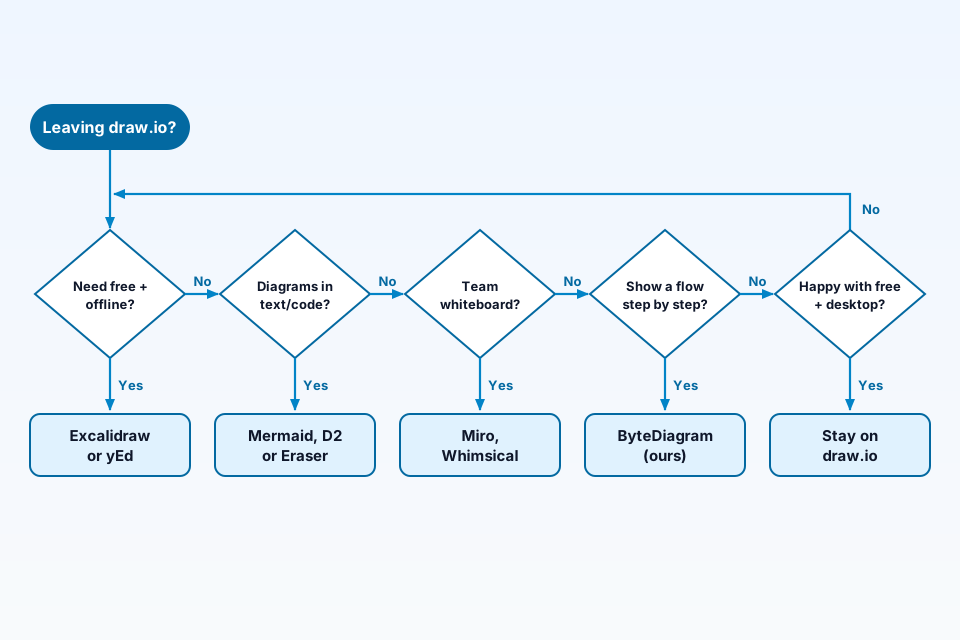
The decision flow below shows the main paths in short form. It groups Excalidraw and yEd under free tools that work offline. Excalidraw is open source; yEd is free to use but not open source, as the yEd section explains.
Open-source and free draw.io alternatives
If you want a free or open-source draw.io alternative, these 3 tools are common starting points. Their licences are different, so read each one before you depend on it.
Excalidraw: open-source, hand-drawn whiteboard
Excalidraw describes itself on GitHub as "An open source virtual hand-drawn style whiteboard", and its repository uses the MIT License. Its README lists export to PNG, SVG and the clipboard, and an open format that saves drawings as an .excalidraw JSON file, which you can keep in a repository. According to the same README, the excalidraw.com app adds PWA support that works offline, real-time collaboration, end-to-end encryption and read-only share links. The Excalidraw+ pricing page lists generative AI with 10 requests a day on its free tier, and PDF and PPTX frame export on its paid tier. For architecture work, see our ByteDiagram vs Excalidraw comparison for architecture diagrams.
tldraw: infinite canvas and SDK
tldraw.com presents itself as a free and instant collaborative whiteboard. The project behind it is the tldraw SDK, which its README describes as an infinite canvas engine for building canvas apps in React. The licence needs a careful read. The README says you can use the SDK freely in development, but production use requires a licence key, while each starter kit is MIT-licensed. So the SDK is source-available with a licence key for production use, per its README, rather than open source in the usual sense. It suits teams that want to build a canvas into their own product.
yEd: free desktop editor with automatic layout
yWorks calls yEd "a powerful desktop application", available for Windows, macOS and Linux. Its FAQ says the use of yEd is free of charge, including in a commercial environment. yEd is not open source: yWorks grants the right to use it under its own yEd Software License Agreement. The product page lists automatic layout algorithms that can arrange large data sets, import from an Excel spreadsheet (.xls) or XML, and export to PNG, JPG, SVG, PDF and SWF. That makes it a fit when you have a large graph and do not want to place every box by hand.
Code and text-first alternatives
Mermaid and D2: diagrams from text
Mermaid calls itself an open-source library for diagrams and charts, and its documentation defines each diagram type as a text syntax that you can try in the browser-based Mermaid Live Editor. D2 describes itself as "A modern language that turns text to diagrams", lists a local CLI with a completely offline workflow, and says it is an independent open-source project. Both keep diagrams as plain text, so changes show up in normal code review. We compare text formats, rendering and licences in our guide to code-first diagram tools for developers.
Eraser: diagram-as-code plus AI
According to Eraser's pricing FAQ, an AI diagram starts from a prompt and "can be edited either manually using diagram-as-code or through AI edits". That page also says teams on the free plan get a capped number of files and AI credits, and lists unlimited free guests on every plan. Every plan in that table can export PDF, PNG, SVG and MD files, and the integrations it names include GitHub, Notion, Confluence and VS Code. Its homepage also lists Draw.io among the file types you can upload as input for AI diagrams. For more AI tools, see our AI diagram generator roundup.
Whiteboard and team alternatives
Miro
Miro's diagramming page says you can bring existing diagrams into Miro by importing them from draw.io and other tools. The FAQ on that page describes the import as bringing in one specific exported file type and does not say that Miro opens native draw.io files, so check that FAQ before you move a large set of diagrams. Miro's pricing page lists 3 editable boards on its free plan, and its plan table showed free AI credits as a "Limited trial" (checked 19 October 2026). It suits teams that already plan and review work on a shared whiteboard. For technical diagrams, see our ByteDiagram vs Miro comparison for technical diagrams.
Lucidchart
Lucid's help center says Lucidchart can import draw.io files saved as .drawio or .xml, as long as they were exported from draw.io. Lucid's pricing page gives the free version 3 editable documents, up to 75 shapes in each one and 100 templates, and it also lists Lucid AI for that version. Lucid's help center lists draw.io import on its Free, Individual, Team and Enterprise plans, but says only users with a paid subscription can edit imported documents. For cloud diagrams in particular, see our cloud diagram comparison of ByteDiagram and Lucidchart.
Whimsical
Whimsical's pricing FAQ says its free plan includes unlimited boards, unlimited workspace members, unlimited guests and 10 AI credits per member. The same page lists up to 50 board objects per month and a watermark on exports for the free tier, and its pricing page lists watermark removal on exports as a paid feature. Its feature table also lists a desktop app.
For animated flow diagrams: ByteDiagram (our product)
Disclosure: we build ByteDiagram, so this section describes our own tool. The homepage presents it as a way to make animated flowcharts and architecture diagrams, and says its AI can turn text descriptions or existing code into a diagram. Eight diagram types are named there (architecture, flowcharts, sequence, network, pipelines, state machines, mind maps and timelines), along with built-in icons for widely used tech stacks. You can open a guest canvas with no account. As of our check on 19 Oct 2026, its Export menu includes PNG, SVG and Animated GIF.
It fits when the diagram has to show a flow moving step by step, such as a request passing through services or a job moving through a pipeline. Try the guest canvas without an account to sketch your own flow.
draw.io alternatives compared
Every cell is drawn from that vendor's own pages; if those pages were silent on a point, you will see "Not stated on pages checked".
| Tool | Best for | Open source? | Works offline / desktop | Text or code input | AI | Source |
|---|---|---|---|---|---|---|
| draw.io (baseline) | General diagramming, free | Apache 2.0 source; icon sets and stencil libraries have separate terms | Desktop app | Mermaid import (draw.io blog) | Homepage links to AI assistant (MCP) docs | drawio.com, GitHub |
| Excalidraw | Hand-drawn sketches | Yes, MIT | PWA works offline | Text to diagram and Mermaid to Excalidraw on the free tier (Excalidraw+ pricing page) | Generative AI, 10 requests a day, on the free tier on the Excalidraw+ pricing page | GitHub, plus.excalidraw.com |
| tldraw | Infinite canvas and SDK | No; SDK needs a licence key for production; starter kits MIT | Not stated on pages checked | Not stated on pages checked | SDK lists AI integrations for building with LLMs | GitHub, tldraw.com |
| yEd | Automatic layout of large graphs | No; free under its own licence | Desktop (Windows, macOS, Linux) | Imports Excel or XML data | Not stated on pages checked | yworks.com |
| Mermaid | Diagrams as text | Open-source library | Not stated on pages checked | Yes, text syntax | Not stated on pages checked | mermaid.js.org |
| D2 | Text diagrams with a CLI | Open-source project | Local CLI, offline workflow | Yes, D2 language | Not stated on pages checked | d2lang.com |
| Eraser | Diagram-as-code with AI | Not stated for the editor | Not stated on pages checked | Yes, diagram-as-code | AI diagrams; limited AI credits on its free plan | eraser.io |
| Miro | Team whiteboard | Not stated on pages checked | Not stated on pages checked | Mermaid and PlantUML apps | Free AI credits listed as a "Limited trial" (checked 19 October 2026) | miro.com |
| Lucidchart | Diagram workspace with draw.io import (editing imports needs a paid plan) | Not stated on pages checked | Not stated on pages checked | Mermaid code (help center) | Lucid AI listed in its free version (pricing page) | help.lucid.co, lucid.app |
| Whimsical | Whiteboard and docs for teams | Not stated on pages checked | Desktop app | Not stated on pages checked | 10 AI credits per member on its free plan | whimsical.com |
| ByteDiagram (our product) | Animated flow diagrams | No | Browser | AI from text or existing code | Yes, per homepage | bytediagram.com |
When to stay on draw.io
draw.io may already cover what you need. Staying is a reasonable choice when:
- You want it free with no sign-up. The homepage says "Free forever • No sign-up required • No lock-in".
- You want open source code. The homepage says the source code is Apache 2.0 licensed, with "no Enterprise tier for SSO".
- You work offline. draw.io offers a desktop app, and the homepage says you can save locally with it.
- You need common export formats. The homepage lists export to SVG, PNG and PDF, or keeping diagrams editable.
- You draw C4 architecture diagrams. A post on the draw.io blog covers its C4 shape library. For tools built around C4 and system design, see our roundup of software architecture diagram tools.
- You rely on integrations. The homepage lists Google Drive, Confluence and Jira, GitHub, VS Code and Notion, among others.
If you plan to self-host, read the GitHub README first. It says the repository "is a test version of draw.io, for evaluating draw.io", that a paid production version is available for production deployments, and that the icon sets, stencil libraries and diagram templates come with separate terms. It also says that this version does not support real-time collaborative editing, while the homepage lists real-time collaboration.
FAQ
Is there a free, open-source alternative to draw.io?
Yes. Excalidraw is open source under the MIT License, per its GitHub repository. draw.io's own source code is Apache 2.0 licensed, per its homepage. yEd is free to use, including commercially, but it is not open source. The tldraw SDK needs a licence key for production use, per its README.
Which tools can import draw.io files?
Miro's diagramming page says it can import diagrams from draw.io. Lucid's help center says Lucidchart can import .drawio or .xml files, as long as they were exported from draw.io, and that only paid users can edit imported documents. If a tool you want cannot import them, export SVG, PNG or PDF from draw.io and use that file instead.
When should a developer stay on draw.io?
Stay when the free, no sign-up editor, the desktop app, the Apache 2.0 source and the C4 shape library already cover your work. Consider switching when you want diagrams kept as text or code, AI drafting, a team whiteboard or animated flows.
Sources
We read each of these pages in October 2026.
- draw.io homepage: free, no sign-up, Apache 2.0 source, desktop app, export formats, integrations.
- draw.io GitHub repository: licence terms, test version and production version wording, collaboration note.
- draw.io blog: C4 modelling: C4 shape library.
- Excalidraw GitHub repository: MIT licence, export formats, .excalidraw format, offline PWA.
- Excalidraw+ pricing: free tier AI requests and paid PDF and PPTX export.
- tldraw GitHub repository: SDK licence and MIT starter kits.
- tldraw.com: free collaborative whiteboard.
- yEd product page: desktop platforms, free use, automatic layout, import and export.
- Mermaid homepage: open-source library and Live Editor.
- D2 homepage: text-to-diagram language, offline CLI, open-source project.
- Eraser pricing: free plan limits, AI diagrams, exports, integrations.
- Eraser homepage: file types listed for AI input.
- Miro diagramming page: import from draw.io, Mermaid and PlantUML apps.
- Miro pricing: free plan boards and AI credits.
- Lucid help: Import files into Lucidchart: draw.io file import.
- Lucid help: Mermaid in Lucidchart: Mermaid code support.
- Lucidchart pricing: what the free version includes, with Lucid AI.
- Whimsical pricing: free plan details, watermark, desktop app.
- ByteDiagram homepage: product description and diagram types (our product).
Need a diagram that shows the flow?
ByteDiagram is ours. Open it and sketch a flow step by step.
Visit ByteDiagram