
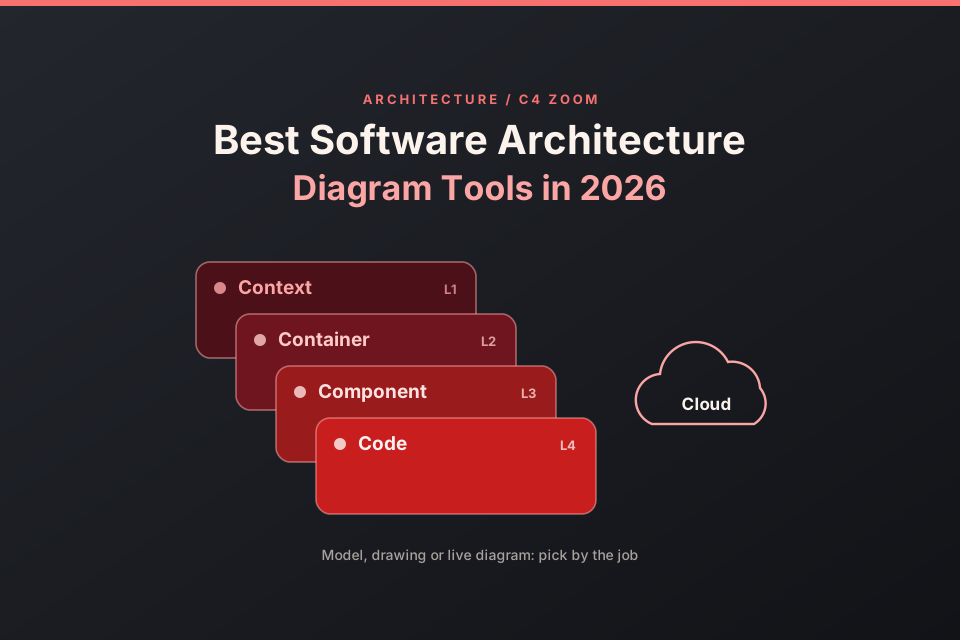
One architecture usually has several audiences. Stakeholders want a C4 context view, engineers want a container view, ops teams want a deployment or cloud view, and reviewers want to follow one request path. A software architecture diagram tool tends to focus on one or two of these jobs, so this guide groups the options by the job each one is built for.
Disclosure: ByteDiagram, one of the tools on this list, is our product, made by us. We checked every tool's own pages and docs in October 2026; the tools were not tested by us hands-on, so treat this as a sourced guide rather than a benchmark. If you want diagrams that live in your repo as code, see our guide to diagram tools for developers who work in code.
Quick picks: the best software architecture diagram tool for each job
Each line names one tool and the job it suits. All 11 tools are covered in more detail below.
- Structurizr: C4 models as code, from the author of the C4 model.
- IcePanel: interactive C4 models that a team can zoom through.
- draw.io: a C4 shape library in a free editor.
- Mermaid: experimental C4 views written as text.
- C4-PlantUML: C4 elements for teams that already use PlantUML.
- Visual Paradigm: six C4 diagram types and an AI C4 generator.
- Cloudcraft: live AWS, Azure and GCP diagrams for Datadog users.
- Lucidchart: cloud shape libraries and AWS or Azure data import.
- Eraser: architecture diagrams from AI prompts or diagram-as-code.
- Archi: open-source ArchiMate models for enterprise architecture.
- ByteDiagram (our product): animated request paths, shown step by step.
What a software architecture diagram needs to show
The C4 model, created by Simon Brown, gives teams a shared vocabulary. Its official site lists 4 hierarchical diagrams: system context, containers, components and code. It adds 3 supporting diagrams: system landscape, dynamic and deployment. The 4 levels are:
- Context (L1): the system, the people who use it and the other systems it talks to.
- Container (L2): the apps, services and data stores inside the system.
- Component (L3): the parts inside one container.
- Code (L4): classes or functions, usually drawn only where they help.
The C4 site also separates diagramming from modelling. In a diagramming tool, the domain language is "boxes and lines", so a renamed box has to be renamed in every diagram where it appears. In a modelling tool, you build one model and create different views of it. Two more views matter in practice: a request path, which C4 calls a dynamic diagram, and a deployment view that maps containers onto infrastructure.
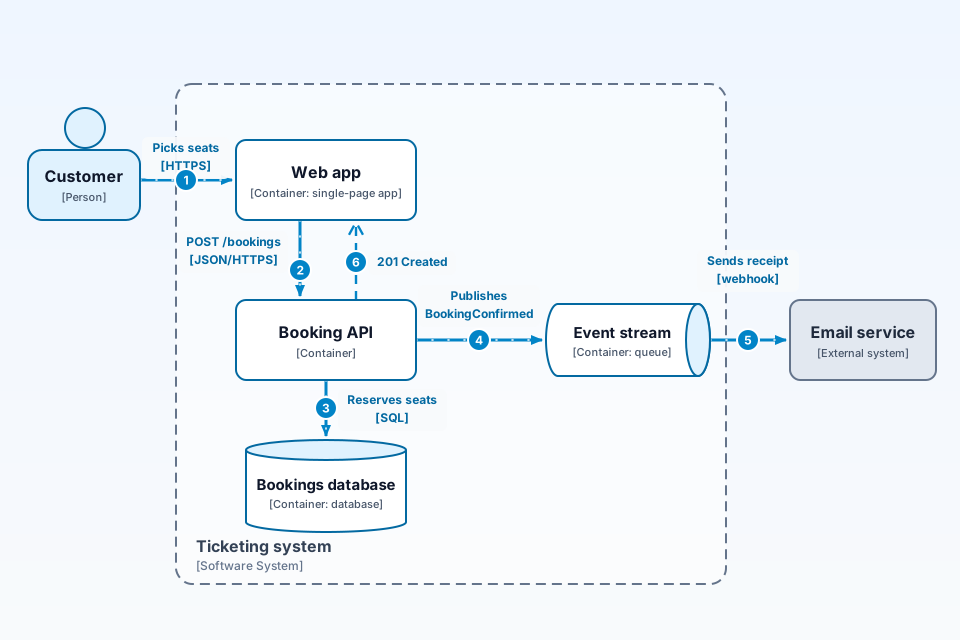
The example below is a C4 dynamic-style request path with 6 elements. Inside 1 dashed "Ticketing system" boundary sit 4 containers: a Web app, a Booking API, a Bookings database and an Event stream. A Customer and an external Email service sit outside it. The path has 6 numbered steps, from picking seats at step 1 to the "201 Created" return to the Web app at step 6. Steps 1 to 5 are solid arrows overlaid with small dots; when animation is allowed, the dots move together and only the step badges pulse in step order. Step 6 is the only dashed step. The boundary box is dashed too, as C4 boundaries often are.
How we chose
We used 6 criteria, and we did not give numeric scores:
- C4 support: does the tool support C4, and which levels does it cover?
- Model reuse: can one element appear in several views without copy and paste?
- Cloud and infrastructure views: does it have provider icons or live data?
- Request-flow storytelling: can a diagram walk a reader through numbered steps?
- Export and sharing: which formats and sharing options are listed?
- Free option: what can you use for free, as each vendor describes it?
Best C4 diagram tools
Structurizr: the C4 reference tool
Structurizr calls itself "The original tool for the C4 model" and says it "was created by the author of the C4 model and remains the reference implementation". You write Structurizr DSL to create multiple diagrams from a single model, which is the modelling approach the C4 site describes. Its site lists system landscape, system context, container, component, dynamic and deployment diagrams. It describes itself as open source and offers a browser playground, a local viewer and a self-hosted server; the server comes as an open-core build you compile yourself or as pre-built binaries with enterprise features that need a licence. An export CLI turns views into PlantUML, Mermaid or a static HTML site, and a free, open-source MCP server can validate DSL and export diagrams.
IcePanel: interactive C4 models for teams
IcePanel's pricing page invites you to "Start modelling free" and describes its free tier as "Perfect for small teams and solo developers". That tier lists 1 editor, unlimited viewers, up to 100 model objects, unlimited diagrams and 1 flow per diagram. Its feature list says you can zoom in and out of the C4 model diagram levels, show message flows, and add AWS, Azure, GCP and Kubernetes technology icons. It lists exports in PNG, PDF, JSON, CSV, HTML and LLMs.txt formats, but the page text does not make clear which tier includes each export.
draw.io: C4 shape library in a free editor
draw.io's blog describes a C4 shape library in the Software section of its shape picker, with labels added to shapes through metadata that also shows as a tooltip. You can open a new C4 diagram directly with app.diagrams.net/?libs=c4. For larger models, the blog suggests multi-page diagrams with links between pages. The editor is free with no sign-up, per its homepage. It is a drawing tool rather than a modelling tool, so the C4 site's note about renaming boxes in every diagram applies. If you are weighing other editors, see our list of draw.io alternatives for developers.
Mermaid and C4-PlantUML: C4 views from text
Mermaid's docs call its C4 diagram "an experimental diagram for now" and warn that the syntax and properties can change in future releases. They list 5 supported C4 types: system context, container, component, dynamic and deployment. The same page says Mermaid's C4 syntax is compatible with PlantUML.
C4-PlantUML says it "combines the benefits of PlantUML and the C4 model". Its repository has files for context, container, component, dynamic, deployment and C4-styled sequence diagrams, and it uses the MIT licence. Its README says PlantUML includes the last released C4 files as a standard library, so no additional files or internet access are needed for that version.
Visual Paradigm: C4 plus AI generation
Visual Paradigm's C4 page says it "Supports all six C4 diagram types: System Context, Containers, Components, Landscape, Dynamic, and Deployment". The same page describes an AI C4 diagram generator that maps a written description to these views. Its Community Edition download page says the edition is "FREE for non-commercial use only", so check the licence before you use it at work.
Best tools for cloud and system design diagrams
Cloudcraft: live AWS, Azure and GCP diagrams
Cloudcraft's homepage offers "Live AWS, Azure, GCP infrastructure diagrams" and also lists Oracle Cloud and VMware vSphere. It says "The diagram updates as your infrastructure changes", and it shows alerts, logs, security findings and a cloud cost overlay on the diagram. Its pricing page says "Cloudcraft is free in Datadog", with unlimited users and unlimited diagrams, so you need a Datadog subscription to use it. The pages we checked do not mention C4.
Lucidchart: cloud libraries and infrastructure import
Lucid's developer docs list AWS 2024, Azure 2021, Azure 2024 and GCP 2021 shape libraries. Its help center says the Data Hub can import AWS and Azure infrastructure data and generate diagrams from it, for accounts with the Cloud Accelerator, which Lucid sells to Enterprise accounts through its sales team. For C4, a Lucid help article says Lucidchart supports Mermaid diagram-as-code, including C4. Its pricing page lists 3 editable documents, 75 shapes per document and 100 templates in its free version. For more depth on cloud work, see our ByteDiagram vs Lucidchart comparison for cloud diagrams.
Eraser: architecture diagrams from AI or code
Eraser's docs describe architecture diagrams that show cloud infrastructure as nodes, groups and connections, written in a simple syntax, with AWS, Google Cloud and Azure examples. Its pricing FAQ says AI diagrams are created from a prompt and can be edited manually with diagram-as-code or through AI edits, and that free plan teams get a limited number of files and AI credits. Its homepage advertises codebase diagrams that update themselves, and its docs list data-source guides for AWS, Azure and Google Cloud. For a prompt-first workflow, see how to turn text into an architecture diagram with AI.
Archi: open-source ArchiMate for enterprise architecture
Archi describes itself as "The Open Source modelling toolkit for creating ArchiMate models and sketches", aimed at enterprise architects and modellers, and says it runs on Windows, Mac or Linux. It models in ArchiMate, which is a different notation from C4. It fits teams that already use ArchiMate rather than teams that want C4 views.
For animated request-path diagrams: ByteDiagram (our product)
Disclosure: ByteDiagram is ours, built by our team. Its homepage describes it as a tool to create animated flowcharts and architecture diagrams, with AI generation from text, and says AI can create diagrams from text descriptions or existing code. It lists eight diagram types, including architecture, sequence and network, and includes built-in icons for common tech stacks. Its guest canvas opens without an account, and its Export menu includes PNG, SVG and Animated GIF (checked 19 Oct 2026).
It fits when you need to show a request path step by step, much like a C4 dynamic-style flow, in a design review, a doc or an onboarding session. This guide makes no claim that it supports C4 notation, model reuse or cloud import, so pair it with a modelling tool if you need those. If you are preparing for an interview, see how to draw a system design diagram for an interview. Sketch your own request path in the guest canvas, no account needed.
Software architecture diagram tools compared
Each cell comes from the vendor's own pages. Where a page did not say, the cell reads "Not stated on pages checked".
| Tool | Best for | C4 support | Cloud / infra views | Free option (per vendor) | Source |
|---|---|---|---|---|---|
| Structurizr | C4 models as code | Reference implementation; 6 diagram types listed | Deployment diagrams | Open source; pre-built server binaries need a licence | structurizr.com |
| IcePanel | Interactive C4 models for teams | Zoom between C4 levels | AWS, Azure, GCP and Kubernetes icons | Free tier: 1 editor, up to 100 model objects | icepanel.io |
| draw.io | C4 drawings in a free editor | C4 shape library | AWS and Azure shape libraries (draw.io docs) | Free, no sign-up | drawio.com |
| Mermaid | C4 views from text | Experimental; 5 C4 diagram types | Architecture diagrams for cloud or CI/CD services | Open-source library | mermaid.js.org |
| C4-PlantUML | C4 for PlantUML users | Context to deployment, plus C4-styled sequence | Deployment diagrams | MIT licence | GitHub |
| Visual Paradigm | C4 with AI generation | Six C4 diagram types | Deployment diagrams | Community Edition, non-commercial use only | visual-paradigm.com |
| Cloudcraft | Live cloud diagrams | Not stated on pages checked | Live AWS, Azure, GCP, Oracle Cloud and VMware vSphere | Free with a Datadog subscription | cloudcraft.co |
| Lucidchart | Cloud shape libraries and data import | Via Mermaid code (help center) | AWS, Azure and GCP libraries; AWS and Azure import with the Cloud Accelerator | Free version: 3 documents, 75 shapes each, 100 templates; Lucid AI listed in its free version (pricing page) | developer.lucid.co, help.lucid.co, lucid.app |
| Eraser | Architecture diagrams from AI or code | Drill-downs across C4 context, containers and components (homepage) | AWS, Google Cloud and Azure examples | Free plan: limited files and AI credits | docs.eraser.io, eraser.io |
| Archi | ArchiMate enterprise models | Not stated on pages checked; models in ArchiMate | Not stated on pages checked | Open source | archimatetool.com |
| ByteDiagram (our product) | Animated request paths | Not stated on pages checked | Architecture and network types, built-in stack icons | Guest canvas opens without an account; its Export menu includes PNG, SVG and Animated GIF (checked 19 Oct 2026) | bytediagram.com |
How to pick: model, drawing or live diagram
- Pick a model when the same elements appear in many views and the architecture changes often. A model-based tool lets you rename an element once. Structurizr and IcePanel work this way.
- Pick a drawing or a text tool when you need one or two diagrams soon and do not want to maintain a model. draw.io's C4 library, Mermaid and C4-PlantUML fit here.
- Pick a live diagram when the picture must follow real infrastructure. Cloudcraft and Lucidchart's Data Hub import read data from cloud accounts.
- Pick an animated flow when people need to follow one request from start to finish, for example in a design review or onboarding.
FAQ
What is the best tool for C4 diagrams?
It depends on whether you want a model, a drawing or text. Structurizr describes itself as the reference implementation of the C4 model, created by the model's author. IcePanel offers interactive C4 models, draw.io has a C4 shape library, Mermaid has an experimental C4 syntax, and C4-PlantUML adds C4 elements to PlantUML.
Can a tool draw my cloud architecture from a live AWS, Azure or GCP account?
Cloudcraft says its diagrams update as your infrastructure changes, and its pricing page says it is free with a Datadog subscription. Lucid's help center documents importing AWS and Azure data into Lucidchart through its Data Hub, which needs the Cloud Accelerator.
Is a system design diagram the same as a software architecture diagram?
Not quite. A system design diagram usually shows one request path and its trade-offs. A software architecture diagram describes the structure of a system at several levels, such as C4 context and container views. Many teams keep both.
Sources
All pages were checked in October 2026.
- C4 model homepage: abstractions and diagram types.
- C4 model: Tooling: diagramming compared with modelling.
- Structurizr homepage: reference implementation, diagram types, tooling, server licence note, export and MCP server.
- Structurizr documentation: DSL and tooling docs.
- IcePanel pricing: free tier, C4 zoom, flows, icons and export formats.
- draw.io blog: C4 modelling: C4 shape library, metadata, multi-page diagrams.
- draw.io homepage: free, no sign-up.
- draw.io docs: AWS diagrams: AWS shape libraries.
- draw.io docs: Azure diagrams: Azure shape library.
- Mermaid docs: C4 diagrams: experimental status and supported C4 types.
- Mermaid docs: Architecture diagrams: cloud and CI/CD architecture diagrams.
- C4-PlantUML repository: C4 diagram files, standard library note, MIT licence.
- Visual Paradigm C4 diagram tool: six C4 diagram types and AI generator.
- Visual Paradigm Community Edition: non-commercial licence.
- Cloudcraft homepage: live cloud diagrams and overlays.
- Cloudcraft pricing: free with a Datadog subscription.
- Lucid developer docs: AWS 2024 Library: AWS, Azure and GCP library list.
- Lucid help: Import AWS data in the Data Hub: AWS import and Cloud Accelerator.
- Lucid help: Import Azure data in the Data Hub: Azure import and Cloud Accelerator.
- Lucid help: Mermaid in Lucidchart: C4 through Mermaid code.
- Lucidchart pricing: free version documents, shapes, templates and Lucid AI.
- Eraser docs: Architecture Diagrams: cloud architecture syntax and examples.
- Eraser pricing: free plan limits and AI diagrams.
- Eraser homepage: codebase diagrams and C4 drill-downs.
- Archi homepage: open-source ArchiMate modelling.
- ByteDiagram homepage: product description and diagram types (our product).
Show the request path, step by step
ByteDiagram is ours. Open it and sketch one request from start to finish.
Visit ByteDiagram