
A Mermaid architecture diagram often begins in a README, and at first it renders without trouble. Then the system grows past a dozen services, and the auto-layout decides where every box goes, whether or not that matches how your team pictures the system. Mermaid is a fair default here: its docs describe a JavaScript tool that renders Markdown-inspired text definitions into diagrams, and its GitHub repository lists the MIT licence. This guide looks at Mermaid alternatives for the point where an architecture diagram needs more than plain text can give it.
Disclosure: ByteDiagram, one of the tools below, is our product, made by us. We read each vendor's own documentation on 20 October 2026 for this guide, so every competitor fact here was not tested by us in practice. If you are still choosing a text format, start with our comparison of diagram languages that live in your repo.
Quick picks: Mermaid alternatives by architecture need
Each line pairs an architecture need with the tool whose own docs address it most directly.
- Need a choice of layout engine, still in text: D2.
- Need C4 shapes and AWS icons from text: PlantUML with C4-PlantUML.
- Need one C4 model behind every view: Structurizr.
- Need zoomable C4 views that a team can browse: IcePanel.
- Need to turn existing Mermaid code into editable shapes: draw.io.
- Need a hand-drawn canvas made from Mermaid code: Excalidraw.
- Need Mermaid diagrams inside a shared team workspace: Lucidchart.
- Need cloud architecture syntax plus manual drag edits: Eraser.
- Need an architecture flow shown one step at a time: ByteDiagram (our product).
Where Mermaid's text syntax runs out on architecture diagrams
Mermaid does cover architecture work, and it keeps moving. Its architecture diagram is documented for v11.1.0 and later and starts with the keyword architecture-beta. A small icon set ships by default (cloud, database, disk, internet and server), and the docs say you can register an icon pack to use any of the 200,000+ icons on iconify.design.
C4 is less settled. Mermaid's C4 page labels it "an experimental diagram for now" and says the syntax may still change before proper documentation arrives. A team that wants a Mermaid C4 diagram for long-lived docs takes on that risk.
Layout has improved too. According to Mermaid's layouts page and its 12.0.0 release notes, ELK is now bundled with Mermaid and is the default layout for flowcharts, state, class, entity-relationship and several other diagram types, replacing Dagre. The architecture diagram uses its own fcose-based layout, and its docs describe a seed option that locks the result between renders. Even so, an algorithm still decides where each box lands. You can tune the settings, but plain Mermaid text has no step where you drag a box into place and keep it there.
There is also a people problem. A product manager or designer who does not write code cannot change a Mermaid diagram without editing its text. Some reviews also need a request walked through in order, rather than shown all at once.
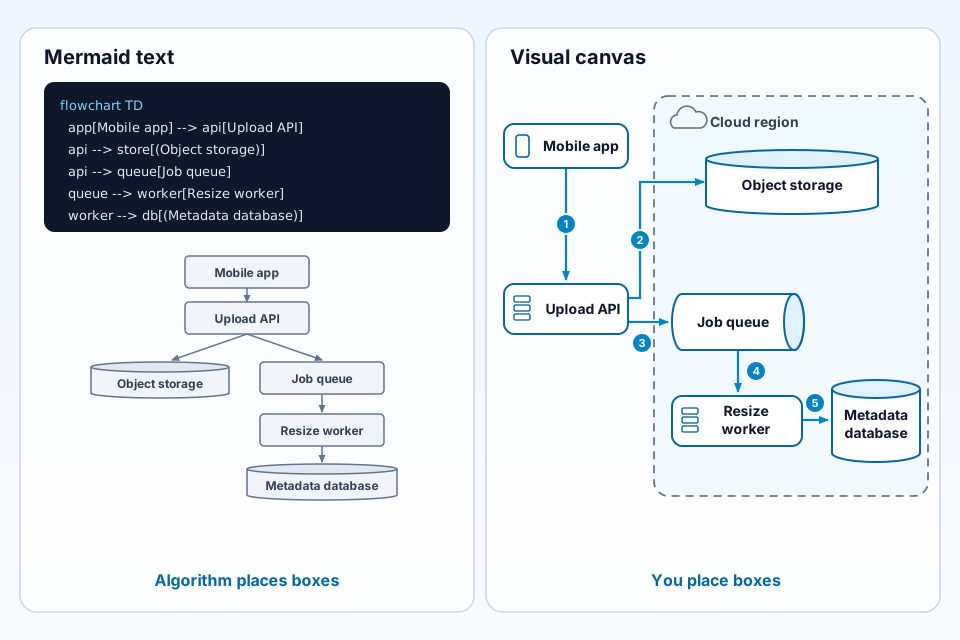
The example below shows one photo upload system drawn both ways. The left panel holds a flowchart definition and a sketch of the kind of top-down layout automatic placement produces from it. The right panel shows the same 6 components arranged by hand: Mobile app, Upload API, Object storage, Job queue, Resize worker and Metadata database. A dashed "Cloud region" groups the last 4 of them, and 5 numbered steps follow the upload from the app to the database.
How we chose these Mermaid alternatives
Each tool had to close at least one of these 7 gaps, judged only by what its own pages say:
- Layout control: can you choose a layout engine or move elements by hand?
- C4 modelling: is C4 supported as a stable feature or as a model?
- Cloud and tech icons: are provider or technology icons documented?
- Visual drag editing: can someone edit the diagram without writing text?
- Team collaboration: does the vendor describe shared or real-time editing?
- Motion or step-by-step flows: can a reader follow a flow in order?
- Reads existing Mermaid code: can you bring your current diagrams with you?
There is no points table or numeric ranking here. Every fact below was checked on the vendor's pages on 20 October 2026.
Keep writing text, but get more layout control
These options keep the diagram as text next to your code, while giving you more say over placement, icons or notation.
D2: choose the layout engine yourself
Fixes: layout control, cloud and tech icons, motion.
D2's homepage calls it a modern language that turns text to diagrams, and its GitHub repository lists the MPL-2.0 licence. Its layouts page names three engines: dagre as the default, ELK, and TALA, which the page says was designed for software architecture diagrams and which D2's blog says is now open source under the same MPL-2.0 licence. The same page notes that some keywords, such as top and left for locking positions, work only in TALA. For icons, the D2 team hosts a free collection of common architecture icons at icons.d2lang.com, and any image URL can be used as an icon. Its composition docs show several boards combined into one diagram and exported as an animated SVG.
The old Terrastruct address terrastruct.com now redirects to d2lang.com. D2 Studio, the hosted editor at d2studio.ai, says it is shutting down at the end of the year and has closed new registrations. D2's blog says D2 is now an independent, non-profit open-source project and that D2 Studio will return as a purely client-side app that works offline, with no release date given yet.
PlantUML with C4-PlantUML and AWS icons
Fixes: C4 modelling (as drawings), cloud and tech icons.
PlantUML's homepage presents it as open-source software that turns plain textual descriptions into UML diagrams. C4-PlantUML layers C4 elements on top of it; the repository says it brings together PlantUML and the C4 model to describe software architectures, and it uses the MIT licence. For cloud icons, PlantUML's standard library page includes the Amazon Labs AWS library, which supplies sprites, macros and other includes for AWS services and resources. The same list also names an Azure library. Placement is still automatic, so this route improves notation and icons more than it improves layout control.
Model C4 architecture instead of drawing it
Since Mermaid's C4 syntax is still experimental, some teams stop drawing C4 views and keep a model instead. For a wider survey, see tools grouped by architecture job, from C4 to live cloud views.
Structurizr: models as code for C4
Fixes: C4 modelling, layout control.
Structurizr's site says it comes from the person who defined the C4 model. It describes a models-as-code approach: you write Structurizr DSL once and get several architecture diagrams from a single model, so an element is defined in one place rather than redrawn in each view. Its tagline lists open source and manual layout, which speaks to the placement problem above, and its GitHub repository uses the Apache-2.0 licence.
IcePanel: zoomable C4 models for teams
Fixes: C4 modelling, team collaboration, step-by-step flows.
IcePanel's homepage calls it a collaborative diagramming and modelling tool for software architecture. Its C4 page describes zooming from context diagrams into container and component diagrams for different audiences, and the homepage describes message flows that step through how data moves on top of existing diagrams. According to its pricing page, the free tier includes 1 editor, unlimited viewers, up to 100 model objects and 1 flow per diagram, and the page aims that tier at small teams and solo developers.
Paste your Mermaid code into a visual editor
If the text already exists, these tools can use it as a starting point, which is the closest thing to a Mermaid to visual editor path. For the reverse move, read what to use if you are moving off draw.io itself.
draw.io: convert Mermaid into editable shapes
Fixes: reads existing Mermaid code, visual drag editing, team collaboration.
draw.io's Mermaid docs describe the path: click Arrange > Insert > Mermaid, paste your text, then insert it. You can place the result as a single non-editable SVG image, or as a Mermaid container group built from draw.io shapes and connectors. The docs then explain how to turn that group into a plain draw.io diagram by ungrouping it, a step that deletes the stored Mermaid source, so keep a copy of the text if your repo still needs it. The docs also cover switching the layout engine to ELK. On its homepage, draw.io says it is free with no sign-up, that its source code is Apache 2.0 licensed, and that it offers real-time collaboration.
Excalidraw: Mermaid to hand-drawn canvas
Fixes: reads existing Mermaid code, visual drag editing, team collaboration.
Excalidraw's repository describes an open-source whiteboard with a hand-drawn look that is collaborative and end-to-end encrypted, released under the MIT licence. The same team maintains mermaid-to-excalidraw, an MIT-licensed library whose stated purpose is converting Mermaid diagrams into Excalidraw. The output is a sketch that you can rearrange freely, which may fit early design talks better than formal C4 documentation. For more detail, see how Excalidraw and ByteDiagram differ on architecture work.
Lucidchart: diagram as code with Mermaid
Fixes: reads existing Mermaid code, team collaboration.
A Lucid help article, last updated on 7 October 2026, explains how to generate a Lucidchart diagram from Mermaid code. It lists availability on the Individual, Team and Enterprise plans, names C4 among the supported diagram types, and says Lucidchart is optimised for Mermaid version 11.14, which is older than the v12 layout change described above. One limit matters here: per the article, a code-generated diagram is changed by reopening and editing its code, not by dragging shapes. Lucidchart's product page also promotes real-time collaboration and cloud shape libraries.
Eraser: cloud architecture syntax plus drag edits
Fixes: cloud and tech icons, layout control, visual drag editing.
Eraser documents a cloud architecture diagram type in which you describe nodes, groups and connections in its own syntax, and its docs include examples for AWS, Google Cloud and Azure. A feature its docs call Drag-Drop Editing lets you select a node, group or arrow on the canvas and move or resize it. The docs are open about the trade-off: a layout reset returns to Eraser's default layout engine and drops your manual edits, and a significant change in the code editor triggers that reset automatically. Its pricing FAQ says AI diagrams start from a prompt, and that its Free plan caps files and AI credits for teams. For a wider look at prompt-based tools, see AI diagram generators compared on the same prompt.
For architecture flows that move step by step: ByteDiagram (our product)
Fixes: motion or step-by-step flows, cloud and tech icons.
ByteDiagram is ours, so read this section with that in mind. Its homepage positions it for animated flowcharts and architecture diagrams, and says AI can build a diagram from a text description or from existing code. It names 8 diagram types: architecture, network, sequence, state machines, pipelines, flowcharts, timelines and mind maps. It also comes with built-in icons for common tech stacks.
A guest canvas opens without an account. In that canvas, its Export menu includes PNG, SVG and Animated GIF (menu checked on 19 October 2026). It may suit an architecture diagram that has to show a request or data flow moving step by step, for example in a design review, an onboarding session or a doc. This guide makes no claim that it reads or imports Mermaid code, so keep your Mermaid source if you depend on it. Draw the same photo upload flow in the guest canvas, no account needed.
Mermaid alternatives compared
Every competitor cell comes from the vendor's own pages; the ByteDiagram row is our own statement about our product. "Not documented" means the pages checked did not mention Mermaid import, and "Not stated" means they did not state a licence.
| Tool | Best for | Input | Reads Mermaid code? | Open source? | Source |
|---|---|---|---|---|---|
| D2 | Text diagrams with a choice of layout engine | Text (D2) | Not documented | Yes, MPL-2.0 | d2lang.com, GitHub |
| PlantUML + C4-PlantUML | C4 and AWS icons from text | Text (PlantUML) | Not documented | Yes, per plantuml.com; C4-PlantUML is MIT | plantuml.com, GitHub |
| Structurizr | C4 models as code | Text (DSL) | Not documented | Yes, Apache-2.0 | structurizr.com, GitHub |
| IcePanel | Zoomable C4 models for teams | Visual | Not documented | Not stated | icepanel.io |
| draw.io | Turning Mermaid into editable shapes | Visual + Mermaid insert | Yes, per its docs | Apache 2.0 source, per homepage | drawio.com |
| Excalidraw | Hand-drawn canvas from Mermaid | Visual | Yes, via mermaid-to-excalidraw | Yes, MIT | GitHub |
| Lucidchart | Mermaid diagrams in a team workspace | Visual + Mermaid | Yes, on Individual, Team and Enterprise plans | Not stated | help.lucid.co, lucidchart.com |
| Eraser | Cloud architecture syntax with drag edits | Text (own DSL) + visual + AI | Not documented | Not stated | docs.eraser.io, eraser.io |
| ByteDiagram (our product) | Step-by-step animated flows | Visual + AI from text or code | Not documented | No | bytediagram.com |
When Mermaid is still the right choice
- Open licence: its GitHub repository lists the MIT licence, which matters if you embed diagrams in your own tooling.
- Text beside the code: the diagram source can travel in the same pull request as the change it describes, so a reviewer sees both together.
- Better default layout: since v12.0.0, ELK is bundled and is the default for flowcharts and several other diagram types, so older complaints about placement may no longer apply.
- Large icon catalogue: architecture diagrams can use the 200,000+ icons on iconify.design once an icon pack is registered.
- Sequence diagrams: a request between a few services may fit Mermaid better than a large architecture view does; compare the options in sequence diagram tools compared on one login flow.
FAQ
Is there a free, open-source Mermaid alternative for architecture diagrams?
Yes, several. According to their own pages, D2 uses the MPL-2.0 licence, Structurizr uses Apache-2.0, PlantUML calls itself open-source, and Excalidraw uses MIT. draw.io is free to use, and its homepage describes the source code as Apache 2.0 licensed. Choose by the gap you need to close: layout, C4 or visual editing.
Can I reuse my existing Mermaid code in another tool?
In some tools, yes. draw.io's docs show Arrange > Insert > Mermaid and a way to convert the result into a normal draw.io diagram. Lucid's help centre documents diagram as code with Mermaid on Individual, Team and Enterprise plans. Excalidraw's team maintains mermaid-to-excalidraw, a converter library. Keep your original text as the source of record.
Does Mermaid support C4 and cloud architecture diagrams?
Yes, with limits. Mermaid's C4 page describes C4 as experimental, so its syntax may still change. Its architecture diagram, documented for v11.1.0 and later, starts with the architecture-beta keyword and can use icons from iconify.design after you register an icon pack. A layout algorithm, not your hand, still decides where boxes go.
Sources
Checked on 20 October 2026.
- Mermaid docs: About Mermaid: text definitions rendered as diagrams.
- Mermaid docs: Architecture diagrams: v11.1.0+, architecture-beta keyword, iconify icons, seed option.
- Mermaid docs: C4 diagrams: experimental status.
- Mermaid docs: Layouts: ELK bundled and default from v12.0.0.
- Mermaid 12.0.0 release notes: ELK as the default layout.
- Mermaid repository: MIT licence.
- D2 homepage: language description.
- D2 layout engines documentation: dagre, ELK and TALA.
- D2 icons documentation: hosted icon collection.
- D2 composition documentation: boards exported as an animated SVG.
- D2 repository: MPL-2.0 licence.
- D2 Studio: shutdown notice; new registrations closed.
- D2 blog: D2 is non-profit: independent open-source project.
- D2 blog: TALA is open-source: MPL-2.0 licence.
- PlantUML homepage: open-source text-to-UML tool.
- PlantUML standard library: AWS and Azure libraries.
- C4-PlantUML repository: C4 for PlantUML, MIT licence.
- Structurizr homepage: models as code, manual layout.
- Structurizr repository: Apache-2.0 licence.
- IcePanel homepage: collaborative modelling and message flows.
- IcePanel C4 model page: zooming between C4 levels.
- IcePanel pricing: free tier limits.
- draw.io docs: Mermaid diagrams: insert, convert and ELK layout.
- draw.io homepage: free use, licence and collaboration.
- Excalidraw repository: whiteboard description, MIT licence.
- mermaid-to-excalidraw repository: Mermaid conversion library.
- Lucid help: Diagram as code with Mermaid: plans, C4, Mermaid version, editing.
- Lucidchart product page: collaboration and cloud shape libraries.
- Eraser docs: Architecture diagrams: syntax and cloud examples.
- Eraser docs: Drag-Drop Editing: manual layout edits and resets.
- Eraser pricing: AI diagrams and Free plan limits.
- ByteDiagram homepage: product description and diagram types (our product).
Conclusion: pick by the part of Mermaid you outgrew
If placement is the issue, D2's choice of engines or Eraser's drag edits give you more say than plain Mermaid text. If C4 is the issue, a model in Structurizr or IcePanel avoids depending on an experimental syntax. If teammates do not write code, draw.io, Excalidraw and Lucidchart can start from the Mermaid text you already have. If the diagram has to walk people through a flow in order, a step-by-step animated tool such as ours is one option to try.
Show the architecture flow, one step at a time
ByteDiagram is our tool. Try it on one flow from your own system.
Visit ByteDiagram