
An AWS diagram that shows a row of boxes with no arrows, no subnets and no Availability Zones answers almost nothing in a design review. Nobody can tell which way a request travels, what faces the internet, or what happens when a zone has trouble. A good AWS architecture diagram template settles those questions before you place a single shape, because the direction, the payload on each line and the boundary around each part are already in it.
Below are 5 templates, each with a component list, a connection table and its boundaries, and each relationship traced to an AWS documentation page. Every relationship below comes from AWS documentation read on 21 October 2026; we did not deploy these stacks, so the behaviour described was not tested by us.
The problem: AWS diagrams with boxes but no story
Three faults turn up again and again. Lines without arrowheads hide the direction of each call, so a reader cannot tell a push from a pull. Missing boundaries hide what is public, what is private and what shares a failure domain. Outdated icon sets make the picture look stale, and they can show a service under a name AWS has since changed.
Starting from a template fixes the first two at once, since the boundary boxes and labelled arrows are part of the layout from the first minute. The icon section further down deals with the third. If you are getting ready for a whiteboard round rather than a design doc, read an interview-style walkthrough of sketching a system.
What every AWS architecture diagram template needs
Whatever the workload, a useful AWS architecture diagram template has 4 parts:
- Components: every service the request or event touches, named the way AWS names it.
- Directed connections: one arrow per hop, labelled with what crosses it, such as an HTTPS request, a message batch or SQL.
- Boundaries: the Region, the VPC, each Availability Zone, and public versus private subnets.
- A short legend: what a dashed line or a dashed box means in your drawing.
The zone boxes are more than decoration. The AWS Well-Architected reliability pillar defines fault isolation as keeping a failure's impact inside a set boundary, and its first best practice in that area, REL10-BP01, is to deploy the workload to multiple locations. If a design claims high availability, the zones it depends on should be visible on the page.
How to read and reuse these templates
Every template uses the same format. A "Use it when" line names the workload it suits. The component list names the parts. The connection table gives each arrow from source to target, what flows along it and the AWS page that backs it. The boundary list says which boxes go around what, and a common mistake closes each template.
- Arrows point the way a request or event travels. A reply gets its own arrow only when it matters, as in Template 2.
- Shapes are generic and carry the AWS service name as text, so any editor can reproduce them.
- Rename components to match your stack, but keep the boundaries; they hold most of the meaning.
- Draw one template per diagram. Merging two usually buries the arrows that matter.
AWS architecture diagram examples: 5 templates
The templates run from the simplest layout to the busiest. Each one stands on its own, so jump straight to the workload you have.
Template 1: Static website with S3, CloudFront and Route 53
Use it when: you host a marketing site, a docs site or a single-page app with no server-side code.
Components:
- Viewer (browser)
- Route 53 hosted zone with alias records for the apex and www names
- CloudFront distribution
- ACM certificate, requested in us-east-1
- S3 bucket as a private origin (use the bucket's REST endpoint, not the S3 website endpoint)
| From | To | What flows | Source |
|---|---|---|---|
| Browser | Route 53 | DNS query for example.com or www.example.com; the alias record answers with the distribution's domain name | Route 53 docs |
| Browser | CloudFront | HTTPS request for pages and assets | Route 53 static site guide |
| ACM (us-east-1) | CloudFront | TLS certificate attached to the distribution | CloudFront HTTPS requirements |
| CloudFront | S3 bucket | Origin request signed through origin access control (OAC) | CloudFront OAC docs |
| S3 bucket policy | CloudFront | Read access granted only to the CloudFront service principal | CloudFront OAC docs |
Boundaries:
- Place the S3 bucket inside a Region box.
- Keep Route 53 and CloudFront outside that box, near the viewer.
- Label the certificate "us-east-1", because CloudFront needs its ACM certificate in that Region.
Common mistake: leaving the bucket open to the public and skipping OAC. AWS recommends OAC over the older origin access identity (OAI).
Template 2: Serverless API with API Gateway, Lambda and DynamoDB
Use it when: you need a CRUD or JSON API with spiky traffic and no servers to look after.
Components:
- Client
- API Gateway HTTP API with routes such as GET /items/{id}
- Lambda function and its execution role
- DynamoDB table
| From | To | What flows | Source |
|---|---|---|---|
| Client | API Gateway | HTTPS request to a route, for example GET /items/{id} | API Gateway CRUD tutorial |
| API Gateway | Lambda | Synchronous invocation; the event is a JSON form of the HTTP request | Lambda with API Gateway docs |
| Lambda | DynamoDB | Item reads and writes, allowed by the function's execution role | API Gateway CRUD tutorial |
| Lambda | API Gateway | Response handed back to the caller | Lambda with API Gateway docs |
Boundaries:
- Draw one Region box around all three services; the AWS tutorial builds them in a single Region.
Common mistake: a line from the client straight to DynamoDB. In this layout every call goes through the API and then the function.
Template 3: Three-tier web app across two Availability Zones
Use it when: you run a classic web app or monolith that has to keep serving if one zone has trouble.
Components:
- Internet gateway
- Application Load Balancer (ALB) with a node in each public subnet
- NAT gateway, one per zone
- EC2 instances in an Auto Scaling group, spread over private subnets in 2 zones
- RDS Multi-AZ DB instance (primary and standby) in a DB subnet group that covers both zones
| From | To | What flows | Source |
|---|---|---|---|
| Users | Internet gateway, then ALB | HTTP or HTTPS requests; the public subnets' route table sends internet traffic to the internet gateway | VPC example, ALB docs |
| ALB | EC2 instances (Auto Scaling group) | Requests sent only to healthy targets, across more than one zone | ALB docs, Auto Scaling docs |
| EC2 instances | NAT gateway in the same zone | Outbound-only internet traffic such as package updates; the private subnets' route table points to the NAT gateway | VPC example |
| EC2 instances | RDS primary | SQL queries | RDS in a VPC docs |
| RDS primary (zone A) | RDS standby (zone B) | Synchronous replication; the standby is the failover target | RDS Multi-AZ docs |
Boundaries:
- Region, then VPC, then 2 Availability Zone columns side by side.
- In each zone, a public subnet holding an ALB node and a NAT gateway, and a private subnet holding the app servers.
- A DB subnet group across both zones, since RDS expects subnets in at least two zones.
For the load balancer layer on its own, see L4 and L7 load balancing patterns in detail. The zone columns also show where traffic can be drained during an incident, which is covered in moving traffic away from an impaired Availability Zone.
Common mistake: drawing the standby as a read replica that takes traffic. AWS says a Multi-AZ DB instance standby cannot serve reads; it is there for failover.
Template 4: Event-driven file processing with S3, SQS and Lambda
Use it when: work starts the moment a file lands, such as thumbnails, virus scans or CSV imports, and has to survive bursts.
Components:
- Upload bucket
- SQS standard queue (S3 cannot send notifications to a FIFO queue directly)
- Lambda function with an event source mapping
- Dead-letter queue
- Output bucket or table
| From | To | What flows | Source |
|---|---|---|---|
| Producer | Upload bucket | Object upload (PUT) | S3 event notifications docs |
| Upload bucket | SQS queue | Object-created event notification | S3 event notifications docs |
| SQS queue | Lambda | Message batches; Lambda polls the queue and invokes the function synchronously | Lambda with SQS docs |
| SQS queue | Dead-letter queue | Messages still unprocessed after maxReceiveCount receives, set in the redrive policy | SQS dead-letter queue docs |
| Lambda | Output bucket | Processed result, written to a different bucket | Lambda with S3 docs |
EventBridge variant: once EventBridge is turned on for the bucket, S3 sends all of its events there, and a rule can route the ones you want to the SQS queue as a target. For bus design beyond this, see a deeper look at custom EventBridge event buses.
Boundaries:
- One Region box; the Lambda function and the SQS queue must sit in the same Region.
Common mistake: writing output back to the bucket that triggers the function. AWS warns this can make the function run in a loop.
Template 5: Data lake and analytics with S3, Glue and Athena
Use it when: you collect clickstream, logs or IoT events and want SQL over them without running a database. Ingestion goes through Amazon Data Firehose (formerly Kinesis Data Firehose).
Components:
- Producers
- Amazon Data Firehose stream with a Direct PUT source
- S3 data lake bucket
- AWS Glue crawler
- AWS Glue Data Catalog
- Amazon Athena
| From | To | What flows | Source |
|---|---|---|---|
| Producers | Amazon Data Firehose | Records written straight to the stream (Direct PUT) | Amazon Data Firehose source docs |
| Amazon Data Firehose | S3 bucket | Buffered batches, delivered when a size or time threshold is reached | Amazon Data Firehose overview |
| Glue crawler | S3 bucket | Crawler reads the data to infer its schema | Glue crawler docs |
| Glue crawler | Glue Data Catalog | Databases and tables created or updated | Glue crawler docs |
| Athena | Glue Data Catalog | Table and column metadata | Athena and Glue docs |
| Athena | S3 bucket | Standard SQL queries over the data where it sits | Athena overview |
Boundaries:
- One Region box. Label prefixes such as raw/ on the bucket if that helps readers.
Common mistake: drawing Athena as the place the data is stored. Athena queries the data in S3 where it already sits.
Which AWS template fits your workload
This table matches workloads to templates. It does not compare tools.
| Template | Use it when | Core services | Boundaries to draw |
|---|---|---|---|
| Template 1: Static website | Content with no server-side code | Route 53, CloudFront, ACM, S3 | Region box for S3; ACM labelled us-east-1 |
| Template 2: Serverless API | CRUD API with spiky traffic | API Gateway, Lambda, DynamoDB | One Region |
| Template 3: Three-tier web app | Web app that must ride out a zone failure | ALB, EC2 Auto Scaling, NAT gateway, RDS Multi-AZ | Region, VPC, 2 Availability Zones, public and private subnets |
| Template 4: Event-driven file processing | Work triggered by uploaded files | S3, SQS, Lambda, dead-letter queue | One Region |
| Template 5: Data lake and analytics | SQL over logs or events | Amazon Data Firehose, S3, Glue, Athena | One Region |
Best practices for AWS architecture diagrams
- Label every arrow. "HTTPS", "SQL" or "message batch" says more than a bare line.
- Draw zones when you claim high availability. Show which parts are repeated in each Availability Zone.
- Mark the certificate Region on static sites. Writing us-east-1 next to ACM stops someone requesting it in the wrong Region.
- Show the dead-letter queue. Every queue in a design should show where failed messages end up.
- Avoid the same-bucket loop. Never draw a Lambda function writing into the bucket that triggers it.
- Keep icons current. AWS releases icon packages quarterly, with none in the fourth quarter, and notes that some libraries may contain legacy icon sets.
AWS architecture diagram icons: what AWS allows
AWS publishes official architecture icons on its icons page and says it allows customers and partners to use those toolkits and assets to create architecture diagrams. The page also gives the release schedule: new packages at the end of January, April and July, and none in the fourth quarter. Check that page for current usage conditions before you publish a diagram that uses the icons. The diagrams in this article use generic labelled shapes rather than official AWS icons, which sidesteps the question. For a look at how two editors handle cloud shape libraries, see our earlier comparison.
Starting from a draw.io AWS architecture diagram template
According to draw.io's documentation (checked 21 October 2026), draw.io includes a library of example AWS infrastructure templates. You open it with Arrange > Insert > Template, expand the Cloud category and select AWS, then insert a template onto the canvas and edit it. The same page says AWS shape libraries are switched on under More Shapes, in the Networking section, and that several years of AWS icon libraries are available. Once a starting layout is on the canvas, you can redraw any of the templates above with it. For other editors in this space, browse editors built for architecture work, grouped by task.
Drawing the templates as code or as a step-by-step flow
If your diagrams live in a repository as text, look at text-based tools that give you more control over layout. For Mermaid specifically, see Mermaid's architecture-beta syntax with working code. Sometimes the goal is different: you want to show a request or an event moving through a template in order. For that case, ByteDiagram is our product, made by us, built around animated flow diagrams. Its AI turns a text description or existing code into a diagram, and built-in icons cover common tech stacks. Once a template is drawn, its Export menu includes PNG, SVG and Animated GIF (checked 19 Oct 2026). Use the result in a design doc or a runbook. Redraw Template 4 in the guest canvas and step through the file event, no account required.
Template 3, drawn out
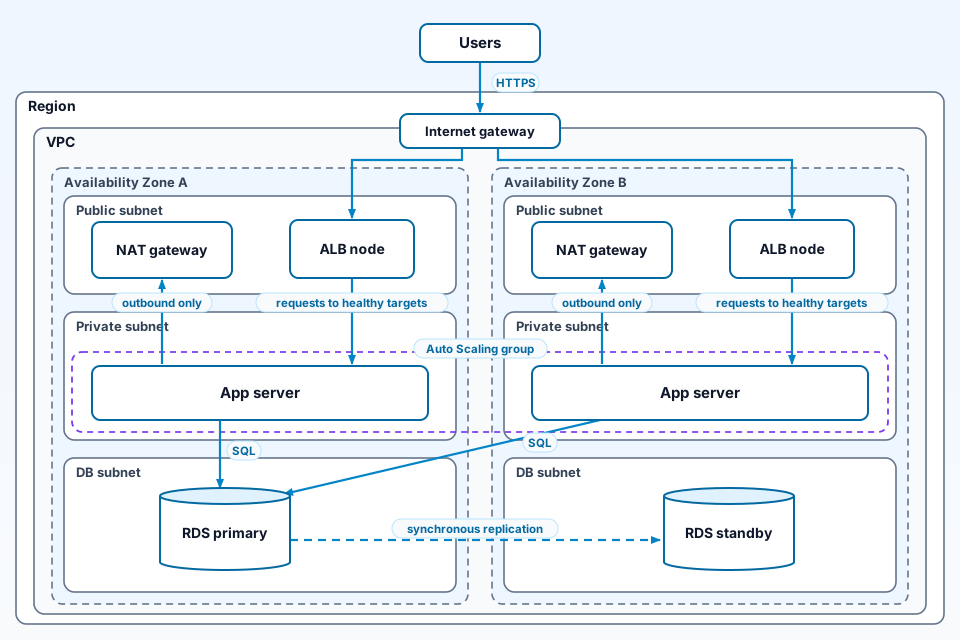
The drawing uses generic labelled shapes inside a Region box and a VPC box. Users send HTTPS to an internet gateway on the VPC edge, which feeds the ALB node in the public subnet of each Availability Zone. Each ALB node passes requests to healthy targets: the app servers in the private subnets, which share one Auto Scaling group across both zones. The app servers send outbound-only traffic through the NAT gateway in their own zone and SQL to the RDS primary in zone A, which replicates synchronously to the standby in zone B.
FAQ
What should an AWS architecture diagram template include?
It should include the components, one directed arrow per connection labelled with what flows across it, and the boundaries: Region, VPC, Availability Zones, and public and private subnets. Add a short legend for line and box styles. Zone boxes show whether the workload runs in more than one location, which the Well-Architected reliability pillar recommends for fault isolation.
Can I use official AWS icons in my architecture diagrams?
AWS's icons page says it allows customers and partners to use its toolkits and assets to create architecture diagrams. New icon packages come out at the end of January, April and July, with none in the fourth quarter. Check that page for current usage conditions before publishing. Generic labelled shapes, as used in this article, avoid the question.
Is there a draw.io AWS architecture diagram template?
According to draw.io's documentation, yes. Open Arrange > Insert > Template, expand the Cloud category and choose AWS to see example AWS infrastructure templates. AWS shape libraries are switched on under More Shapes, in the Networking section. You can then rearrange and relabel the shapes to match one of the layouts in this article.
Sources
Checked on 21 October 2026.
- Route 53: Routing traffic for a static website to CloudFront: alias records for the domain and subdomain.
- Route 53: Routing traffic to a CloudFront distribution: how alias queries are answered.
- CloudFront: Restrict access to an Amazon S3 origin: OAC, OAI and the bucket policy.
- CloudFront: Requirements for using TLS certificates: ACM certificate in us-east-1.
- Amazon S3: Hosting a static website: website endpoints, and OAC for SSE-KMS objects.
- Lambda: Invoking a function with API Gateway: synchronous invocation and the event format.
- API Gateway tutorial: CRUD HTTP API with Lambda and DynamoDB: routes, function, role and table.
- What is an Application Load Balancer?: targets in multiple Availability Zones, healthy targets.
- EC2 Auto Scaling with Elastic Load Balancing: traffic spread across instances.
- Amazon VPC example: servers in private subnets and NAT: subnets, NAT gateways and route tables in two zones.
- Amazon RDS Multi-AZ DB instance deployments: synchronous standby, no read traffic.
- Amazon RDS: DB instances in a VPC: DB subnet groups in at least two zones.
- Amazon S3 event notifications: destinations and the FIFO limit.
- Amazon S3 with EventBridge: all events sent once enabled.
- EventBridge targets: SQS queues as targets.
- Lambda with Amazon SQS: polling, batches and the same-Region rule.
- Amazon SQS dead-letter queues: redrive policy and maxReceiveCount.
- Lambda with Amazon S3: the same-bucket loop warning.
- What is Amazon Data Firehose?: delivery to S3 and buffering.
- Amazon Data Firehose: source and destination: the Direct PUT source.
- AWS What's New: Introducing Amazon Data Firehose: announcement of the current service name.
- AWS Glue: Using crawlers to populate the Data Catalog: schema inference, tables created or updated.
- Athena: Use the AWS Glue Data Catalog: table and column metadata.
- What is Amazon Athena?: standard SQL on data in S3.
- AWS Well-Architected reliability pillar: fault isolation: REL10-BP01, multiple locations.
- AWS Architecture Icons: permitted use and the release schedule.
- draw.io docs: AWS diagrams: the AWS template library and shape libraries.
- ByteDiagram homepage: product description (our product).
Conclusion: start from the boundary, then add the arrows
Pick the template whose "Use it when" line matches your workload. Draw its Region, VPC and zone boxes first, then add one labelled arrow per connection. Check each arrow against the AWS page in the Sources list before the diagram goes into a review. Keep the icons current and the legend short, and the diagram will answer questions instead of raising them.
Draw your AWS template and play it step by step
ByteDiagram is our own tool. Lay out one template and show each request moving through it in order.
Visit ByteDiagram