
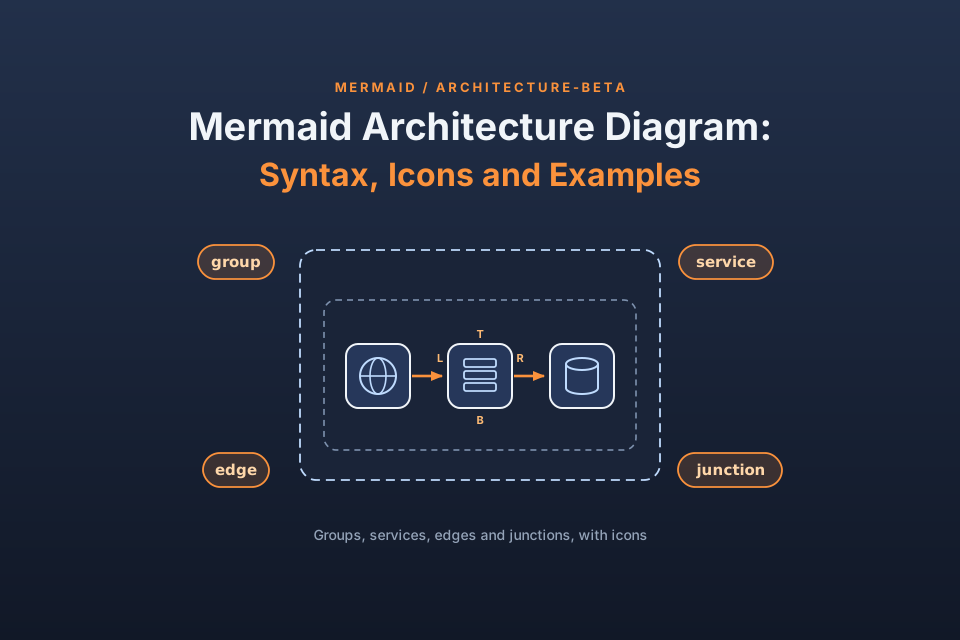
Picture a cloud diagram pasted into a README as a PNG. The system changes, the image does not, and nobody can find the file it was drawn in. A Mermaid architecture diagram avoids that trap: the picture is plain text that lives in the same repository as the code and goes through the same pull requests. This guide covers the syntax for groups, services, edges and junctions, shows how to add icon packs such as AWS logos, and walks through 4 examples you can paste.
We rendered every example in this guide with Mermaid 12.2.0 through mermaid-cli 12.0.0 on 21 October 2026. Mermaid introduced this diagram type in v11.1.0, so older releases will not parse it.
The problem: architecture diagrams that drift away from the code
Most architecture pictures start life in a drawing app. Someone exports an image, drops it into a docs folder and moves on. A few months later the queue has been swapped out, a second region exists, and the picture still shows last year's system. Reviewers stop trusting it, and new hires learn the wrong shape of the platform.
Keeping the diagram as text changes that. A one-line edit in a pull request updates the picture, the diff shows exactly what moved, and the history sits in version control next to everything else. That is the core of why teams keep diagram source in the repository. For a wider view, see how other architecture tools approach the same job.
How a Mermaid architecture diagram is put together
Mermaid's docs describe this diagram as a way to show how services and resources relate inside cloud or CI/CD deployments. The first line of every diagram is the word architecture-beta, and the declarations follow below it. The docs list 4 building blocks:
- Groups: labelled boxes that hold related services. A group can sit inside another group.
- Services: the nodes of the picture, each with an icon and a title.
- Edges: lines between nodes, with a chosen side at each end and optional arrowheads.
- Junctions: small connector nodes where one line can split into as many as 4.
You may declare these in any order, with one catch: an id has to exist before another line refers to it. A simple habit removes the risk. Write groups first, then services and junctions, then edges, and the parser never meets an unknown name.
You never give coordinates. Mermaid passes the nodes to fcose, a force-directed layout, and the sides you pick on each edge tell it which neighbour should sit where. That is why the same text can come out tidy or awkward, and why the best practices section below spends time on layout options.
Mermaid architecture syntax, line by line
Every declaration fits on a single line. Icons go in round brackets, and titles go in square brackets.
Groups, and groups inside groups
A group line has this shape. The trailing part in brackets is optional and nests the group inside a parent.
group {group id}({icon name})[{title}] (in {parent id})?
So group vpc(cloud)[VPC] creates a box titled VPC with the cloud icon, and group private_net(cloud)[Private subnet] in vpc places a second box inside it. Group ids cannot be the ends of an edge. You connect nodes, and the boxes follow.
Services and the five built-in icons
Services use the same pattern with a different keyword:
service {service id}({icon name})[{title}] (in {parent id})?
With no extra setup you can choose from 5 icons: cloud, database, disk, internet and server. A line such as service db(database)[Orders DB] in app adds a database node titled Orders DB inside the app group.
Edges: pick a side with T, B, L or R, then add arrows
An edge names a node, a colon and a side letter, then the line, then a side letter, a colon and the second node. T, B, L and R mean top, bottom, left and right.
db:R -- L:server
That line leaves db from its right side and enters server on its left. Arrowheads are opt-in: put < in front of the first side letter, > after the second one, or use both. So api:R --> L:db points at db, and client:R <--> L:lb draws a two-way arrow, which Example 2 uses. You can also mix axes. Pairing T with L, for instance, gives a line with one 90 degree bend.
Edges that leave a group: the {group} modifier
Sometimes a line should cross a box border instead of reaching one particular node. Add {group} straight after the node id. In Example 4, alb{group}:R --> L:split{group} draws an edge out of the box that holds alb and into the box that holds split. The docs limit the modifier to services that sit inside a group. Example 4 also applies it to a junction, and that rendered without errors in our test. The docs do not cover that use, so it may change in a later release. In our render, the line stopped at the box border rather than touching the inner node.
Junctions for fan-out and fan-in
A junction takes one keyword and an id, and it can sit inside a group just like a service:
junction {junction id} (in {parent id})?It acts as a split point for up to 4 edges, one per side. Reach for it when a load balancer feeds several workers, or when many producers merge into one queue. The diagram then shows a single trunk line instead of a tangle of diagonals.
Mermaid architecture diagram icons: built-in, iconify and custom packs
The 5 default icons suit generic pictures. For vendor logos or more specific symbols, Mermaid can use icons from iconify.design, which the docs count at more than 200,000, or a custom pack you provide yourself.
Using iconify icons with the pack:icon-name format
After a pack is registered, refer to an icon as name:icon-name, where name is whatever you called the pack when you registered it. Register the iconify logos set as logos, and the Lambda logo becomes logos:aws-lambda. The name you pick replaces the pack's own prefix, so short names are fine. Mermaid's icon page points to icones.js.org for browsing the packs.
Registering an icon pack on a web page
In the browser, call mermaid.registerIconPacks before any diagram renders. The CDN version from Mermaid's docs looks like this:
import mermaid from 'CDN/mermaid.esm.mjs';
mermaid.registerIconPacks([
  {
    name: 'logos',
    loader: () =>
      fetch('https://unpkg.com/@iconify-json/logos@1/icons.json').then((res) => res.json()),
  },
]);
With a bundler, install @iconify-json/logos@1 and have the loader call import('@iconify-json/logos') instead, so the pack loads lazily. This browser setup is copied from Mermaid's docs and was not tested by us; the command-line route below was.
Icon packs in mermaid-cli
For README images or CI builds, mermaid-cli (the mmdc command) takes icon packs as flags. --iconPacks @iconify-json/logos loads a pack you installed with npm. To load one from a URL, mmdc --help in version 12.0.0 lists --iconPacksNamesAndUrls, which takes a prefix and a URL joined by #, such as logos#https://unpkg.com/@iconify-json/logos@1/icons.json. Both routes worked in our run.
The project README spells the URL flag differently, so go by the help output of the version you install. And if you forget the pack entirely, mmdc still exits without an error, but every custom icon comes out as a question mark box. That failure is silent, so look at the output before you commit it.
Mermaid architecture diagram examples you can paste
Each example below rendered cleanly in our test run. Save one as a .mmd file, render it, then rename the nodes to match your system.
Example 1: one group, four services, three arrows
The smallest useful layout: a browser outside the app tier, and an API server inside it that talks to a database and to file storage.
architecture-beta
    group app(cloud)[App tier]

    service web(internet)[Browser]
    service api(server)[API server] in app
    service db(database)[Orders DB] in app
    service files(disk)[File storage] in app

    web:R --> L:api
    api:R --> L:db
    api:B --> T:files
group app(cloud)[App tier]draws the dashed boundary, with the cloud icon in its corner.- The browser line has no
inclause, so that node stays outside the box. api:B --> T:filesleaves the API from its bottom, so in our render file storage landed below it while the database sat to its right.
Example 2: edge sides, a two-way arrow and a junction
A client talks both ways with a load balancer, and a junction fans the traffic out to 3 workers.
architecture-beta
    service client(internet)[Client]
    service lb(server)[Load balancer]
    junction fork
    service w1(server)[Worker A]
    service w2(server)[Worker B]
    service w3(server)[Worker C]

    client:R <--> L:lb
    lb:R -- L:fork
    fork:T --> L:w1
    fork:R --> L:w2
    fork:B --> L:w3
junction forkdeclares the split point. It has no icon and no title.lb:R -- L:forkhas no arrowheads, so the trunk reads as one line into the split.- The worker edges leave fork from its top, right and bottom, which uses 3 of its 4 sides.
- Our first 3 drafts of this example parsed fine, but the layout stacked a node on the junction or drew misleading diagonals. This version came out clean.
Example 3: AWS logos with the logos icon pack
This version swaps the built-in icons for AWS logos from the iconify logos set. It is about icons only and does not explain how these services work together. The logos pack has to be registered before the render, so install it next to the CLI and pass the flag:
npm i @mermaid-js/mermaid-cli @iconify-json/logos
mmdc --iconPacks @iconify-json/logos -i diagram.mmd -o diagram.svg
Inside a container, the headless browser behind mmdc may refuse to start. Our run passed -p puppeteer-config.json with {"args":["--no-sandbox","--disable-setuid-sandbox"]} in that file.
architecture-beta
    group aws(logos:aws)[AWS account]

    service gw(logos:aws-api-gateway)[API Gateway] in aws
    service fn(logos:aws-lambda)[Lambda function] in aws
    service table(logos:aws-dynamodb)[DynamoDB table] in aws

    gw:R --> L:fn
    fn:R --> L:table
group aws(logos:aws)[AWS account]puts a logo on the group box, not just on nodes.- Every
logos:aws-...name resolves only because the pack was registered under the name logos. - Render the same file without the flag and each logo turns into a question mark box.
For how these services connect in real layouts, see five AWS layouts with every connection explained.
Example 4: a web app inside a VPC with public and private subnets
A fuller layout: users reach a CDN, then a load balancer in a public subnet, which hands traffic to a junction in a private subnet with 2 app servers, a cache and a database. If you need to sketch a system like this by hand in a hurry, see the whiteboard method for sketching a system under time pressure.
architecture-beta
    service users(internet)[Users]
    service cdn(cloud)[CDN]

    group vpc(cloud)[VPC]
    group public_net(cloud)[Public subnet] in vpc
    group private_net(cloud)[Private subnet] in vpc

    service alb(server)[Load balancer] in public_net
    junction split in private_net
    service app1(server)[App server 1] in private_net
    service app2(server)[App server 2] in private_net
    service cache(disk)[Cache] in private_net
    service db(database)[Primary DB] in private_net

    users:R --> L:cdn
    cdn:R --> L:alb
    alb{group}:R --> L:split{group}
    split:T --> B:app1
    split:B --> T:app2
    app1:R --> L:cache
app2:R --> L:db- Both subnet groups end with
in vpc, which nests them inside the VPC box. alb{group}:R --> L:split{group}crosses from one subnet box into the other, and the line meets the box borders.split:T --> B:app1andsplit:B --> T:app2put one app server above the split and one below it.- Users and CDN carry no
inclause, so they stay outside the VPC.
Best practices for readable Mermaid architecture diagrams
- Pin the version. Write the Mermaid version next to the diagram, because features arrived in steps: the diagram itself in v11.1.0,
randomizein v11.14.0, layout tuning options in v11.15.0 andalignin v11.16.0. - Separate stacked nodes with align. When two services render on top of each other, add
align roworalign columnfollowed by their ids. The docs say no spacing option can pull apart siblings that share a spot in the layout map. - Keep the default seed. The
seedoption defaults to 1, so the same text gives the same picture on every render. Turning onrandomizetries new starting positions each time, which helps while exploring and hurts in code review. - Give nodes room. Raise
idealEdgeLengthMultiplierabove its default of 1.5 when nodes inside a group look cramped. - Declare before you connect, and keep titles short. The docs note that a long single word can wrap at small
iconSizevalues. - Register icon packs first. A missing pack does not fail the build, so scan the output for question mark boxes.
- Pick one reading direction. Let the main flow run left to right, and use groups to mark network or trust boundaries.
When you need to walk people through the flow
A Mermaid file makes a good source of record, but it shows the whole system at once. In a design review or an onboarding session, people often need to watch a request travel one hop at a time. ByteDiagram is our product, made by us, and it focuses on animated flow diagrams. Its AI can draft a diagram from a written description or from code you already have, and it has built-in icons for common tech stacks. For a worked case, read a step-by-step animation walkthrough for a web app. When you finish, its Export menu includes PNG, SVG and Animated GIF (checked 19 Oct 2026). That gives you a file for a wiki page or README, while the Mermaid text stays the source of record. Rebuild Example 4 as a step-by-step flow in the guest canvas, no sign-up needed.
The web app example, annotated
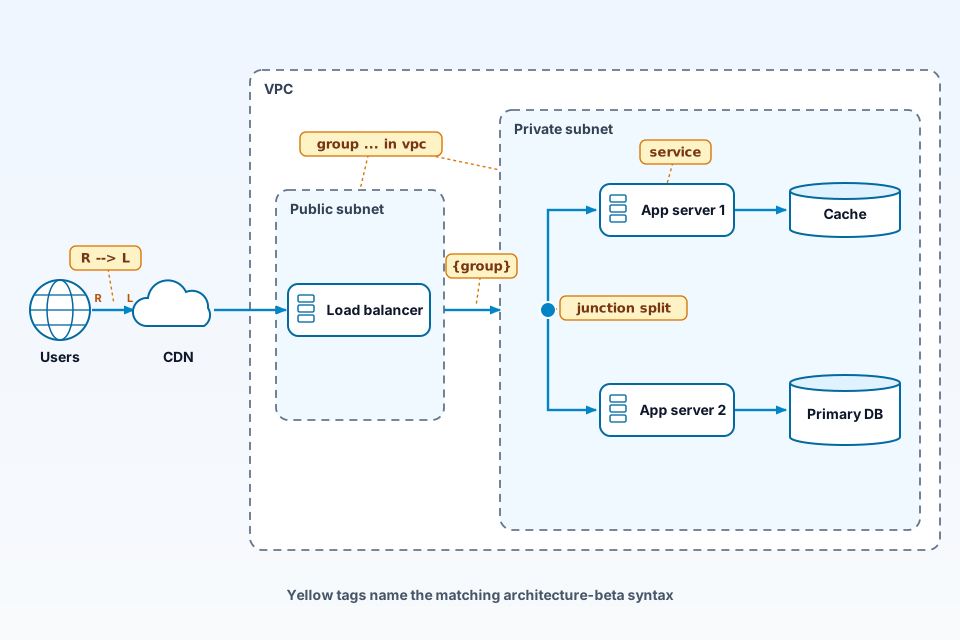
The picture redraws Example 4 with plain shapes and tags each piece of syntax where it shows up. A group ... in vpc tag points at the subnet boxes, a service tag sits on App server 1, and the Users to CDN arrow carries R and L letters at its ends. The dot in the private subnet is tagged junction split, and the arrow leaving the public subnet is tagged {group}. Read it beside the code above to match each line with what it draws.
FAQ
What Mermaid version do I need for architecture diagrams?
Use Mermaid v11.1.0 or later, the release that added the architecture diagram. Some options arrived later: randomize in v11.14.0, the layout tuning settings in v11.15.0 and the align directive in v11.16.0. Every example in this guide was rendered with Mermaid 12.2.0, so pin at least the version your features need.
How do I add AWS or other logos to a Mermaid architecture diagram?
Register an iconify pack first, for example the logos set, then refer to icons as pack:icon-name, such as logos:aws-lambda. On a web page, call mermaid.registerIconPacks before rendering. With mermaid-cli, pass --iconPacks @iconify-json/logos. If no pack is registered, the diagram still renders, but each custom icon appears as a question mark box.
Why do services overlap in my Mermaid architecture diagram?
The fcose layout can place sibling services that share the same edge pattern on one spot, so one hides the other. Add an align row or align column line that lists those services, which needs v11.16.0 or later. According to the docs, spacing options such as idealEdgeLengthMultiplier cannot separate nodes in that situation.
Sources
Checked on 21 October 2026.
- Mermaid architecture diagram syntax docs: building blocks, groups, services, edges, junctions, align, layout options and icons.
- Mermaid docs: Registering icon packs: registerIconPacks with a CDN or a bundler.
- Mermaid docs: Layouts: which diagram types use which layout by default.
- Mermaid docs: About Mermaid: what Mermaid is.
- Mermaid 11.1.0 release notes: architecture diagrams added.
- Mermaid 12.2.0 release notes: the version used for our renders.
- mermaid-cli repository: the mmdc command and icon pack options.
- mermaid on npm: published versions.
- Iconify logos collection on Icones: the logos icon set.
- ByteDiagram homepage: product description (our product).
Conclusion: keep the diagram next to the code
A Mermaid architecture diagram earns its place when it changes in the same commit as the system it describes. Start with groups and services, give every edge explicit sides, use junctions for fan-out, and register icon packs before you render. Pin the version and the seed so the picture stays stable from one build to the next. If hand placement starts to matter more than plain text for your team, look at options for when you need hand placement instead of auto-layout.
Turn your Mermaid sketch into a guided walkthrough
Redraw one flow from your Mermaid file in ByteDiagram, our own tool, and play it hop by hop.
Visit ByteDiagram